Teacher gradebook template for Excel with weighted grades
Teacher Planner & Gradebook is an Excel (.xlsx) template with a weighted gradebook: homework 20%, quizzes 30%, tests 50%. It calculates each student's category averages, weighted final grade and letter grade automatically. The free Lite file has 3 tabs; Pro has 10 tabs for $5.
Updated · By Pintergrab
Lite is free to download, no sign-up. Pro is sold on Lava.top.
How the gradebook works
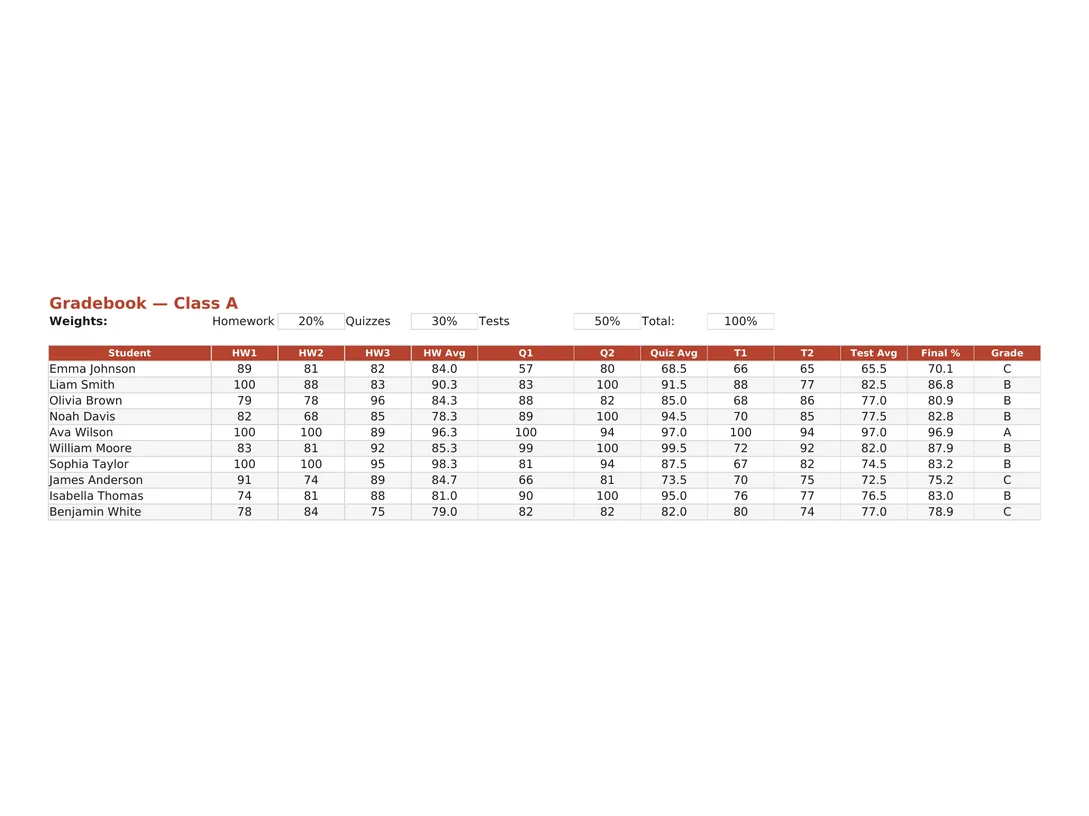
The Gradebook sheet is the core of the template. You list your students down the left side, then type raw scores under each category: Homework, Quizzes and Tests. Everything else is calculated — you write no formulas.
At the top of the sheet sits the weight row. The defaults are 20% homework, 30% quizzes, 50% tests. Change any weight and the sheet recalculates every final grade. If your weights stop adding up to 100%, the cell turns red so you notice.
Letter grades come from the Scale sheet: 0 gives an F, 60 a D, 70 a C, and so on. Edit the cutoffs there and the letters update.
What teachers track with it
- Scores by category. Homework, quiz and test columns feed three category averages per student.
- Final grade per student. A weighted final percentage and a letter, computed from the header weights.
- (Pro) Attendance. One Attendance sheet per class, with a P/A/L dropdown for each day and a present-rate per student.
- (Pro) Weekly plans. A Schedule grid (Period by Mon–Fri) and a Lesson Plans grid (Day, Class, Topic, Homework).
- (Pro) Dashboard. Average grade and attendance per class, how many students are below 60% (per class and in total) and a grade count from A to F.
Example: a filled-in week, Class A
On the Gradebook — Class A sheet, the weight row reads Homework 0.2, Quizzes 0.3, Tests 0.5. Under Homework you enter the week's scores for each student; under Quizzes, one quiz score; under Tests, nothing this week.
A student with a homework average of 90 and a quiz score of 80 has no test average yet, so the sheet weights what exists. Once the first test is in — say 85 — the final grade settles: 90 × 0.2 + 80 × 0.3 + 85 × 0.5 = 84.5%, which the Scale sheet turns into a C. Bump the quiz weight to 0.4 and the tests weight to 0.4, and the same scores give a new number instantly.
On the (Pro) Attendance sheet for Class A, the week's row reads P, P, L, P, A, P, P — the dropdowns offer only P, A or L. On the (Pro) Lesson Plans grid, Monday's row for Class A lists the topic and the homework you assigned.
Which parts matter most
The Gradebook sheet and the Scale sheet do the heavy lifting; they are the two tabs you touch weekly. The weight row matters most at the start of the term, when you set your grading policy. Everything after that is just typing scores.
In short
Teacher Planner & Gradebook is a gradebook template that works in Excel and in Google Sheets through File > Import. The free Lite download (a 9 KB .xlsx file) contains 3 tabs: Start Here, Scale, and a Gradebook sheet with 51 formula cells. You list students and type raw scores; the sheet computes each category's average, then a weighted final grade using weights you set in the header — the defaults are 20% homework, 30% quizzes and 50% tests. Letter grades come from a lookup scale on its own sheet: 0 gives an F, 60 a D, 70 a C. The Pro version costs $5 and expands to 10 tabs and 22 KB: one Gradebook and one Attendance sheet per class, a weekly Schedule, a Lesson Plans grid, and a Dashboard with average grade and attendance per class and how many students are below 60%.
Questions people ask
How do I use this gradebook template in Google Sheets?
Download the .xlsx file, then in Google Sheets use File > Import > Upload. The formulas and print areas carry over, so the weighted grades and letter grades keep calculating.
What scale does the gradebook use for letter grades?
The Scale sheet uses a minimum-score lookup: 0 is an F, 60 a D, 70 a C, and so on. You can edit the cutoffs on that sheet and every letter grade updates.
How many classes can I track?
The free Lite file covers one class with one Gradebook sheet. Pro includes a Gradebook and an Attendance sheet for each class, plus a Schedule, Lesson Plans grid and Dashboard.
Does the attendance sheet count anything for me?
Yes (Pro). You mark P, A or L from a dropdown for each day, and the sheet calculates a present-rate per student. The Dashboard also shows average attendance across classes.