Teacher Planner & Gradebook for Back-to-School Planning
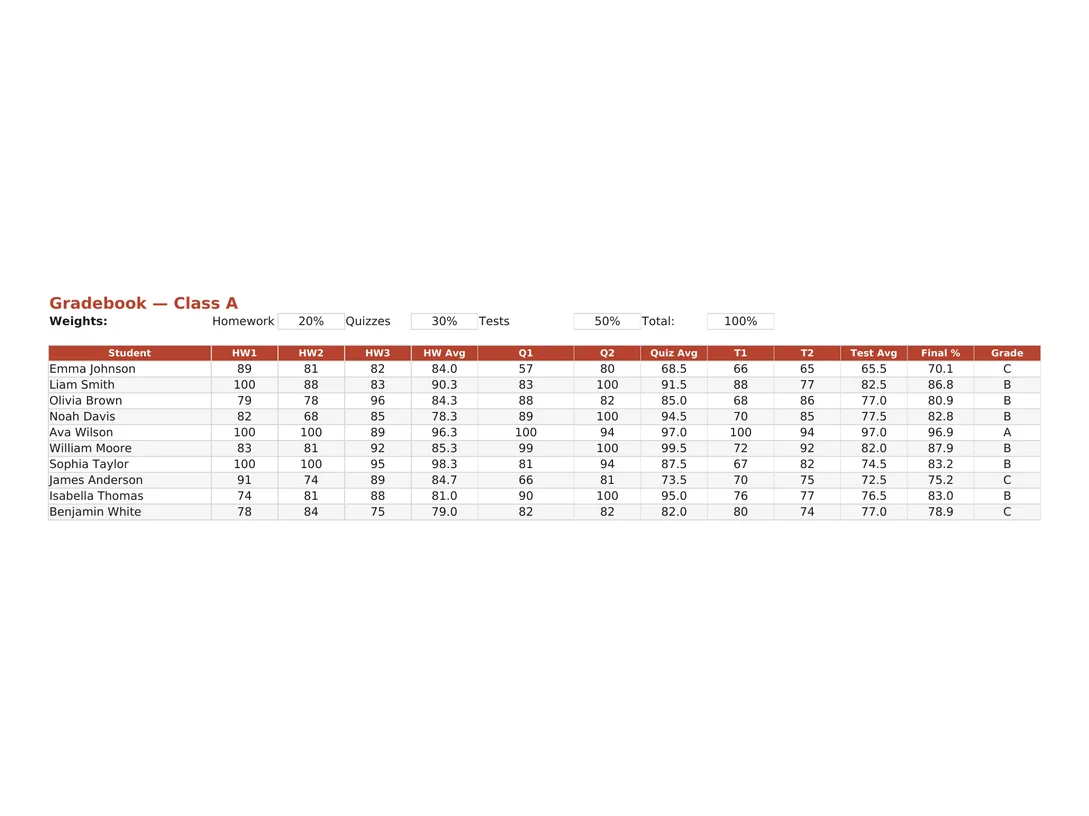
Back to school, you plan the semester in one file: list students, set homework/quizzes/tests weights, and the gradebook computes each average, weighted final grade and letter grade. Lite has 3 tabs free; Pro has 10 tabs with attendance, schedule and lesson plans for $5.
Updated · By Pintergrab
Lite is free to download, no sign-up. Pro is sold on Lava.top.
Back-to-school planning with the template
The first weeks of a new semester are mostly lists: who is in each class, what you will grade, when classes meet. The Teacher Planner & Gradebook keeps those lists in one spreadsheet that works in Excel and Google Sheets (via File > Import).
Start with the free Lite file. It has 3 tabs: Start Here with instructions, a Scale tab where letter grades begin at 0 for F, 60 for D and 70 for C, and one Gradebook sheet with 51 formula cells. List your students and type raw scores. The sheet computes each category average, the weighted final grade and the letter grade. Default weights are 20% homework, 30% quizzes and 50% tests — change them in the header and the math adjusts. If the weights stop adding to 100%, the cell turns red.
What to plan and track
For the new semester you would typically:
- Enter your class roster and set the category weights once.
- Record scores as homework, quizzes and tests come in.
- (Pro) Mark attendance per student with P, A or L from a dropdown, and see the present-rate the sheet calculates with its 10 formula cells.
- (Pro) Fill the weekly schedule: periods down the side, Monday to Friday across, with a class dropdown per cell.
- (Pro) Write the week's topics and homework in the lesson plan grid — Day, Class, Topic, Homework.
Which parts matter most
The Gradebook sheet is the core in both versions. In Pro, the Dashboard adds a cross-class view — average grade, average attendance and a count of students who need attention across both classes. That is the part you check before parent meetings: it pulls together 14 formula cells of numbers you did not type twice.
A filled-in week (Pro)
A Monday in the Lesson Plans grid might read: Monday, Class A, "Fractions review", "Workbook p. 12". The Schedule tab shows Period 1 as Class A on Monday. In the Attendance sheet, a student marked P for lessons 1 through 5 has a present-rate of 100%. In the Gradebook for Class A, that student's homework average of 88, quiz average of 82 and test average of 79 combine as 0.2 × 88 + 0.3 × 82 + 0.5 × 79 = 81.9%, a B on the default scale.
Pro costs $5 once and has 10 tabs; Lite is free with 3.
In short
The Teacher Planner & Gradebook is a template for Excel and Google Sheets built around a weighted gradebook. You list students in a Gradebook sheet, type raw scores, and the sheet calculates each category average, the weighted final percentage and a letter grade from a scale that starts at 0 for F, 60 for D and 70 for C. The default weights are 20% homework, 30% quizzes and 50% tests, and you can change them at the top of the sheet — the math recalculates, and the weights cell turns red if they stop adding to 100%. The free Lite file contains 3 tabs in a 9 KB Excel workbook. The Pro version, $5 once, expands this to 10 tabs: two gradebooks for two classes, attendance sheets that log Present, Absent or Late per student, a weekly schedule with periods Monday to Friday, a lesson plan grid and a dashboard. Lite includes 51 formula cells in its Gradebook sheet; Pro adds 10 formula cells per Attendance sheet and 14 on the Dashboard.
Questions people ask
How do I plan a new semester with this teacher planner?
List your students in a Gradebook sheet, set the homework, quizzes and tests weights in the header, and type scores as they come in. The sheet calculates each average, the weighted final grade and the letter grade from the scale tab.
What does the weekly schedule tab look like? (Pro)
Periods run down the side and Monday to Friday run across the top. Each cell has a dropdown with your classes, such as Class A or Class B, so you can lay out the whole teaching week in one grid.
How do lesson plans work? (Pro)
The Lesson Plans grid has columns for Day, Class, Topic and Homework, with a class dropdown per row. You write one line per day: Monday, Class A, the topic, and the homework you assigned.
How many gradebooks and attendance sheets do I get?
Lite has one Gradebook sheet for one class. Pro has two Gradebook sheets, two Attendance sheets with P, A and L dropdowns, plus the Schedule, Lesson Plans, Classes and Dashboard tabs — 10 tabs in total.