Church Membership Form Template
Part of church bulletin templates: 20 bulletins, programs, certificates and forms.
FreeDOCXPDF
Free, no sign‑up. Size: DOCX 152 KB, PDF 59 KB. The DOCX opens in Word or LibreOffice Writer; the PDF shows the sample filled in.
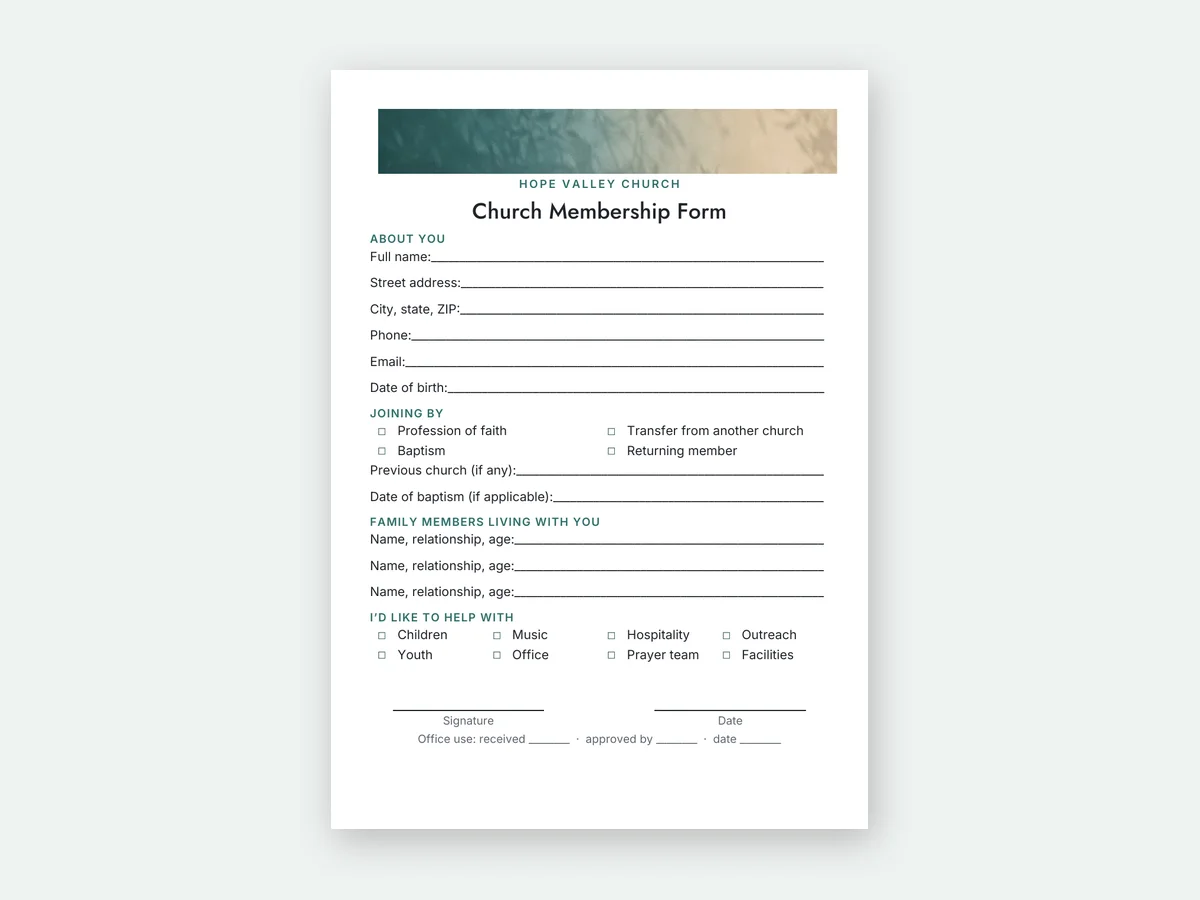
This church membership form template is a one-page form on A4, 8.27 × 11.69 in. It asks for name, address, phone, email and date of birth, how the person is joining (4 options), previous church, family members at home, 8 ministries they would help with, and a signature and date. Free DOCX, with a PDF sample.
Updated · By Pintergrab
How to fill in and print it
Download the form as a DOCX to edit, or the PDF to see it finished.
Type your church name into the header.
Rename the joining options and the ministry list to match your church.
Delete any field you will not use, such as date of birth.
Print on A4 at 100% scale, or check the preview first if you only have US Letter.
Set copies and pens at the welcome desk and file signed forms in the office.
Fields on the form
| Section | Fields |
|---|---|
| About you | Full name, street address, city and ZIP, phone, email, date of birth |
| Joining by | Profession of faith, Transfer from another church, Baptism, Returning member |
| Background | Previous church (if any), date of baptism (if applicable) |
| Family | 3 lines: name, relationship, age |
| I'd like to help with | Children, Music, Hospitality, Outreach, Youth, Office, Prayer team, Facilities |
| Sign-off | Signature, date |
| Office use | Received, approved by, date |
Adjusting the form to your church
The four Joining by options cover the usual ways people join, but churches use different words. Rename them to match your bylaws, or add one, by typing over a checkbox label. The ministry list works the same way: replace Facilities with Grounds, add Media, or delete what your church does not run. Keep the number of boxes even so the four columns stay full.
If your church asks for more, such as a statement of faith or a membership class date, add a line in the Background section. Delete the date of birth line if you do not need it: a form should only ask what the church will use.
Sample filled in
The header shows the fictional Hope Valley Church above the title Church Membership Form. Every field after that is blank, so the form is ready to print once you change the church name. The office use line reads received _, approved by _, date __.
Printing
The form is set up for A4 paper. Print one-sided at 100% scale. A US Letter sheet is 0.69 in shorter than A4, so if your printer has only Letter, look at the print preview before you print a stack. Keep a few copies at the welcome desk with pens, and file signed forms in the church office.
Keeping the forms
A signed membership form holds a person's address, phone, email and date of birth. Store completed forms in a locked cabinet or a password-protected folder, limit who can see them and shred copies you no longer need.
Filling it in on a computer
The DOCX opens in Microsoft Word and LibreOffice Writer. A person can type over the blank lines, save the file and print it for a signature. The fonts, Jost for headings and Inter for text, are embedded.
In short
The church membership form template on this page is one A4 page, 8.27 × 11.69 in, in portrait. Under a header band with the church name it has 5 parts. About you has 6 fill-in lines: full name, street address, city and ZIP, phone, email and date of birth. Joining by offers 4 checkboxes: Profession of faith, Transfer from another church, Baptism and Returning member, followed by lines for the previous church and the date of baptism. Family members living with you has 3 lines for name, relationship and age. I'd like to help with lists 8 checkboxes: Children, Music, Hospitality, Outreach, Youth, Office, Prayer team and Facilities. The form ends with signature and date lines and an office use line for the date received, who approved it and the date. The sample church name, Hope Valley Church, is fictional.
Questions people ask
What is a church membership form used for?
A church membership form records that a person wants to join and gives the church what it needs to welcome them: contact details, how they are joining, family at home and where they would like to serve. The church office keeps it as a record of membership. Our form adds a signature and date and an office use line for who received and approved it.
What to put in a church membership form?
Put contact details (name, address, phone, email), how the person is joining, the previous church and baptism date if they apply, family members at home, and the ministries they would help with. End with a signature, the date and an office use line. Our template has these sections on one A4 page, with 4 joining options and 8 ministry checkboxes.
How to create church membership forms?
Start from a template like ours, then change the church name in the header, rename the joining options to match your bylaws and edit the ministry list. Delete fields you will not use. Print one copy and fill it in yourself to check the line lengths. Then print a stack for the welcome desk, or save your version as a PDF and share it by email.
What is a church membership form called?
Churches call it a membership form, a membership application or a new member form; some fold it into a membership class handout. A different document, the visitor or connection card, collects details from first-time guests who are not joining yet. Our membership form is titled Church Membership Form and can be renamed in the DOCX.
$5All 20 templates in one ZIP
Get all 20 church templates in one download
One ZIP with all 20 church bulletin and program templates in 4 styles. Each one is an editable DOCX and a PDF sample, and a README explains fonts, printing and folding.
Price on Lava.top: $5 or €5, one payment, no subscription. Payment and the download are on Lava.top.