Free Church Bulletin Template to Edit and Print
Part of church bulletin templates: 20 bulletins, programs, certificates and forms.
FreeDOCXPDF
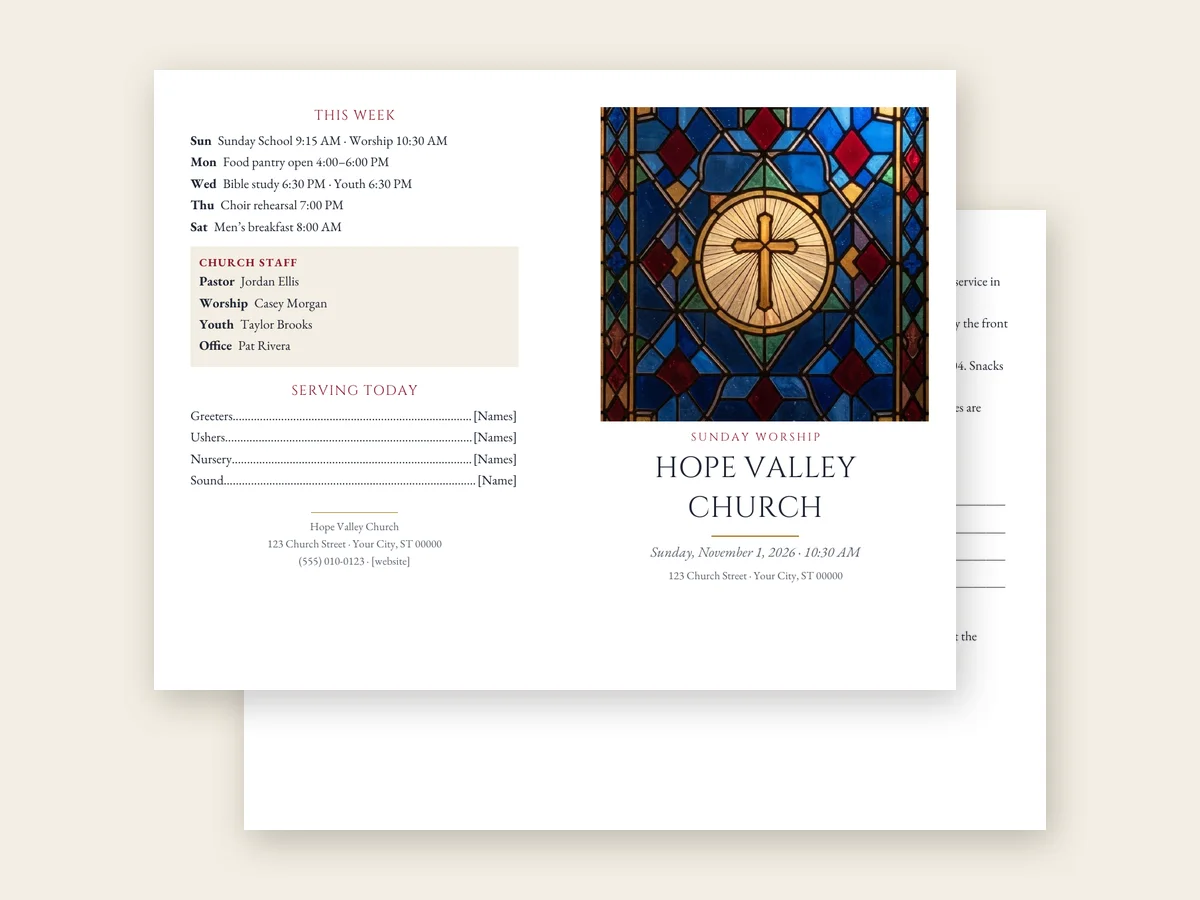
Free, no sign‑up. Size: DOCX 400 KB, PDF 267 KB. The DOCX opens in Word or LibreOffice Writer; the PDF shows the sample filled in.
This free church bulletin comes as an editable DOCX and a filled-in PDF sample. It is a bi-fold: one US Letter sheet in landscape (11 × 8.5 in), printed on both sides and folded to 5.5 × 8.5 in. Its four panels hold the cover, the week's schedule, the order of worship, announcements, prayer requests and giving.
Updated · By Pintergrab
How to fill in and print it
Download the DOCX to edit and the PDF to see the finished sample.
Open the DOCX in Microsoft Word or LibreOffice Writer and replace the church name, service date and time, address, phone and website.
Type over the fields in square brackets: musicians, leaders, hymn titles and numbers, the Scripture reference, the sermon title.
Replace the sample week, staff names, serving roles and announcements, and delete lines you do not need.
Print one test sheet on US Letter: landscape, two-sided, flip on short edge, 100% (actual size).
Fold the test sheet in half with the cover on the front, check that the inside is upright, then print the full run.
What is on each of the four panels
Each printed side of the sheet becomes two panels after the fold.
| Panel | Where on the sheet | What it holds |
|---|---|---|
| Cover | Outside, right half | Stained glass picture, Sunday Worship, church name, service date and time, address |
| Back panel | Outside, left half | This Week, Church Staff, Serving Today, church contacts |
| Inside left | Inside, left half | Welcome, Order of Worship |
| Inside right | Inside, right half | Announcements, Prayer Requests, Giving |
The order of worship has 12 items, from Prelude to Postlude. Each line ends in a field: [Musician], [Leader], [Title, No. 000] for a hymn and its number, [Book 0:0–00] for the Scripture reference. The Message line has the preacher's name under it and a [Sermon title] field.
What to change first
The file is filled in for Hope Valley Church, a made-up church. Swap these details first:
- Church name: on the cover and above the address on the back panel.
- Service date and time. The sample cover reads Sunday, November 1, 2026 · 10:30 AM.
- Address. The sample 123 Church Street is on the cover and on the back panel.
- Phone and website. The sample (555) 010-0123 and [website] sit on the back panel, and [website]/give is in the Giving note.
Find and Replace (Ctrl+H in Word and LibreOffice Writer) changes both copies of the name and address in one pass. The pastor's name, Jordan Ellis in the sample, appears in Church Staff and under the Message line.
How the sample is filled in
The sample week on the back panel:
- Sun: Sunday School 9:15 AM · Worship 10:30 AM
- Mon: Food pantry open 4:00–6:00 PM
- Wed: Bible study 6:30 PM · Youth 6:30 PM
- Thu: Choir rehearsal 7:00 PM
- Sat: Men's breakfast 8:00 AM
Under it, Serving Today lists greeters, ushers, nursery and sound, each with a field for names. Each sample announcement takes one or two lines: the event, the day, the place, and what to bring or do. Prayer Requests has the field [Names and requests, shared with permission] and four ruled lines. Type names there, or leave the lines blank for people to write on.
Editing text, styles and the picture
Click into any line and type over it, brackets included. Delete lines you do not use, such as Special Music.
Titles, headings and list lines use named styles: CB Title, CB Heading, CB Body, CB Item. Change the color in CB Heading once, and every heading follows.
To swap the cover picture, right-click it and choose Change Picture in Word or Replace in LibreOffice.
The DOCX carries its two fonts inside the file: Cinzel and EB Garamond, both free under the SIL Open Font License. If your editor shows another font, install the family from fonts.google.com.
Leaving Microsoft Publisher
According to Microsoft Support, Microsoft 365 subscribers stopped getting access to the app on or shortly after October 1, 2026, and support for its one-time-purchase version ended on October 13, 2026. This bulletin is a DOCX, so it opens in any editor that reads DOCX. The PDF is the filled-in sample: print it to test your printer's two-sided settings. Once your version is ready, save it as a PDF from the File menu for a print shop.
How to print on both sides and fold
- Load US Letter paper.
- In the print dialog, choose landscape, two-sided printing and flip on short edge.
- Set the scale to 100% (actual size), not fit to page.
- Print one sheet and fold it in half with the stained glass cover on the front. If the inside comes out upside down, switch to the other flip setting, then print the rest.
No two-sided printer: print page 1 on every sheet, put the stack back in the tray and print page 2. Test the direction on one sheet first.
In short
The free church bulletin template on this page is a two-page bi-fold file in a stained glass style. It prints on one US Letter sheet in landscape, 11 × 8.5 inches, on both sides, and folds once to 5.5 × 8.5 inches. The outside holds the cover (a stained glass picture, the church name, the service date and time, the address) and a back panel with the week's schedule, church staff and four serving roles: greeters, ushers, nursery and sound. The inside holds a welcome note, a 12-item order of worship from Prelude to Postlude, announcements, four blank lines for prayer requests and a note on giving. Words in square brackets, such as [Leader] or [Sermon title], are fields to type over. The DOCX opens in Microsoft Word or LibreOffice Writer, and the PDF shows the finished sample. Print at 100% (actual size) with flip on short edge, then fold the sheet in half.
Questions people ask
What is the size of a church bulletin?
This template is half-letter size when folded. It prints on a US Letter sheet turned landscape, 11 × 8.5 in, and folds in half to 5.5 × 8.5 in. One sheet gives four panels: the cover and the back panel outside, two pages of service details inside. The file is set up for US Letter paper only.
How do you make a church bulletin?
Start from a file with the panels already laid out. Download the DOCX, replace the sample church name, date, time and address, then type over the fields in the order of worship. Add this week's events, announcements and the names of people serving. Print one test sheet two-sided with flip on short edge at 100%, fold it, check that the inside is upright, then print the rest.
How do you write a church bulletin?
Write for one service and one week. The order of worship names each part of the service and the person leading it. Each announcement fits in one or two lines: the sample Fellowship Lunch item gives the date (Sunday, November 8), the place (the fellowship hall, after the service) and one request, to bring a dish to share. Print prayer requests only with the person's permission, as the field in the file says.
$5All 20 templates in one ZIP
Get all 20 church templates in one download
One ZIP with all 20 church bulletin and program templates in 4 styles. Each one is an editable DOCX and a PDF sample, and a README explains fonts, printing and folding.
Price on Lava.top: $5 or €5, one payment, no subscription. Payment and the download are on Lava.top.