Child Dedication Certificate Template
Part of church bulletin templates: 20 bulletins, programs, certificates and forms.
FreeDOCXPDF
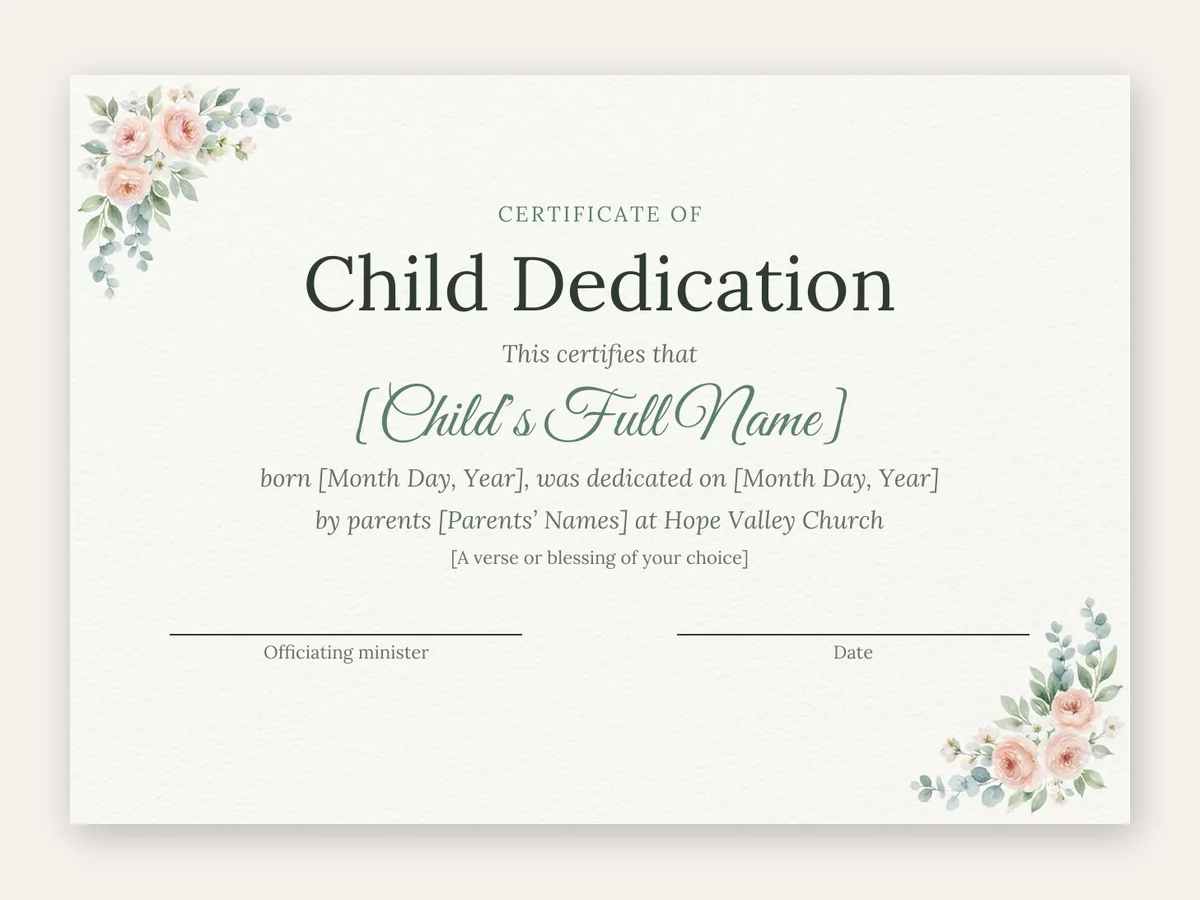
Free, no sign‑up. Size: DOCX 660 KB, PDF 337 KB. The DOCX opens in Word or LibreOffice Writer; the PDF shows the sample filled in.
This child dedication certificate template is one A4 landscape page, 11.69 × 8.27 in, with a watercolor frame. You fill in the child's full name, date of birth, date of dedication, the parents' names and the church; the officiating minister signs and dates it. One line is left for a verse or blessing of your choice. Free DOCX and PDF.
Updated · By Pintergrab
How to fill in and print it
Save the DOCX to your computer and open it.
Type the child's full name, the date of birth and the date of dedication.
Add the parents' names and replace the sample church name.
Add your church's verse or blessing, or delete that line.
Print on A4 landscape card stock at 100% scale.
Have the officiating minister sign and date it, then give it to the family.
What the certificate says
| Line | Text in the sample |
|---|---|
| 1 | Certificate of |
| 2 | Child Dedication |
| 3 | This certifies that |
| 4 | [Child's Full Name] |
| 5 | born [Month Day, Year], was dedicated on [Month Day, Year] |
| 6 | by parents [Parents' Names] at Hope Valley Church |
| 7 | [A verse or blessing of your choice] |
| 8 | Officiating minister · Date |
Filling it in
Type the child's full name the way the parents spell it, then the date of birth and the date of the dedication service. Write both parents' names on line 6, or one parent's name, and replace Hope Valley Church with your church. Line 7 is optional: add the verse or blessing your church reads at dedications, or delete it. Print the certificate, then the minister signs and dates it by hand.
If your church dedicates several children on one Sunday, make one copy per child, or keep the names in a spreadsheet and use mail merge (the Mailings tab in Word, Tools › Mail Merge Wizard in LibreOffice Writer).
Who it is for
The certificate goes home with the family as a keepsake, and the church office can keep a copy with its records. Some parents ask for a second copy for a grandparent or a godparent; print one more before the minister signs.
Adding sponsors or a photo
If your church names sponsors, add a line under line 6 in the same style: with sponsors [Names]. For a photo, insert a small picture in a corner of the frame and set its wrapping to In Front of Text in Word or Through in LibreOffice so the text stays in place. Check the print preview after any addition, so the certificate stays on one page.
Paper and printing
This certificate is laid out on A4 paper in landscape. Print one-sided at 100% scale on card stock. A US Letter sheet is 0.69 in narrower than A4 in landscape, and the frame reaches toward the edge, so on Letter paper look at the print preview before printing. A white or cream card stock shows the watercolor frame best.
Editing
Click any line of the DOCX in Word or LibreOffice Writer and type. The frame is a background picture: right-click it and choose Change Picture in Word or Replace in LibreOffice to use another one.
In short
The child dedication certificate template on this page is one A4 page in landscape, 11.69 × 8.27 in, with a watercolor floral frame. The lines read from the top: Certificate of, then Child Dedication as the title, and This certifies that. Next comes [Child's Full Name] in a script font, Great Vibes. Two lines give the details: born [Month Day, Year], was dedicated on [Month Day, Year], and by parents [Parents' Names] at the church, in the sample Hope Valley Church. A small line, [A verse or blessing of your choice], is left for the church; the file contains no verses or blessings. Two signature lines close the page: Officiating minister and Date. The other text is set in Lora. A child dedication, also called a baby presentation, is a ceremony in evangelical churches in which parents present a child and make commitments to raise the child in the faith.
Questions people ask
What is a child dedication certificate used for?
It is a keepsake and a record of a child's dedication service. Parents receive it after they present the child at church and make their commitments, and it shows the child's name, the dates of birth and dedication, the parents' names, the church and the minister's signature. It can be framed or kept in a baby book.
What to put in a child dedication certificate?
Put the child's full name, the date of birth, the date of the dedication, the parents' names and the church's name and city. Add a verse or blessing if your church uses one, and lines for the officiating minister's signature and the date. Our template has all of these lines, with the child's name set in a script font.
How to make a child dedication certificate?
Open a template like ours in Word or LibreOffice Writer and type the child's name, the dates, the parents' names and your church over the sample. Add the verse or blessing your church uses, or delete the line. Print on A4 card stock at 100% scale, or check the preview if you print on US Letter, and have the minister sign by hand.
$5All 20 templates in one ZIP
Get all 20 church templates in one download
One ZIP with all 20 church bulletin and program templates in 4 styles. Each one is an editable DOCX and a PDF sample, and a README explains fonts, printing and folding.
Price on Lava.top: $5 or €5, one payment, no subscription. Payment and the download are on Lava.top.