Baptism Certificate Template to Fill In
Part of church bulletin templates: 20 bulletins, programs, certificates and forms.
FreeDOCXPDF
Free, no sign‑up. Size: DOCX 1116 KB, PDF 302 KB. The DOCX opens in Word or LibreOffice Writer; the PDF shows the sample filled in.
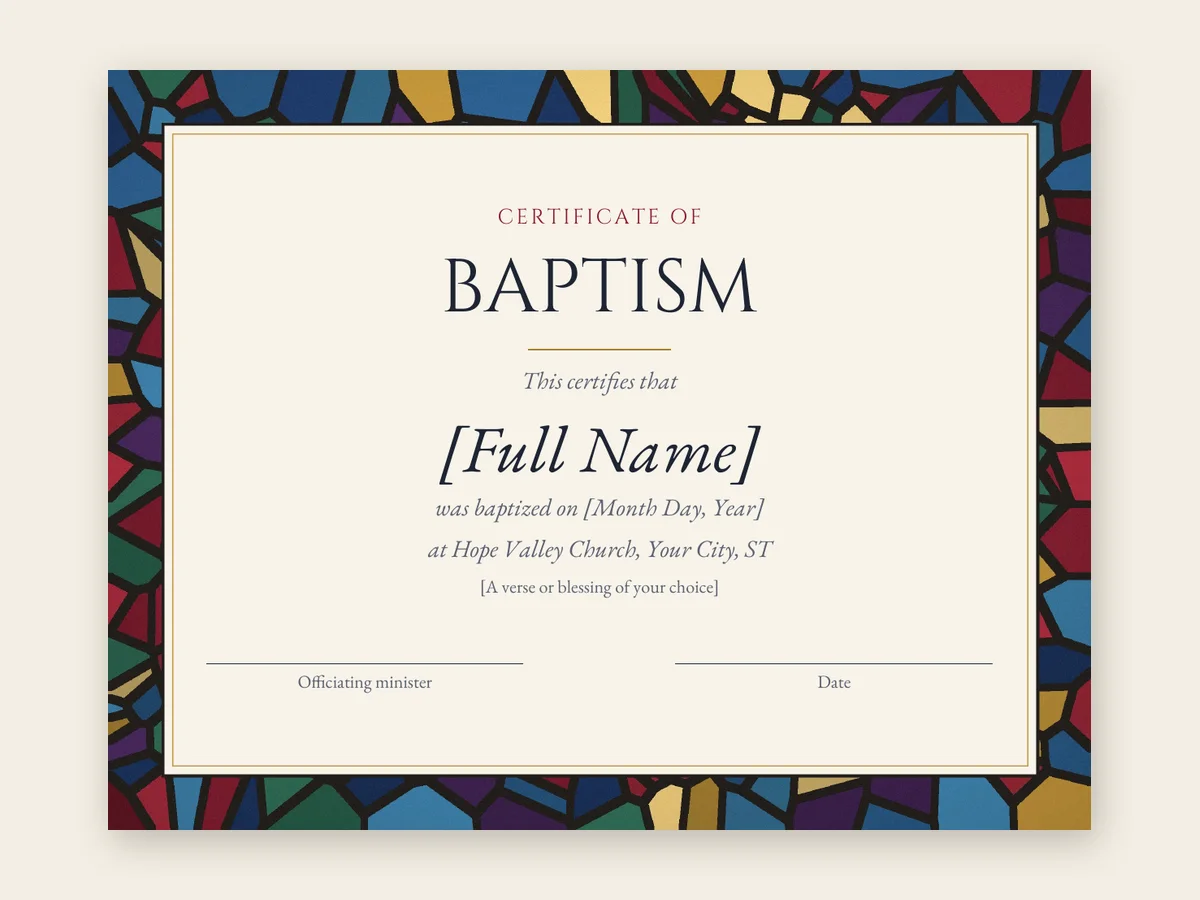
This baptism certificate template is a one-page certificate on US Letter landscape, 11 × 8.5 in, with a stained glass frame. You fill in the full name, the date of baptism and the church, add a verse or blessing of your choice if you want one, and the officiating minister signs and dates it. Free DOCX and PDF.
Updated · By Pintergrab
How to fill in and print it
Download the certificate as a DOCX file.
Type the full name and the date of baptism.
Replace the sample church name and city.
Add the verse or blessing your church uses, or delete that line.
Print on US Letter landscape at 100% scale on card stock or heavier paper.
Have the officiating minister sign and date it by hand.
What the certificate says
| Line | Text in the sample |
|---|---|
| 1 | Certificate of |
| 2 | Baptism |
| 3 | This certifies that |
| 4 | [Full Name] |
| 5 | was baptized on [Month Day, Year] |
| 6 | at Hope Valley Church, Your City (sample church and city) |
| 7 | [A verse or blessing of your choice] |
| 8 | Officiating minister · Date (signature lines) |
Filling it in
Type the full name as the church records it, usually first, middle and last name. Write the date in words or numbers to match your church's records, for example June 7, 2026. Replace the church name and the city in line 6. Line 7 is optional: put in the verse or blessing your church uses, or delete it. The minister signs above Officiating minister and writes the date above Date, by hand, after printing.
If your church records more, such as the date of birth, the parents or the sponsors, add a line under the date in the same style. Copy an existing detail line and type over it: the copy keeps the CB Subtitle style, so the font and size match.
Sample text
The sample reads Hope Valley Church, a fictional congregation. The name and date lines are fields in square brackets, so nothing personal is printed by mistake. The layout was tested with a church name over 40 characters long, and the certificate still fits on one page.
Several certificates at once
For a baptism Sunday with several candidates, list the names and dates in a spreadsheet and use mail merge: the Mailings tab in Word, or Tools › Mail Merge Wizard in LibreOffice Writer. You get one certificate per name from the same design, ready for the minister to sign.
Paper and printing
Print on US Letter in landscape at 100% scale, one-sided. Card stock or parchment-style paper gives the certificate weight, if your printer takes it; feed one sheet first to test. The border is part of the page, so keep the scale at 100%: fit to page can shrink it unevenly or cut the edges.
A US Letter certificate fits an 11 × 8.5 in document frame or a certificate holder made for letter-size paper.
Editing the design
Word and LibreOffice Writer both open the DOCX. The stained glass frame is a background picture: to swap it, right-click and choose Change Picture in Word or Replace in LibreOffice. Lettering uses Cinzel for the title and EB Garamond for the rest.
In short
The baptism certificate template on this page is a single US Letter page in landscape, 11 × 8.5 in, inside a stained glass border. From the top it reads Certificate of, then Baptism in large capitals, a rule, and the line This certifies that. Below sits the name field, [Full Name], in large lettering, followed by was baptized on [Month Day, Year] and the line with the church and city, in the sample Hope Valley Church. One small line, [A verse or blessing of your choice], is left for the church to fill in; the file contains no verses or blessings of its own. At the bottom are 2 signature lines, Officiating minister and Date. The lettering uses 2 fonts, Cinzel and EB Garamond, both embedded in the DOCX. The sample church is fictional, so change its name before printing.
Questions people ask
How to write a baptism certificate?
Write the person's full name, the date of the baptism and the name and city of the church, then add a verse or blessing only if your church uses one. Leave the signature lines blank until the certificate is printed, so the officiating minister can sign and date it by hand. Our template has these lines in order, each as a field you type over.
What does an official baptism certificate look like?
A certificate is official when the church that performed the baptism issues and signs it. It usually shows the person's full name, the date of baptism, the church's name and city and the officiating minister's signature. Some churches add the date of birth, the parents' names, the sponsors or a seal. Our template is a design your church fills in and signs.
Can you get a baptism certificate?
Yes. Ask the church where the baptism took place. Churches record baptisms in a register, often with the date and the names of the parents, and the church office can issue a certificate or a copy from that record. If the church has closed or merged, ask the regional office of its denomination which church now keeps its records.
What information is on a baptism certificate?
A baptism certificate shows the full name of the person baptized, the date of baptism, the church and its city or town, and the signature of the officiating minister with a date. Some add a verse or blessing, the date of birth, the parents or sponsors. Our file includes the name, date, church, a verse or blessing field and two signature lines.
$5All 20 templates in one ZIP
Get all 20 church templates in one download
One ZIP with all 20 church bulletin and program templates in 4 styles. Each one is an editable DOCX and a PDF sample, and a README explains fonts, printing and folding.
Price on Lava.top: $5 or €5, one payment, no subscription. Payment and the download are on Lava.top.