Church Directory Template
Part of church bulletin templates: 20 bulletins, programs, certificates and forms.
FreeDOCXPDF
Free, no sign‑up. Size: DOCX 273 KB, PDF 146 KB. The DOCX opens in Word or LibreOffice Writer; the PDF shows the sample filled in.
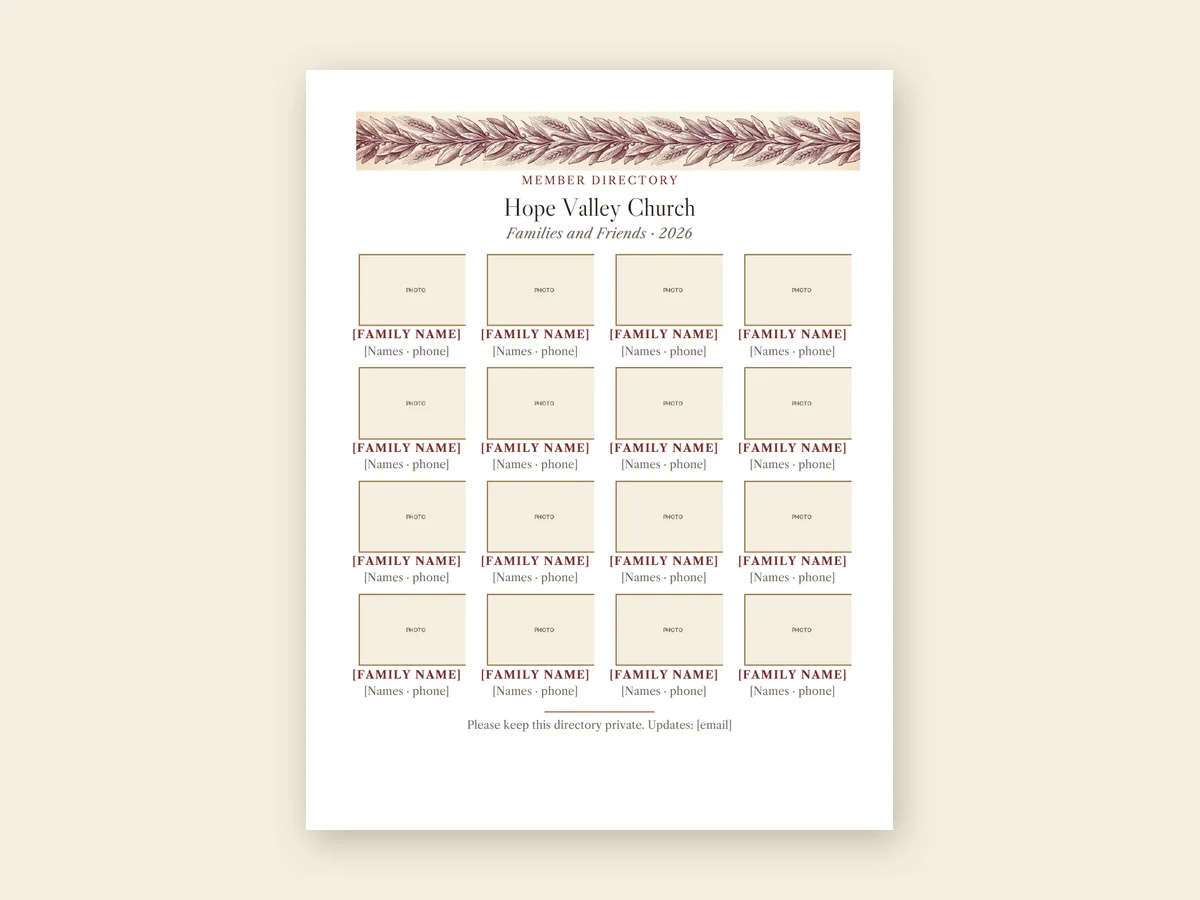
This church directory template is a photo directory page on US Letter, 8.5 × 11 in. A 4 × 4 grid holds 16 families, each cell with a photo frame, a family name line and a names and phone line, under a header with the church name and year. Copy the page for more families. Free DOCX and PDF.
Updated · By Pintergrab
How to fill in and print it
Download the directory DOCX; the PDF shows the finished page.
Change the church name and the year in the header.
Replace each photo frame with a family photo using Change Picture or Replace.
Type the family name and the names and phone in each cell, sorted by last name.
Copy the page for every 16 families and number the pages.
Print on US Letter at 100% scale and staple or bind the pages.
Layout of the page
| Part | What it holds |
|---|---|
| Header | Member Directory · church name · Families and Friends · 2026 |
| Grid | 16 cells, 4 × 4 |
| Each cell | Photo frame about 1.65 × 1.05 in, [Family name], [Names · phone] |
| Footer | Please keep this directory private. Updates: [email] |
Collecting photos and details
Ask each family for one photo and the names and phone number they want printed. Photos in landscape shape fit the frames best, since each frame is wider than it is tall. A photo Sunday, with one volunteer taking pictures against the same wall after worship, gives a directory that looks consistent.
A sign-up sheet at the welcome desk with columns for the family name, first names and phone gives you the text to copy into the cells, already spelled the way each family wants.
Get permission before printing anyone, and ask families how they want children listed. Some prefer first names only.
Adding photos and names
Each frame is a placeholder picture. Right-click it and choose Change Picture in Word or Replace in LibreOffice Writer, then pick the family's photo. Type the family name, for example The Ellis Family, and the first names and phone on the line below. Sort families by last name so people can find each other.
More than 16 families
Copy the whole page and paste it after itself for each 16 families. Change the subtitle on later pages if you want a section, such as Members A to G. A directory of 100 families needs 7 pages. Number the pages in the footer and add a cover with the church name and year.
Privacy
The footer note is there on purpose: a directory lists names, phones and faces of the people in your church. Give printed copies to members, not visitors, keep the email for updates current and print a new edition when many details change. For a digital copy, save the filled-in directory as a PDF and send it only to member lists.
Printing
Print on US Letter at 100% scale. One-sided keeps each page easy to replace when a family changes; double-sided halves the paper. Staple in the top left corner or punch for a binder. Photos print better on heavier, brighter paper if your printer feeds it.
Fonts
The title uses Libre Caslon Display and the text Libre Caslon Text, both embedded in the DOCX.
In short
The church directory template on this page is one US Letter page, 8.5 × 11 in, in portrait. A header band carries the title Member Directory, the church name and a subtitle line, in the sample Families and Friends · 2026. Below it is a grid of 16 family cells, 4 across and 4 down. Each cell is about 1.7 in wide and holds a photo frame of about 1.65 × 1.05 in, a [Family name] line and a [Names · phone] line. The photo frames are placeholder pictures you replace one by one. The footer asks readers to keep the directory private and gives an email for updates. For a church with 60 families, 4 copies of the page hold everyone, and a cover or an index can go in front. The sample church name, Hope Valley Church, is fictional, and no real names or photos are in the file.
Questions people ask
How to make a church directory?
Decide what to print for each family, usually a photo, names and a phone number. Collect the details and permission from each family, then fill one cell per family in our template: change the photo, type the family name and the names and phone. Sort by last name, copy the page for every 16 families, add a cover and print copies for members.
What's included in a church directory?
A church directory lists each household: the family name, the first names of the people in it, a phone number and often an email or address, with a photo in a photo directory. Some add staff and ministry contacts at the front. Our page has a photo, family name and a names and phone line for 16 households, plus a privacy note and an email for updates.
Do churches do directories anymore?
Yes. Churches still make member directories, in print, as PDFs and in church apps. A printed photo directory helps people put names to faces, especially in a church where not everyone uses an app. A one-page template like ours lets a church office print its own without a photographer, a year at a time.
How to make a church directory with pictures?
Collect one photo per family, preferably landscape, with permission to print it. In our template, right-click each photo frame and choose Change Picture in Word or Replace in LibreOffice Writer, then type the family name and the names and phone under it. Each page holds 16 families; copy the page for more and print on US Letter at 100%.
What size is a church directory card?
There is no fixed size. Our directory is a full US Letter page, 8.5 × 11 in, with 16 family cells. Each cell is about 1.7 in wide, with a photo frame of about 1.65 × 1.05 in and two text lines. For pocket cards, print two pages per sheet from the print dialog; the cells come out half the size.
$5All 20 templates in one ZIP
Get all 20 church templates in one download
One ZIP with all 20 church bulletin and program templates in 4 styles. Each one is an editable DOCX and a PDF sample, and a README explains fonts, printing and folding.
Price on Lava.top: $5 or €5, one payment, no subscription. Payment and the download are on Lava.top.