Church Visitor Card and Connection Card Template
Part of church bulletin templates: 20 bulletins, programs, certificates and forms.
FreeDOCXPDF
Free, no sign‑up. Size: DOCX 135 KB, PDF 39 KB. The DOCX opens in Word or LibreOffice Writer; the PDF shows the sample filled in.
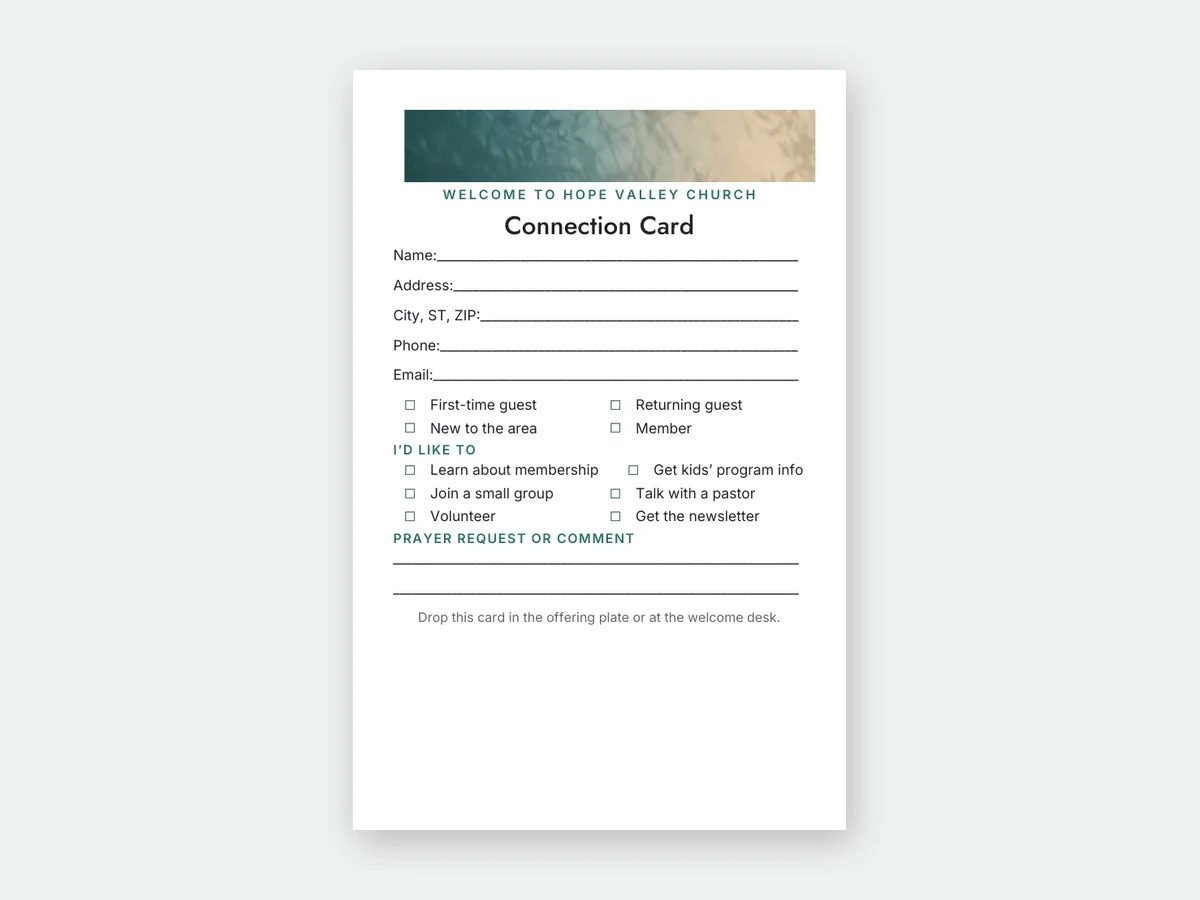
This church visitor card template is a connection card on a half-letter page, 5.5 × 8.5 in. Guests write name, address, phone and email, tick whether they are first-time or returning, choose from 6 next steps such as joining a small group, and add a prayer request. Free DOCX and PDF.
Updated · By Pintergrab
How to fill in and print it
Download the connection card DOCX.
Put your church name in the header band.
Rename the next-step boxes to match what your church follows up on.
Change the return line if you collect cards somewhere other than the offering plate or welcome desk.
Print on half-letter card stock at 100% scale.
Put the cards in the pew racks or at the welcome desk with pens.
What the card asks
| Section | Lines and boxes |
|---|---|
| Contact | Name, address, city and ZIP, phone, email |
| I am a | First-time guest, Returning guest, New to the area, Member |
| I'd like to | Learn about membership, Get kids' program info, Join a small group, Talk with a pastor, Volunteer, Get the newsletter |
| Prayer request or comment | 2 lines |
| Return | Drop this card in the offering plate or at the welcome desk. |
Fitting the card to your follow-up
Each checkbox should lead to a person who acts on it. Before printing, match the 6 next steps to someone on staff or a volunteer: who calls about membership, who sends kids' program details, who connects people to a small group. Rename or replace boxes your church cannot follow up on; an unanswered request does more harm than a missing box. Keep the number of boxes even so the two columns stay full.
If you mail a welcome letter, keep the address line. If you only email, delete it and the card gets shorter.
Where the card goes
Put the cards where guests sit and arrive: in the pew racks, inside the bulletin or at the welcome desk. The return line on our card points to the offering plate or the welcome desk; change it if you collect cards another way, for example at a connection table. Say from the front during the welcome where the cards are and where they go.
Size and printing
The card is 5.5 × 8.5 in, half of a US Letter sheet. Use half-letter card stock at 100% scale, or set two pages per sheet in the print dialog for US Letter and cut the sheet in half. The file has one card on one page, so copy it onto a second page of the DOCX before printing two per sheet. Card stock is easier to write on in a pew than copy paper.
Handling the cards
A connection card holds names, phone numbers, addresses and prayer requests. Collect cards the same day, enter them into your records within the week, and keep the paper cards in a locked place or shred them once entered. Share prayer requests only with the people the guest would expect.
Editing
Edit the DOCX in Microsoft Word or LibreOffice Writer. Type your church name in the header and change any label by typing over it. Headings are in Jost and the text in Inter, both embedded. The band at the top is a picture: right-click it and choose Change Picture in Word or Replace in LibreOffice.
In short
The church visitor card template on this page is a connection card on one half-letter page, 5.5 × 8.5 in. A header band carries Welcome to and the church name, in the sample Hope Valley Church, above the title Connection Card. Five fill-in lines follow: Name, Address, city and ZIP, Phone and Email. Then 4 checkboxes say who is filling it in: First-time guest, Returning guest, New to the area or Member. Under I'd like to, 6 more checkboxes list next steps: Learn about membership, Get kids' program info, Join a small group, Talk with a pastor, Volunteer and Get the newsletter. Two lines take a prayer request or comment. The last line asks guests to drop the card in the offering plate or at the welcome desk. The file is an editable DOCX in the Modern Arch style with a PDF sample beside it, and both are free to download.
Questions people ask
What is a church visitor card used for?
A visitor card, also called a connection card, lets a guest leave contact details and say what they would like next, such as learning about membership or kids' programs, so the church can follow up. Members can use it too, for a prayer request or a change of address. Our card has contact lines, a guest status, 6 next steps and a prayer request.
What to put in a church visitor card?
Put lines for name, address, phone and email, a way to say whether they are a first-time or returning guest, and a short list of next steps your church can actually follow up on. Add space for a prayer request or comment and a line saying where to drop the card. Our template has 5 contact lines, 4 status boxes and 6 next steps.
How to make a church visitor card?
Start from our template in Word or LibreOffice Writer. Type your church name in the header, match the next-step boxes to the follow-up your staff can do, and change the return line to where you collect cards. Print one test card, fill it in with a pen to check the line lengths, then print the cards on card stock.
What size is a church visitor card?
There is no single size; churches use anything from a small tear-off tab to a half page. Ours is half-letter, 5.5 × 8.5 in, which leaves room for 5 contact lines, 10 checkboxes and a prayer request without small print. Copy the card onto a second page of the DOCX, and two cards print on one US Letter sheet, so a stack for the pew racks takes half the paper.
$5All 20 templates in one ZIP
Get all 20 church templates in one download
One ZIP with all 20 church bulletin and program templates in 4 styles. Each one is an editable DOCX and a PDF sample, and a README explains fonts, printing and folding.
Price on Lava.top: $5 or €5, one payment, no subscription. Payment and the download are on Lava.top.