Family Budget Planner: Free Lite Template and Pro Version
The free Lite download gives you 3 tabs: Start Here, Categories, and a January sheet with 49 formula cells and dropdown lists for type and category. You type amounts; the sheet does the math. Pro adds 14 more tabs for $5, including all 12 months, a dashboard, debts and goals.
Updated · By Pintergrab
Pro: $5 on Lava.top, one payment.
What the free Lite file contains
The Lite download is an Excel file (about 11 KB) with 3 tabs:
- Start Here — a short guide: open Categories, enter transactions in the Jan sheet, and watch the Summary box on the right update.
- Categories — the category list (22 entries) with group and type columns. Categories you add here show up in the dropdown.
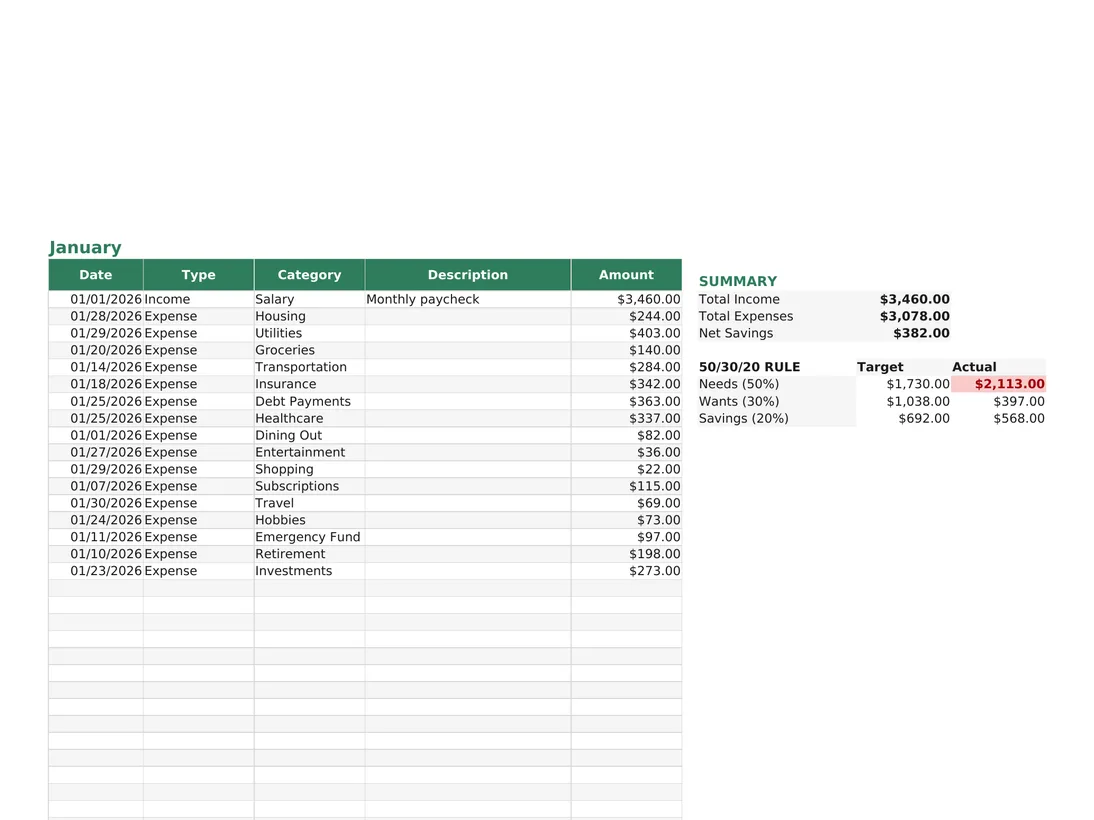
- Jan — a January transaction table with 49 formula cells. Dropdowns handle the Type column (Income or Expense) and the Category column. You enter the date, description and amount.
A dark-mode Lite file is also included. The Lite file calculates a single month; there is no dashboard and no debt or goals sheet.
How to download and use it
- Download the Lite file from this page.
- Open it in Excel or LibreOffice Calc, or upload it to Google Sheets via File, then Import.
- Check the Categories sheet, then type your January transactions into the Jan sheet.
- Read the Summary box on the right for your totals.
Leave the header row and the hidden Grp helper column alone — everything else is safe to change.
What Pro adds for $5
Pro is one payment of $5 and contains 17 tabs:
- All 12 months — Jan through Dec sheets, each built like the Lite January sheet.
- Dashboard — annual income, annual expenses, net savings, savings rate, debt remaining, and a monthly breakdown.
- Debts — a snowball planner: you set your extra payment per month and number the payoff order in the Priority column. The whole extra goes to debt 1, and the sheet shows months to payoff.
- Goals — savings goals with target amount, current amount, monthly contribution, months remaining and progress.
Which one to pick
If you want to test the formulas on one month, Lite is enough. If you want the full year, the dashboard, and the debt and goals sheets, Pro covers it for a single $5 payment.
In short
The Family Budget Planner is a budget spreadsheet for Excel and Google Sheets where you type in numbers and the formulas calculate the rest. The free Lite file contains 3 tabs — Start Here, Categories, and Jan — and the January sheet has 49 formula cells plus dropdowns for transaction type (Income, Expense) and category (drawn from the Categories sheet, 22 entries). The Pro version, a one-time $5, expands this to 17 tabs: all 12 monthly sheets (Jan through Dec, 49 formula cells each), a Debts sheet with a snowball planner (32 formula cells, with balance, APR, minimum payment and priority columns), a Goals sheet with target amount, monthly contribution, months remaining and progress (16 formula cells), and a Dashboard with annual income, annual expenses, net savings, savings rate, debt remaining and a monthly breakdown across 47 formula cells. Both Lite and Pro come in light and dark .xlsx files.
Questions people ask
How do I use the Family Budget Planner in Google Sheets?
Download the .xlsx file, then in Google Sheets go to File, then Import, then Upload, and select the file. The formulas and dropdowns carry over, so you can start typing transactions into a month sheet right away.
Does the free version calculate anything?
Yes. The Lite January sheet has 49 formula cells that total your income and expenses in the Summary box. It also flags when spending goes over budget. What Lite lacks is the other 11 months and the dashboard.
What does the Pro debt snowball sheet do?
The Debts sheet lists each debt with its balance, APR and minimum payment. You number the payoff order in the Priority column, and the whole extra monthly payment goes to debt 1. When debt 1 is paid off, renumber the rest.
Is the template really free?
The Lite version is a free download with 3 tabs. Pro costs $5 once and includes 17 tabs — all 12 months, the year dashboard, the debt snowball planner and the savings goals tracker.