Debt Snowball Payoff Spreadsheet: Plan and Track Payoff in Excel
The Family Budget Planner (Pro, $5) includes a Debt Snowball sheet: list each debt with balance, APR and minimum payment, set the extra payment per month, and number the payoff order yourself: the whole extra goes to debt 1. It runs in Excel or Google Sheets; the free Lite file covers one month.
Updated · By Pintergrab
Lite is free to download, no sign-up. Pro is sold on Lava.top.
How the debt snowball sheet works (Pro)
The Debts sheet in the Pro file is where the snowball plan lives. You fill in a short list:
- Debt — the name of each loan or card
- Balance — what you still owe
- APR % — the interest rate
- Min Payment — what the lender requires
- Priority — the payoff order you type: 1, 2, 3
At the top you set one number: extra payment available per month. You number the payoff order in the Priority column (snowball: smallest balance first). The whole extra payment goes to debt 1; the sheet shows each debt's total payment and months to payoff (balance ÷ payment, interest not counted). When debt 1 is paid off, renumber the rest.
What you plan and track
- The payoff order of every debt in one table
- How the monthly extra payment is applied
- Total debt remaining, which the year Dashboard also shows
- The rest of your budget in the 12 monthly sheets, so the snowball money actually exists each month
The Dashboard tab sums annual income, annual expenses, net savings and savings rate, and lists debt remaining next to the monthly breakdown. That is the check that your extra payment fits your real budget.
Example: one week in a month sheet
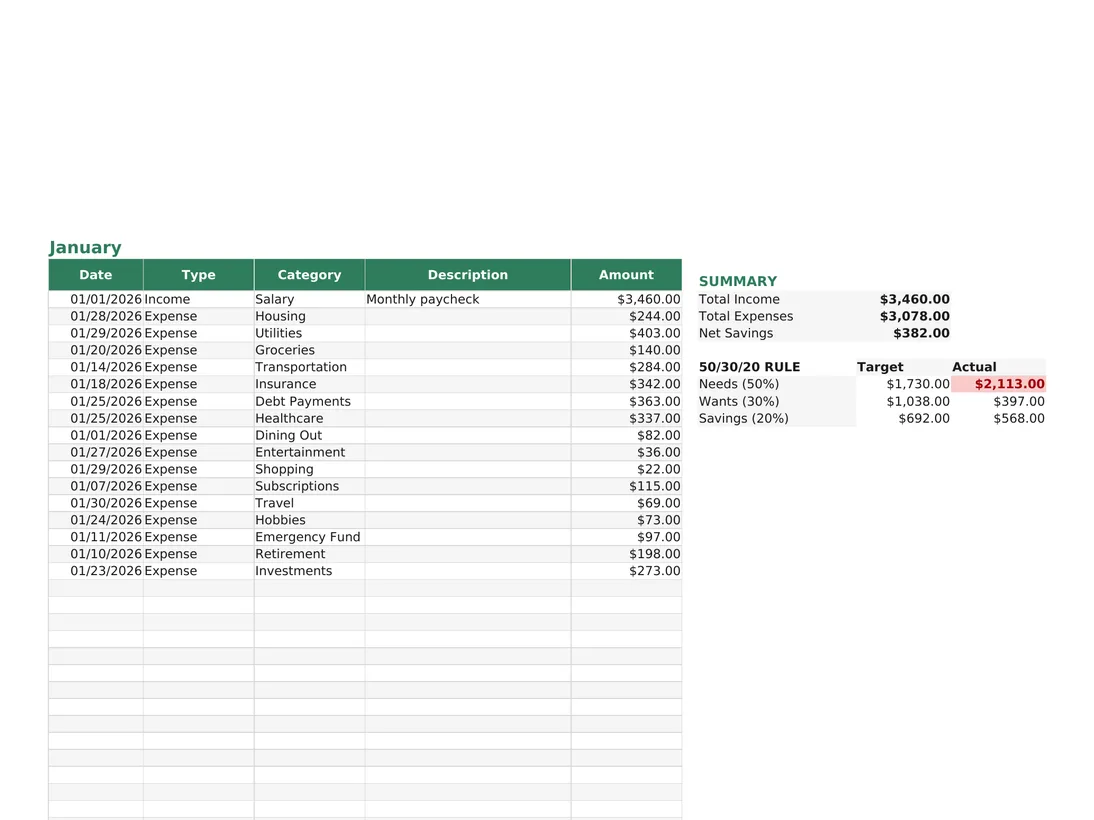
On the Jan sheet you type rows into the transaction table (Date, Type, Category, Description, Amount), picking Type and Category from dropdowns:
| Date | Type | Category | Description | Amount |
|---|---|---|---|---|
| Jan 6 | Income | Salary | Paycheck | 2,400 |
| Jan 8 | Expense | Groceries | Weekly shop | 145 |
| Jan 10 | Expense | Debt Payments | Snowball payment | 210 |
| Jan 12 | Expense | Utilities | Electric bill | 95 |
The Summary box on the right updates on its own, and the 50/30/20 needs/wants/savings split highlights red when a group goes over. Each month sheet holds 40 transaction rows.
Getting the file
The Lite download is a 3-tab Excel file (Start Here, Categories, Jan) with one month and no debt tracker. The $5 Pro file has 17 tabs: 12 months, Categories, Debts, Goals, Dashboard and Start Here, in light and dark versions. Open the .xlsx in Excel or upload it to Google Sheets with File > Import.
In short
The Family Budget Planner is a budget spreadsheet that opens in Excel, LibreOffice Calc and Google Sheets, and costs $5 for the Pro version. Its Pro file has 17 tabs, including a Debts sheet for the debt snowball method. On that sheet you enter each debt's balance, APR, and minimum payment, plus one number for the extra payment available per month. You number the payoff order in the Priority column. The whole extra payment goes to debt 1, and the sheet shows each debt's total payment and months to payoff (balance ÷ payment, interest not counted). The Pro file also has 12 monthly sheets, a year dashboard that tracks debt remaining and savings rate, and a savings goals tracker with months remaining. The free Lite file is smaller, about 11 KB, with 3 tabs and no debt tracker. A paid Pro file is 43 KB.
Questions people ask
Who sets the payoff order on the Debts sheet?
You do. On the Debts sheet (Pro) you number the payoff order in the Priority column (snowball: smallest balance first). The whole extra payment goes to debt 1; the sheet shows each debt's total payment and months to payoff. When debt 1 is paid off, renumber the rest.
Can I track debt payoff and my regular budget in the same spreadsheet?
Yes, in the Pro version. The Debts sheet holds the snowball plan, the 12 monthly sheets track income and expenses, and the Dashboard shows debt remaining alongside annual income, expenses and savings rate.
Does the free Lite file include the debt snowball planner?
No. The free Lite file has 3 tabs: Start Here, Categories and one month sheet. The Debts snowball sheet is part of the $5 Pro version, which has 17 tabs.
Will the debt spreadsheet work in Google Sheets or only Excel?
Both. The file is an .xlsx that opens in Excel and LibreOffice Calc, and can be uploaded to Google Sheets through File > Import. Light and dark versions are both included.