Family Budget Spreadsheet for Google Sheets and Excel
Family Budget Planner is a family budget spreadsheet that opens in Google Sheets via File > Import and in Excel. The Pro version has 17 tabs: 12 monthly sheets, a year dashboard, a debt snowball planner, and a savings goals tracker. It costs $5 once, and a free Lite version has 3 tabs.
Updated · By Pintergrab
Lite is free to download, no sign-up. Pro is sold on Lava.top.
What families track with it
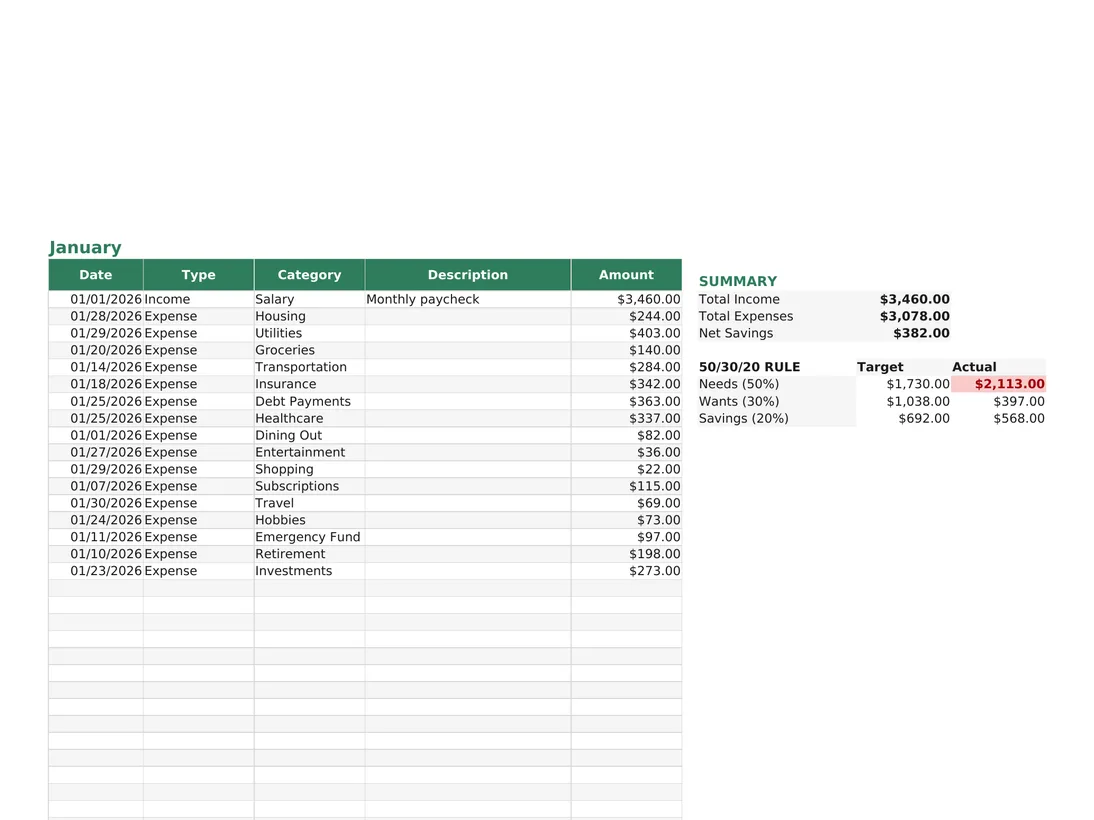
Most families use the planner for the usual monthly household run: salary and freelance income on the income side, then groceries, housing, utilities, kids' costs, and debt payments on the expense side. Each month sheet is a simple transaction table — Date, Type, Category, Description, Amount. The Type dropdown offers two choices: Income or Expense. The Category dropdown pulls from the Categories sheet, so entries stay consistent and the Summary box adds them up correctly.
On the Categories sheet, every category has a Group and a Type. That grouping is what feeds the automatic 50/30/20 split — needs, wants, and savings — with red highlighting when a group goes over its share.
Which parts matter most
- The monthly transaction table. Rows 3 through 42 give you 40 entries per month, with 49 formula cells doing the totals in the Summary box. You type numbers; nothing else.
- The Categories sheet. Edit this first. The month sheets read from it, so the dropdowns match your family's real spending.
- The year Dashboard (Pro). Annual income, annual expenses, net savings, savings rate, and debt remaining, with a monthly breakdown.
- The Debts sheet (Pro). A snowball planner: list each debt with balance, APR, and minimum payment, set the extra payment amount and number the payoff order yourself: the whole extra goes to debt 1.
- The Goals sheet (Pro). Target amount, current amount, and monthly contribution per goal, with a months-remaining countdown and progress.
A filled-in week in January
Here is one week from the Jan sheet, using its own columns:
| Date | Type | Category | Description | Amount |
|---|---|---|---|---|
| Jan 6 | Income | Salary | First paycheck | 2,400 |
| Jan 6 | Expense | Groceries | Weekly shop | 165 |
| Jan 8 | Expense | Utilities | Electric bill | 92 |
| Jan 10 | Expense | Freelance tools | Software | 15 |
Type that in and the Summary box updates on its own: total income, total expenses, and the running 50/30/20 split. No formulas written by you.
Getting it into Google Sheets
Download the file, open Google Sheets, choose File > Import > Upload, and pick the .xlsx. The formulas and dropdowns come across with it. The free Lite download has 3 tabs — Start Here, Categories, and Jan — enough to test the workflow for a full month. Pro adds the other 11 months, the Dashboard, Debts, and Goals tabs.
In short
Family Budget Planner is a family budget spreadsheet sold as .xlsx files that open in Excel, LibreOffice Calc, and Google Sheets via File > Import. The Pro version costs $5 and contains 17 tabs: a Start Here guide, a Categories sheet, 12 monthly sheets (Jan through Dec), a Debts snowball planner, a Goals tracker, and a year Dashboard. Each monthly sheet has 49 formula cells that total income and expenses in a Summary box, plus dropdowns: a Type column limited to Income or Expense over rows 3 to 42, and a Category column fed from the Categories sheet. The dashboard sums annual income, annual expenses, net savings, savings rate, and debt remaining. A free Lite download includes 3 tabs — Start Here, Categories, and one January sheet — so you can try the layout before paying. Formulas are locked, and the header row is frozen.
Questions people ask
How do I get the planner into Google Sheets?
Download the .xlsx file, then in Google Sheets go to File > Import > Upload and select it. The formulas, dropdowns, and frozen headers come across. The same file also opens in Excel and LibreOffice Calc.
What can the free Lite version do?
Lite has 3 tabs: Start Here, Categories, and one January sheet. The January sheet has 49 formula cells that total income and expenses in the Summary box, with dropdowns for type and category over 40 rows.
How many transactions fit on one monthly sheet?
The transaction table runs from row 3 to row 42, so 40 entries per month. Type is limited to Income or Expense, and Category comes from your list on the Categories sheet.
Does the dashboard show the whole year?
Yes, in the Pro version. The Dashboard tab totals annual income, annual expenses, net savings, savings rate, and debt remaining, plus a monthly breakdown across all 12 monthly sheets.