Printable 2027 Planner: Dated vs Undated, GoodNotes Tabs, Letter vs A4
A dated 2027 planner has every month, week, and day already labeled with real calendar dates, while an undated planner leaves the date blank so you write it in and can start on any page, any month, without wasting pages. If you want to start using a planner today rather than waiting for January 1st, or if you tend to fall off a planner habit for a few weeks and do not want blank dated pages staring back at you, undated is the better fit. If you want zero setup and a planner that matches your actual calendar out of the box, get the dated 2027 Printable Planner.
Dated vs undated: the real tradeoff
| Dated 2027 planner | Undated daily planner | |
|---|---|---|
| Best for | People who plan month by month and want the calendar pre-filled | People who want to start any day of the year, or restart after a break |
| Setup | None — open and use | Write in the date yourself each time |
| Falling behind | Blank dated pages pile up if you skip weeks | No wasted pages — pick up wherever you left off |
| Good across years | Only for 2027 | Reusable indefinitely |
Neither is objectively better — it comes down to whether seeing "February 12" printed on a page you didn't fill in bothers you. If it does, the Undated Daily Planner solves that specific annoyance; if you would rather not think about dates at all, the dated version already did that work for you.
What's inside the 2027 planner
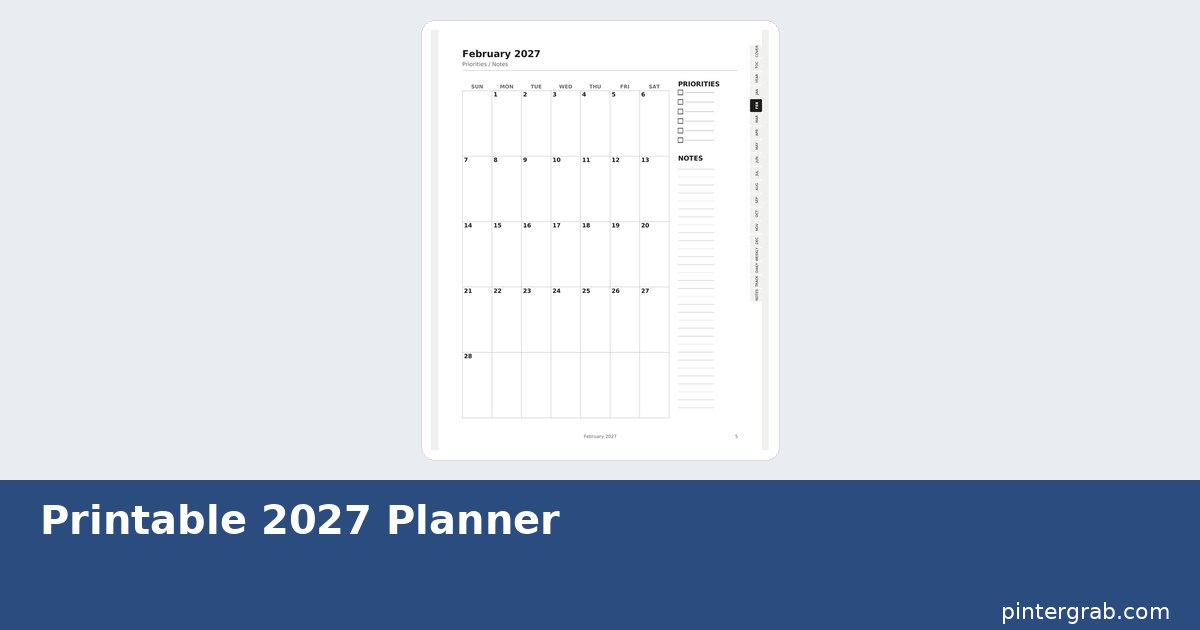
The file covers a year view for at-a-glance planning, a two-page monthly spread for every month of 2027 with a priorities list and notes column next to the calendar grid, weekly spreads with room to break each day into a few lines, and a daily log page for when a week needs more detail than the weekly spread gives you. A cover page and table of contents sit at the front so the PDF is navigable even before you touch the tabs.
GoodNotes tabs: how the clickable navigation actually works
The PDF ships with a right-edge tab strip — Cover, TOC, Year, one tab per month (Jan through Dec), Weekly, Daily, Track, and Notes — built as clickable links inside the PDF itself, not just images. Import the file into GoodNotes (or Notability, or any PDF annotation app that supports internal links) and tapping "MAR" on the tab strip jumps straight to the March spread, the same way a physical planner's plastic tabs work, without you scrolling through 60 pages to find it.
Letter vs A4: how to pick the right one before you print
US Letter (8.5" × 11") is the standard size in the US, Canada, and a few other countries; A4 (210mm × 297mm) is standard almost everywhere else, including the UK, EU, and most of Asia. The two are close in size but not identical — printing a Letter-formatted PDF on A4 paper (or vice versa) usually auto-scales in most print dialogs, but margins can end up uneven and page numbers can drift slightly off the edge in three-hole-punch setups. The safest move is to check what paper your printer actually takes (most home printers default to Letter in the US and A4 elsewhere) and download the matching version rather than relying on scaling. Both sizes are included, so there is no extra cost either way.
Setting it up in GoodNotes, step by step
- Download the file (Letter or A4, whichever matches how you plan to print, or A4/Letter does not matter at all if you are staying fully digital) from the 2027 Planner page.
- In GoodNotes, create a new document and import the PDF, or use "Import as new document" from the Files view.
- Confirm the tab strip on the right edge is tappable — tap "TOC" first to check the internal links resolved correctly for your app version.
- Use GoodNotes' built-in pen or text tool to fill in the daily and weekly pages; the layout leaves lined space specifically for handwriting.
- For printing instead, open the PDF and print at "Actual size" or 100% scale — not "Fit to page" — so the tab labels and margins line up the way they were designed.
Using it as a hybrid: digital during the week, printed for the fridge
A common pattern with this format is not choosing one mode exclusively: keep the full PDF in GoodNotes on a tablet for daily use, where the tab navigation and handwriting recognition make quick entries fast, and separately print just the current month's spread to tape on a fridge or corkboard for anyone in the household who is not going to open an app to check what's happening on Thursday. Because both the digital file and the printable pages come from the same source PDF, there is no separate "print version" to maintain — you are printing a page out of the same file you write in digitally.
Comparison: digital planner vs paper planner vs a plain calendar app
| Option | Cost | Reusable pages | Searchable | Handwriting feel |
|---|---|---|---|---|
| This PDF planner (GoodNotes) | One-time, Letter + A4 included | No, but infinite undo/duplicate pages in-app | Yes, via GoodNotes search | Yes, with a stylus |
| Printed paper planner | $15–40/year, rebought annually | No | No | Yes |
| Calendar app (Google Calendar, etc.) | Free | N/A | Yes | No — typed only |
FAQ
Can I use this planner without an iPad or stylus?
Yes. Print either the Letter or A4 version at 100% scale on any home or office printer and use it exactly like a paper planner — the tab strip becomes decorative but the layout works identically on paper.
What happens to the tabs when I print instead of using GoodNotes?
The tabs print as a visual strip on the page edge but lose their clickable function, since that only exists inside a PDF viewer. On paper, you flip to the month the same way you would in any printed planner.
Is this compatible with Notability or other PDF annotation apps?
Yes, any app that supports standard PDF internal links will honor the tab navigation — GoodNotes is the most common, but Notability and several others work the same way.
Do I have to pick Letter or A4, or can I get both?
Both sizes are included in the download, so you can print on whichever paper you have on hand or switch later without buying anything again.
Built with AI assistance, every formula hand-checked.
Running a classroom rather than a personal calendar? The Teacher Planner & Gradebook guide handles weighted grades and attendance the way this planner handles months and weeks. And if a full year feels like overkill right now, the Undated Daily Planner lets you start today without any date commitment.
Frequently asked questions
Can I use this planner without an iPad or stylus?
Yes. Print either the Letter or A4 version at 100% scale on any home or office printer and use it exactly like a paper planner — the tab strip becomes decorative but the layout works identically on paper.
What happens to the tabs when I print instead of using GoodNotes?
The tabs print as a visual strip on the page edge but lose their clickable function, since that only exists inside a PDF viewer. On paper, you flip to the month the same way you would in any printed planner.
Is this compatible with Notability or other PDF annotation apps?
Yes, any app that supports standard PDF internal links will honor the tab navigation — GoodNotes is the most common, but Notability and several others work the same way.
Do I have to pick Letter or A4, or can I get both?
Both sizes are included in the download, so you can print on whichever paper you have on hand or switch later without buying anything again.