How to Plan Meals for a Week in Google Sheets With an Auto Grocery List
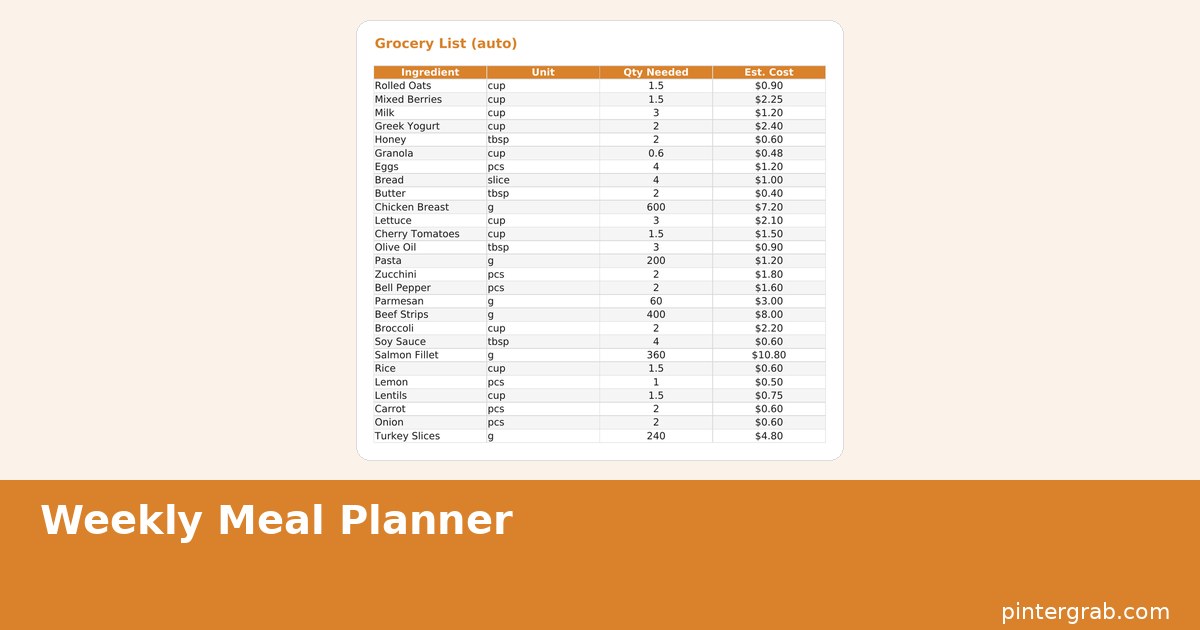
To plan meals for a week in Google Sheets with a grocery list that builds itself, import the free Weekly Meal Planner template, fill in breakfast/lunch/dinner for each day on the week-plan tab, and list each recipe's ingredients once on the recipes tab. The grocery list tab then pulls every ingredient tied to the meals you picked, so you are not copying items by hand or forgetting what you needed for Tuesday's dinner by the time you are standing in the store on Saturday.
Why a spreadsheet works better than a meal-planning app for this
Most meal-planning apps push you toward their own recipe database and subscription tier before you can do anything useful. A spreadsheet skips that: you type in whatever you are actually cooking — a family recipe, something from a cookbook, a five-ingredient weeknight standby — and the tool only has to do one job, which is turning your plan into a shopping list. There is nothing to sync, no login, and the file still works the week your internet is down because it is sitting in your Google Drive or on your hard drive either way.
How the auto grocery list actually works
Each recipe gets logged once on the Recipes tab with its ingredients and rough quantities. When you assign that recipe to a day on the Week Plan tab, the Grocery List tab references it and pulls the ingredients in automatically — cook the same pasta dish three times in a month and you only ever have to type its ingredient list once. Because the list pulls from what you actually planned rather than a generic "healthy eating" template, it does not include cumin you already own or suggest quinoa you have never touched.
Setting up your first week
- Download the file from the Weekly Meal Planner page and import it into Google Sheets (File > Import > Upload, then Replace spreadsheet or Insert new sheet).
- Open the Recipes tab and add 5–8 meals you cook regularly, with ingredients listed one per line.
- On the Week Plan tab, pick a recipe from the dropdown for each day and meal slot — breakfast, lunch, dinner, or leave a slot blank for a takeout night.
- Open the Grocery List tab; it now shows every ingredient needed for the week, in one place.
- Check off items you already have in the pantry before you shop, so the list only reflects what you actually need to buy.
The recipes tab and repeat meals
The Pro version's Recipes tab is meant to grow into a personal cookbook over a few months of use — once you have logged 20–30 meals you cook on rotation, planning a week becomes picking from a dropdown rather than typing recipes from scratch each time. The free Lite version includes the Week Plan tab so you can test the workflow with one week before deciding whether to build out a full recipe library in Pro.
How much time this actually saves
The honest math: filling in a week's worth of meals from a Recipes tab you have already built takes about five minutes on a Sunday. Writing a grocery list from scratch by mentally walking through seven dinners usually takes fifteen to twenty minutes and still misses something — a spice you assumed you had, a side dish ingredient you forgot to count. The spreadsheet does not save you from deciding what to eat; it saves you the second pass of translating that decision into a shopping list, which is the part people actually procrastinate on until they are already at the store improvising.
Leftovers and freezer meals fit the same system
Not every day needs a fresh recipe. Leave a Week Plan slot labeled "Leftovers" or "Freezer: [meal name]" and skip pulling ingredients for it — the grocery list only reflects days tied to an actual Recipes-tab entry, so a leftovers night correctly adds nothing to your shopping list instead of forcing you to invent a placeholder recipe just to fill the cell.
Meal planning apps vs. a spreadsheet vs. no plan at all
| Option | Cost | Grocery list | Works offline | Your own recipes |
|---|---|---|---|---|
| This spreadsheet | Free Lite, Pro paid once | Auto-built from your week | Yes, once downloaded | Unlimited |
| Meal-planning app | $5–12/month | Auto-built, often paywalled | Usually requires login | Limited by app's format |
| Sticky note / memory | Free | None — you build it at the store | Yes | Unlimited |
Common mistakes when planning meals in a spreadsheet
- Listing ingredients too vaguely. "Spices" on the Recipes tab does not tell you what to buy. List each spice by name once, even if it feels tedious the first time — you only type it once per recipe, ever.
- Planning seven days of entirely new recipes. That is seven ingredient lists to write out cold. Repeat 2–3 meals you already know well in the first couple of weeks while you build up the Recipes tab.
- Not checking the pantry before shopping. The grocery list shows everything an ingredient needs, not what is already in your cabinet. A quick check-off pass before you leave saves buying a third bottle of soy sauce.
- Planning meals but not batching the shopping trip around them. The list is grouped so you can shop in one pass; splitting it into multiple trips defeats the point of having a consolidated list at all.
Making it work for a whole household, not just one cook
If more than one person shops or cooks, share the Google Sheets file with edit access rather than keeping it as a personal file — one person can lock in the week's plan on Sunday, and whoever ends up at the store on Wednesday for a top-up trip can see exactly what is still needed without a text message back and forth. The Grocery List tab is the one both people actually need open; the Recipes tab matters mainly to whoever is doing the cooking and building out the library over time.
FAQ
Do I need to be a spreadsheet expert to use this?
No. You are filling in dropdowns and typing ingredient names — no formulas to write. The math (combining duplicate ingredients across meals) happens automatically behind the scenes.
Can I plan more than one week ahead?
The Pro version's Week Plan tab is built for one week at a time, but nothing stops you from duplicating the tab in Google Sheets (right-click the tab > Duplicate) to plan several weeks in the same file.
Does the grocery list combine duplicate ingredients from different recipes?
Yes — if two recipes in the same week both call for onions, the list adds them together rather than showing "onions" twice.
What is the difference between Lite and Pro?
Lite includes the Week Plan and Grocery List tabs for one week. Pro adds the full Recipes tab for building out a personal recipe library over time.
Built with AI assistance, every formula hand-checked.
If groceries keep blowing past what you budgeted, the Free Budget Spreadsheet guide tracks spending by category with the same 50/30/20 automation. Planning for a big family event instead of a normal week? The wedding planning spreadsheet guide covers the catering and guest-count math a weekly meal planner is not built for.
Frequently asked questions
Do I need to be a spreadsheet expert to use this?
No. You are filling in dropdowns and typing ingredient names — no formulas to write. The math (combining duplicate ingredients across meals) happens automatically behind the scenes.
Can I plan more than one week ahead?
The Pro version's Week Plan tab is built for one week at a time, but nothing stops you from duplicating the tab in Google Sheets (right-click the tab > Duplicate) to plan several weeks in the same file.
Does the grocery list combine duplicate ingredients from different recipes?
Yes — if two recipes in the same week both call for onions, the list adds them together rather than showing 'onions' twice.
What is the difference between Lite and Pro?
Lite includes the Week Plan and Grocery List tabs for one week. Pro adds the full Recipes tab for building out a personal recipe library over time.