Editable Church Certificate Template
Part of church bulletin templates: 20 bulletins, programs, certificates and forms.
FreeDOCXPDF
Free, no sign‑up. Size: DOCX 3224 KB, PDF 462 KB. The DOCX opens in Word or LibreOffice Writer; the PDF shows the sample filled in.
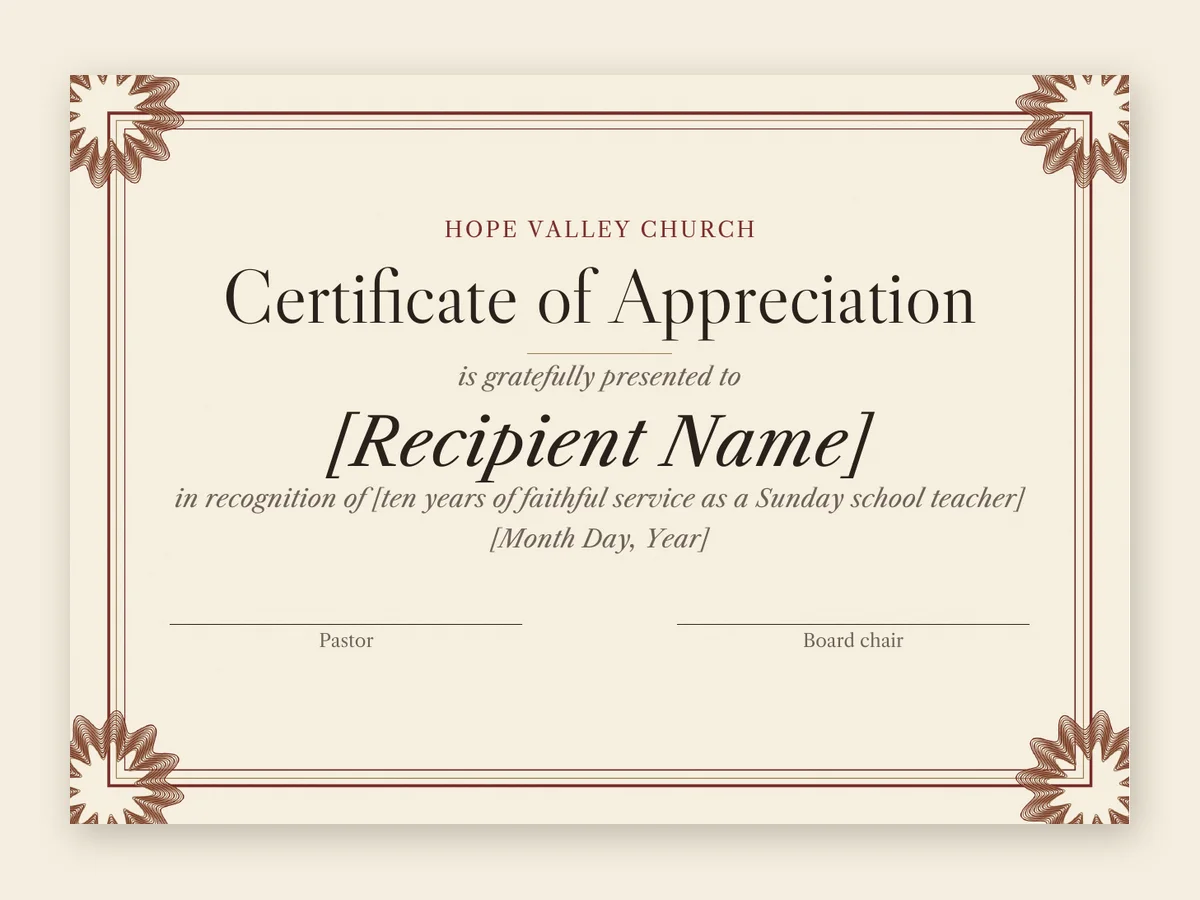
This church certificate template is a Certificate of Appreciation on one A4 landscape page, 11.69 × 8.27 in, in an engraved-style frame. You fill in the recipient's name, the reason for the award and the date, and the pastor and the board chair sign. Change the title line to make a membership or achievement certificate. Free DOCX and PDF.
Updated · By Pintergrab
How to fill in and print it
Open the certificate DOCX in your word processor.
Change the church name and, if needed, the certificate title.
Type the recipient's name, the reason line and the date.
Rename the signature lines to match who signs.
Print on A4 landscape card stock at 100% scale, checking the preview if you use Letter.
Have both leaders sign by hand and present the certificate.
What the certificate says
| Line | Text in the sample |
|---|---|
| Church name | Hope Valley Church |
| Title | Certificate of Appreciation |
| Presentation | is gratefully presented to |
| Name | [Recipient Name] |
| Reason | in recognition of [ten years of faithful service as a Sunday school teacher] |
| Date | [Month Day, Year] |
| Signatures | Pastor · Board chair |
Writing the reason line
The reason line does most of the work. Name the role and the length of service or the specific work: in recognition of twelve years leading the nursery, or for organizing the fall food drive that fed 85 families. A number and a name of the ministry make the certificate personal. Keep it to one line so it fits the frame. Check the spelling of the name against the church roll or with the family, since a certificate may be framed and kept for years.
Other certificates from the same design
The title is text, so one design covers several church certificates:
| Certificate | Title line | Reason line |
|---|---|---|
| Membership | Certificate of Membership | in recognition of becoming a member on [date] |
| Achievement | Certificate of Achievement | for completing [course or program] |
| Completion | Certificate of Completion | for finishing [class name], [number] sessions |
| Ordination or licensing | use your church's own wording | as your church or denomination requires |
Change the signature labels to match who signs, for example Pastor and Clerk for a membership certificate.
Printing
The file is set up for A4 paper in landscape. Print one-sided at 100% scale on card stock or certificate paper if your printer feeds it. A US Letter sheet is 0.69 in narrower than A4 in landscape, and the frame runs close to the edge, so on Letter look at the print preview first.
Several certificates at once
For a recognition Sunday with many names, keep the names and reasons in a spreadsheet and use mail merge: in Word it is on the Mailings tab, in LibreOffice Writer under Tools › Mail Merge Wizard. Each person gets a certificate from the same design, ready to sign.
Editing
Open the DOCX in Microsoft Word or LibreOffice Writer, click into a line and type. The border is a background picture: right-click it and choose Change Picture in Word or Replace in LibreOffice to use another border.
In short
The church certificate template on this page is one A4 page in landscape, 11.69 × 8.27 in, set inside a classic engraved-style frame. The text runs in 6 lines from the top: the church name, in the sample Hope Valley Church; the title Certificate of Appreciation; the words is gratefully presented to; a large [Recipient Name] line; the reason, in recognition of [ten years of faithful service as a Sunday school teacher]; and the date line, [Month Day, Year]. Two signature lines at the bottom read Pastor and Board chair. The bracketed parts are fields you type over, and the title is plain text too, so the same design becomes a Certificate of Membership, of Achievement or of Completion with two edits, the title and the reason line. Headings use Libre Caslon Display and the text Libre Caslon Text, both embedded in the DOCX. The file contains no verses or blessings.
Questions people ask
What to put in a church certificate of appreciation?
Put the church name, the title Certificate of Appreciation, the recipient's full name and one line on what you are thanking them for: the role, the years or the project. Add the date and signature lines for the pastor and a second leader. A number in the reason line, such as ten years or 85 families, makes the thanks specific.
How to make a church certificate?
Open a certificate template like ours in Word or LibreOffice Writer, type the church name and the title, then fill in the name, the reason and the date. Print on card stock at 100% scale and have the pastor and a board member sign by hand. For many certificates, use mail merge from a spreadsheet of names.
How to write a church certificate of achievement?
Change the title to Certificate of Achievement and write what the person finished in the reason line, for example for completing the twelve-week membership class or for teaching vacation Bible school for five summers. Add the date and the signatures of the pastor and the leader of that ministry. Our appreciation certificate turns into an achievement certificate with these two edits.
What is a church certificate called?
A church certificate is named after what it records: a certificate of baptism, of child dedication, of membership, of appreciation, of ordination or of marriage. A certificate given to thank volunteers is usually called a certificate of appreciation or recognition. Our template is titled Certificate of Appreciation, and the title line can be changed to any of these.
$5All 20 templates in one ZIP
Get all 20 church templates in one download
One ZIP with all 20 church bulletin and program templates in 4 styles. Each one is an editable DOCX and a PDF sample, and a README explains fonts, printing and folding.
Price on Lava.top: $5 or €5, one payment, no subscription. Payment and the download are on Lava.top.