How to Use the Weekly Meal Planner: From Recipes to a Shopping List
Type your 10 recipes on the Recipes tab, list each recipe's ingredients with a quantity per serving, then pick a recipe for each of the 21 breakfast, lunch and dinner slots on Week Plan. The Grocery List adds up how much of each ingredient the week needs. Lite is free; Pro is $5.
Updated · By Pintergrab
Lite is free to download, no sign-up. Pro is sold on Lava.top.
Steps
Download the free Lite file, a 14 KB .xlsx, with the button above, or get Pro for $5.
Open it in Excel or LibreOffice Calc, or bring it into Google Sheets with File > Import > Upload.
On Recipes, type your recipe names over the 10 samples in rows 2 to 11.
On Ingredients, add each recipe's ingredients with the quantity for one serving and the unit.
For a new ingredient, insert a Grocery List row above its last item and copy the formulas.
On Week Plan, pick a recipe for each breakfast, lunch and dinner from the dropdown.
Shop from Qty Needed on the Grocery List; in Pro, check daily calories and the TOTAL BUDGET.
Set up your recipes
Open the Recipes tab and type your recipe names over the 10 samples in rows 2 to 11. Keep it to 10: the Week Plan dropdown reads only those rows.
Then open Ingredients. Each row is one ingredient of one recipe: pick the recipe in column A, type the ingredient, the quantity for one serving and the unit. Pick ingredient names you already used from the dropdown in column B so the spelling matches. Leave the Needed Qty column alone; it is the formula.
Plan the week
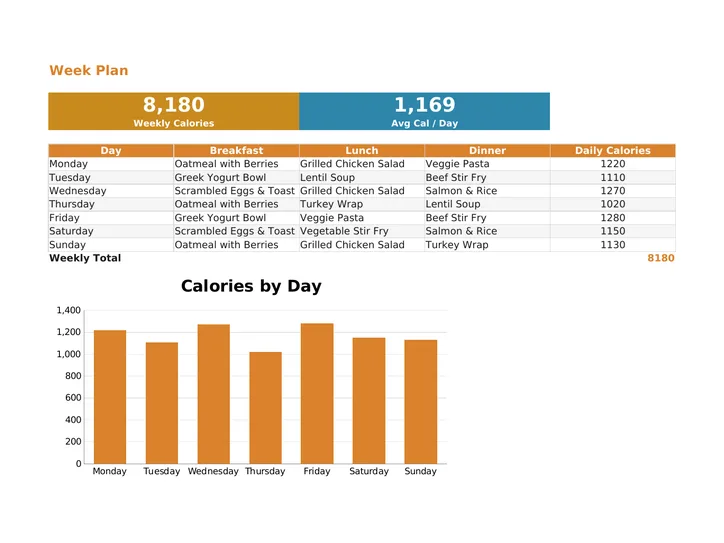
On Week Plan, click each Breakfast, Lunch and Dinner cell and pick a recipe. The sample week shows the idea: Monday is Oatmeal with Berries, Grilled Chicken Salad and Veggie Pasta; Tuesday is Greek Yogurt Bowl, Lentil Soup and Beef Stir Fry.
Each cell counts as one serving for each person in B2, People per meal. Put a recipe in two slots and the sheet doubles its ingredients. Leave a slot empty and it counts nothing.
Shop from the Grocery List
The Grocery List shows Qty Needed for each of its 32 ingredients, added up across all 21 slots by name and unit. For a new ingredient, insert a row inside the Grocery List, above its last item, type the name and unit and copy the formulas from the row above, so Qty Needed (and in Pro the cost and TOTAL BUDGET) count it. If a row shows 0, check that the unit is written the same way on both tabs: cup and cups count as two different units.
In Pro: calories and cost
Pro adds a Calories/Serving column on Recipes. Week Plan then shows Daily Calories for each day, a Weekly Calories total and an average per day. On Ingredients you type a Price/Unit from your store, and the Grocery List shows an estimated cost for each item and a TOTAL BUDGET for the week. With the sample recipes and 1 in People per meal, that total reads $63.98.
In short
The Weekly Meal Planner by Pintergrab works in five steps across five tabs. Recipes holds 10 recipe names in rows 2 to 11, and those 10 rows feed every dropdown on Week Plan. Ingredients holds one row per ingredient of a recipe: the recipe, the ingredient, the quantity per serving and the unit. Week Plan has 21 cells, breakfast, lunch and dinner for Monday through Sunday. For each ingredient row, a formula multiplies the quantity per serving by the number of times its recipe appears in those 21 cells, and the Grocery List adds the results by ingredient name and unit for its 32 rows. In the sample week, oatmeal three times at 0.5 cup of oats per serving becomes 1.5 cups. The free Lite file is 14 KB. Pro costs $5, one payment on Lava.top, and adds calories and an estimated cost per item.
Questions people ask
Why does an ingredient show 0 on the grocery list?
The Grocery List matches the Ingredients tab by name and by unit. If one tab says cup and the other says cups, the row stays at 0. It also stays at 0 when no recipe that uses the ingredient is picked on Week Plan.
Can I plan snacks or a fourth meal?
Week Plan has 3 meal columns, and the ingredient formulas count only those 21 cells. Use one of the 3 slots for a snack recipe, or extend the counting range in the Needed Qty formulas if you add a column.
How do I start a new week?
Pick new recipes in the 21 Week Plan cells. The Needed Qty formulas and the Grocery List recalculate at once. To keep last week's plan, save a copy of the file under a new name before you change it.
Do leftovers count as a second meal?
If you put the same recipe in two slots, the sheet counts two servings and doubles its ingredients. When you cook once and eat leftovers, pick the recipe in one slot only and leave the leftover slot empty.