Free Weekly Meal Planner Spreadsheet: What the Lite File Does
The free Lite file is a 14 KB spreadsheet with 5 tabs. You pick a recipe for each of 21 meals, breakfast, lunch and dinner for 7 days, and the Grocery List adds up how much of each of its 32 ingredients the week needs. Pro adds calories and an estimated grocery cost for $5.
Updated · By Pintergrab
Pro: $5 on Lava.top, one payment.
What the free Lite file contains
The Lite download is one English .xlsx file, 14 KB, with 5 tabs:
- Start Here: four steps from recipes to the grocery list.
- Recipes: 10 sample recipes, from Oatmeal with Berries to Vegetable Stir Fry.
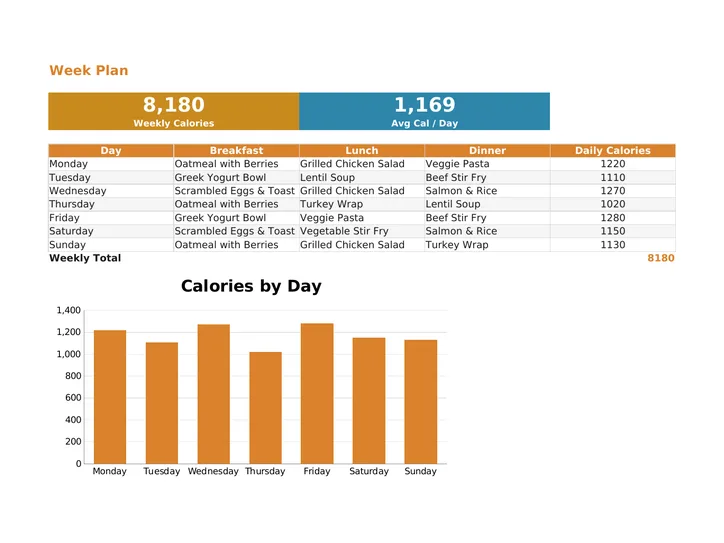
- Week Plan: Monday to Sunday, with a Breakfast, Lunch and Dinner column. Each of the 21 cells is a dropdown of the 10 recipes.
- Ingredients: one row per ingredient of a recipe, with Qty/Serving and Unit. The Needed Qty column is a formula.
- Grocery List: 32 ingredients with their units and a Qty Needed column that adds up the week.
The header row stays frozen on 4 of the 5 tabs while you scroll.
How the grocery list adds up
In the sample week, Oatmeal with Berries is breakfast on Monday, Thursday and Sunday. Its Rolled Oats row asks for 0.5 cup per serving, so Needed Qty shows 1.5 cups. The Grocery List adds every Rolled Oats row in cups, and the total is 1.5 cups. Swap Thursday's breakfast for Greek Yogurt Bowl and the oats drop to 1 cup while the yogurt goes up.
Every meal slot counts as one serving per person, and B2 on Week Plan, People per meal, multiplies the amounts by the number of people.
What to change and what to leave
- Type your recipes over the 10 samples. The Week Plan dropdown reads exactly those 10 rows, so an 11th recipe won't appear in it.
- Give each ingredient the same name and unit everywhere. The Grocery List matches by both, and upper or lower case doesn't matter.
- For a new ingredient, insert a row inside the Grocery List, above its last item, and copy the formulas from the row above. Its rows are typed text; only the Qty Needed column is a formula.
What Pro adds for $5
Pro is one payment of $5 on Lava.top. The Recipes tab gets a Calories/Serving column, and Week Plan adds Daily Calories, a Weekly Calories total and an average per day. Ingredients gets a Price/Unit and a Line Cost, and the Grocery List shows an estimated cost for each item and a total for the week.
In short
The Weekly Meal Planner by Pintergrab is a spreadsheet for Excel, LibreOffice Calc and Google Sheets. The free Lite file is 14 KB and has 5 tabs: Start Here, Recipes, Week Plan, Ingredients and Grocery List. Week Plan has 21 meal slots, breakfast, lunch and dinner from Monday to Sunday, and each slot is a dropdown of the 10 recipes on the Recipes tab. The Ingredients tab lists each recipe's ingredients with a quantity per serving, and its formulas multiply that quantity by the number of times the recipe appears in the week. The Grocery List then adds the results up for 32 ingredients by name and unit. Pro costs $5, one payment on Lava.top. It adds calories per serving for each recipe, daily and weekly calories with a daily average, a price per unit for each ingredient, and an estimated cost per item with a weekly total.
Questions people ask
How many recipes does the free meal planner hold?
Ten. The Week Plan dropdown reads rows 2 to 11 of the Recipes tab, so type your own recipes over the 10 samples. If you need more than 10 for one week, extend the dropdown range in each Week Plan cell yourself.
Will a new ingredient show up on the grocery list?
Only after you insert a row inside the Grocery List, above its last item, with the same name and unit you used on the Ingredients tab, and copy the formulas from the row above. The list rows are typed by hand; the Qty Needed column next to them is the formula that adds the week up.
Can I use the free meal planner in Google Sheets?
Yes. In Google Sheets choose File > Import > Upload and pick the .xlsx file. The same file also opens in Excel and LibreOffice Calc. The dropdowns and the Qty Needed formulas come along with it.
What file do I get with the free version?
One English .xlsx file of 14 KB with 5 tabs: Start Here, Recipes, Week Plan, Ingredients and Grocery List. It comes filled with a sample week of 10 recipes and 32 ingredients that you can overwrite with your own.