Family Meal Planner with a Grocery List That Adds Up the Week
For a family, type how many people eat in People per meal (cell B2 on Week Plan), then pick recipes for the 21 meals. The Grocery List multiplies each per-serving amount by that number and adds up the week. Pro, $5, adds an estimated cost per item and a weekly total.
Updated · By Pintergrab
Lite is free to download, no sign-up. Pro is sold on Lava.top.
Set the number of people first
Type how many people eat each meal in B2 on the Week Plan tab: People per meal, 1 to 20, and the file starts at 1. The Needed Qty formula multiplies Qty/Serving by the number of times a recipe is planned and by that number, so Qty/Serving stays the amount for one person:
- The sample oatmeal uses 0.5 cup of rolled oats and 1 cup of milk per serving.
- With 4 in B2 and oatmeal on 3 mornings, the Grocery List asks for 6 cups of rolled oats.
B2 counts the same people for every meal of the week.
Which parts matter most for a family
- Recipes. Ten rows feed the Week Plan dropdown. Put the dinners your family actually eats there, and keep a couple of easy breakfasts.
- Ingredients. One row per ingredient per recipe, with the amount one person eats. Pick names from the column B dropdown so the same item is spelled the same way in every recipe.
- Grocery List. The week's total by name and unit. For a new ingredient, insert a row inside the Grocery List, above its last item, and copy the formulas from the row above, typed with the same name and unit.
- Pro: Price/Unit and TOTAL BUDGET. Type your store's price per unit once, and the Grocery List shows an estimated cost per item and a total for the week.
A filled-in family week, two days
- Monday: Oatmeal with Berries, Turkey Wrap, Beef Stir Fry
- Tuesday: Scrambled Eggs & Toast, Turkey Wrap, Salmon & Rice
Turkey Wrap appears twice, so the Grocery List counts its ingredients twice: lunch for school on Monday and Tuesday is one shopping line per ingredient. When Monday's dinner leaves enough for Tuesday's lunch, pick it in one slot and leave the other empty; an empty slot counts nothing.
In short
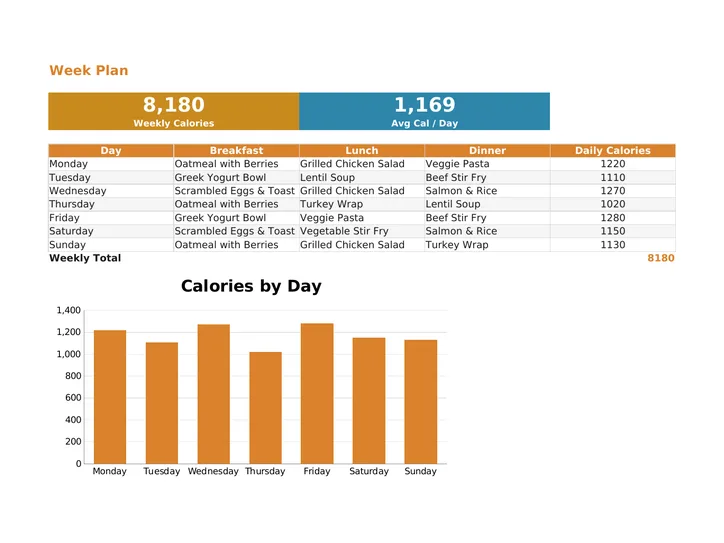
The Weekly Meal Planner by Pintergrab is a spreadsheet that turns a week of family meals into a shopping list. Week Plan has 21 cells, breakfast, lunch and dinner for 7 days, each a dropdown of 10 recipes, and a People per meal cell, B2, that takes 1 to 20. On the Ingredients tab, every ingredient has a quantity per serving, and the formula multiplies it by the number of times the recipe appears in the week and by the number in B2. With 4 in B2, the sample's 0.5 cup of rolled oats per serving and oatmeal on 3 mornings come to 6 cups. The Grocery List then adds the week up for its 32 ingredients. The free Lite file is 14 KB and opens in Excel, LibreOffice Calc and Google Sheets. Pro costs $5, one payment on Lava.top, and adds a price per unit, an estimated cost per item and a total for the week, plus calories per day.
Questions people ask
How do I plan meals for a family of 4?
Type 4 in B2, People per meal, on the Week Plan tab and keep Qty/Serving as the amount for one person. The sheet multiplies it by 4 and by the number of times a recipe is planned, so 0.5 cup of oats per serving becomes 6 cups when oatmeal is planned on 3 mornings.
Can each family member have a different breakfast?
Each slot holds one recipe, and B2 applies the same number of people to every meal. If the kids eat cereal while the adults eat eggs, make one recipe, such as Family Breakfast, with a row for each food and the amount one person eats on average, then pick it in the breakfast slot.
Does the Pro budget use my store's prices?
It uses the Price/Unit you type on the Ingredients tab. The sample prices are placeholders, such as 0.6 for a cup of rolled oats. Replace them with your store's prices, and the Grocery List recalculates each item and the weekly total.
Can I share the grocery list with my partner?
Import the file into Google Sheets with File > Import > Upload and share it from there, or print the Grocery List tab. Both of you then see the same Qty Needed column for the week.