How to Track Rent Payments in a Spreadsheet: From Lease to Status
Set your grace period, then log one row per unit per month: rent due, the date paid and the amount paid. The Landlord Rental Tracker marks each row Paid, Partial, Late or Unpaid. The free Lite ledger covers 3 units for 12 months; Pro covers 20 units with lease lookups for $9.99.
Updated · By Pintergrab
Lite is free to download, no sign-up. Pro is sold on Lava.top.
Steps
Download the free Lite workbook with the button above, or get the 20-unit Pro version for $9.99.
Open it in Excel or LibreOffice Calc, or import it into Google Sheets with File > Import > Upload.
Type your lease's grace period in the cell at the top of the Rent Ledger; it starts at 5 days.
For each unit and month, type Rent Due, then Date Paid and Amount Paid when the money arrives.
Read the Status column: Paid, Partial, Late or Unpaid.
(Pro) List units and leases first, so the ledger fills in tenant, rent and due date for you.
(Pro) Type any late fee in the Late Fee column, then check Balance and the Dashboard's count of Late rows.
Step 1: Set the grace period
Open the Rent Ledger. In the cell at the top, type the number of days your lease allows before rent counts as late. The file starts at 5. Every Status formula reads this cell.
Step 2: Log rent as it comes in
Each row is one unit for one month. For each payment:
- Rent Due: the monthly rent from the lease.
- Date Paid: the day the money arrived.
- Amount Paid: what actually came in.
In Lite you also pick the unit from the dropdown and type the tenant's name. The rows run Jan to Dec of 2027, and Lite treats the 1st as the due date.
Step 3: Read the Status
- Paid: Amount Paid covers Rent Due.
- Partial: some money came in, less than Rent Due.
- Late: nothing paid and the grace period after the due date has passed.
- Unpaid: nothing paid yet, still inside the grace period or before the due date.
A row where Rent Due is empty stays blank, so unused rows don't clutter the list.
Step 4 (Pro): Let the lease fill the ledger
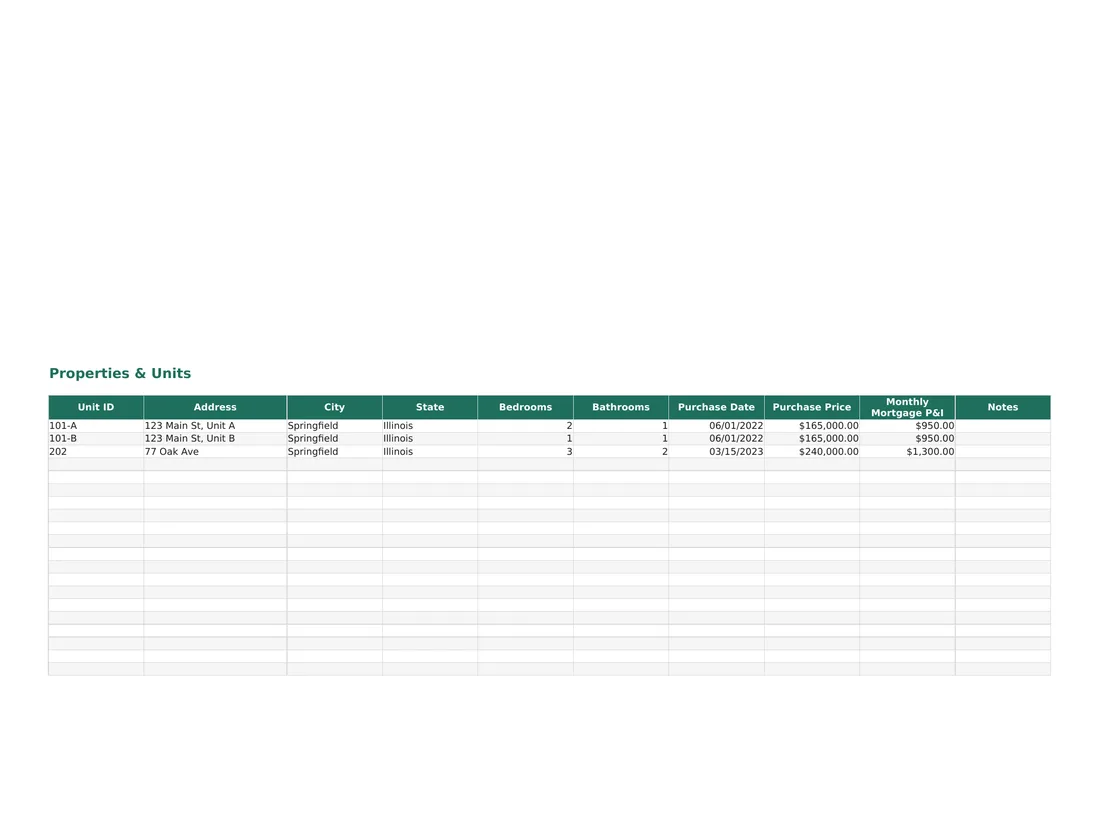
In Pro, start with Properties & Units, one row per unit with a Unit ID such as 101-A. Then fill Tenants & Leases: tenant, unit, lease start and end, monthly rent, deposit and rent due day. On the Rent Ledger you pick the Unit ID, and the tenant, Rent Due and Due Date fill in. If you charge a late fee, type it in the Late Fee column; Total Due and Balance update. The Late Fee Calculator can work out the fee first: flat or a daily percent, compared with the cap on file for your state.
In short
Tracking rent in the Landlord Rental Tracker by Pintergrab takes one row per unit per month. The free Lite Rent Ledger has 36 such rows for 3 units, and the Pro ledger has 240 for 20 units. In each row you type the rent due, the date paid and the amount paid. A formula then returns Paid, Partial, Late or Unpaid, using a grace period that starts at 5 days. In Pro you first list units on Properties & Units and leases on Tenants & Leases. The Pro ledger then fills in the tenant, the rent and the due date from the lease's rent due day, adds any late fee to a Total Due and shows the Balance. The Dashboard counts the rows marked Late. Lite is free and 10 KB. Pro is a 64 KB workbook for $9.99, one payment on Lava.top.
Questions people ask
What's the difference between Partial and Unpaid?
Partial means some money arrived but less than the rent due. Unpaid means nothing has arrived yet and the row is still inside the grace period. Once the grace period passes with nothing paid, Unpaid turns into Late.
Where do I record a late fee?
Lite has no late fee column. In Pro, type the fee in the Late Fee column of the Rent Ledger, and Total Due and Balance include it. The Late Fee Calculator works out a flat or daily percent fee and compares it with the state cap on file.
Can I track rent due on a day other than the 1st?
In Lite, no: each row treats the 1st of its month as the due date. In Pro, each lease on Tenants & Leases has a Rent Due Day, and the ledger builds every Due Date from it, so rent due on the 5th is counted from the 5th.
What year is the ledger set up for?
2027. The Status and due date formulas use 2027 dates, Jan to Dec, so the file fits a 2027 rent year. For another year, the year written inside those formulas would need to change.