Free Landlord Rent Tracker: A 3-Unit Rent Ledger for Excel
The free Lite file is a 10 KB Excel workbook with a Rent Ledger for 3 units and 12 months, 36 rows in all. You type the rent due, the date paid and the amount, and a formula marks each row Paid, Partial, Late or Unpaid after a 5-day grace period. Pro covers 20 units for $9.99.
Updated · By Pintergrab
Pro: $9.99 on Lava.top, one payment.
What the free Lite file contains
Lite is one English .xlsx file, 10 KB, with 2 tabs:
- Start Here: how the workbook is laid out.
- Rent Ledger (Lite, 3 units): 36 rows, one per unit per month from Jan to Dec. Columns: Month, Unit, Tenant, Rent Due, Date Paid, Amount Paid and Status. The Unit column is a dropdown with Unit 1, Unit 2 and Unit 3.
At the top sits one setting: the grace period in days before a payment counts as late. It starts at 5.
How the Status column decides
The Status column holds the only formulas in Lite, 36 of them. For each row it checks, in this order:
- Amount Paid is at least Rent Due: Paid.
- Something was paid, but less than Rent Due: Partial.
- Nothing was paid and today is past the 1st of that month plus the grace days: Late.
- Otherwise: Unpaid.
The ledger is set up for 2027 and assumes rent is due on the 1st. A row with no Rent Due stays blank.
What Pro adds for $9.99
Pro is one payment of $9.99 on Lava.top and is a different workbook, 64 KB, with 14 visible tabs:
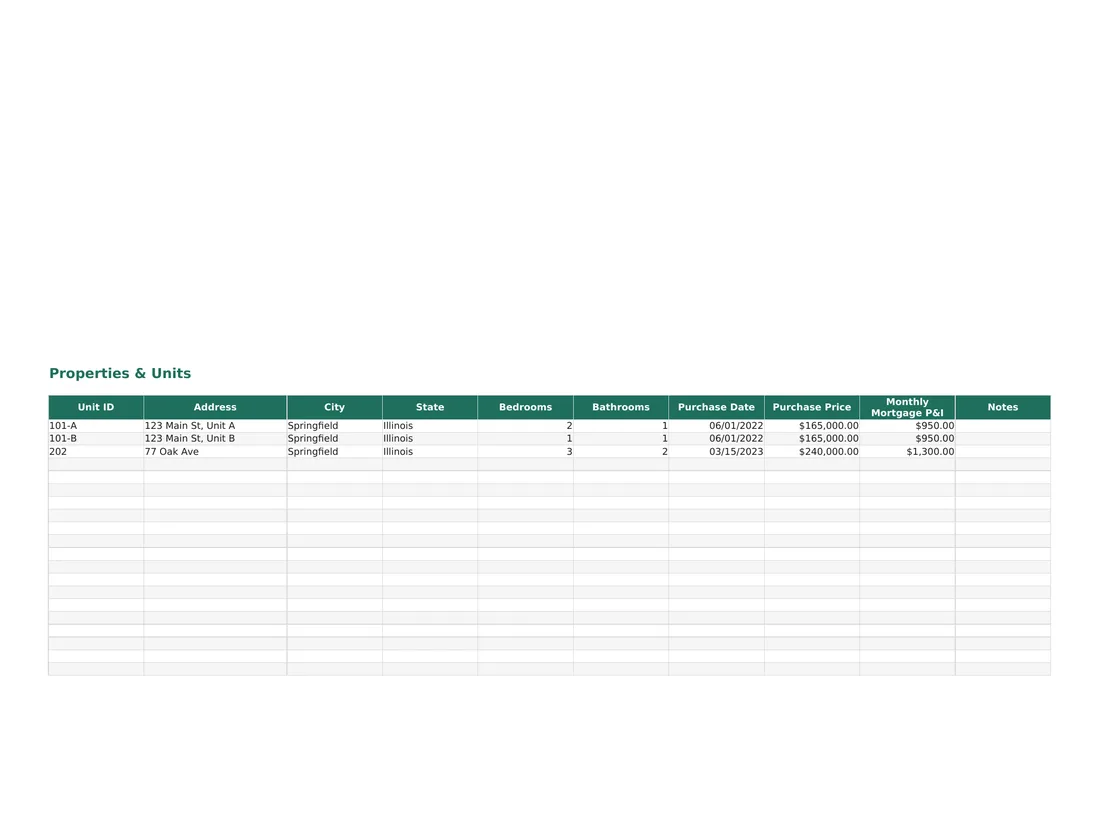
- Properties & Units and Tenants & Leases for up to 20 units, with lease dates, rent, deposit and rent due day.
- Rent Ledger with 240 rows. Tenant, rent and due date fill in from the lease, and Balance and Status follow from what you pay.
- Late Fee Calculator with a flat or daily percent fee, checked against a State Late Fee Rules table for 50 states.
- Proration Calculator with 3 methods side by side.
- Expenses in 13 Schedule E categories with an annual summary, plus Bank Import and an editable Keywords list.
- Maintenance Log, Security Deposit Tracker, Vacancy & Occupancy and a Dashboard with 2 charts.
In short
The Landlord Rental Tracker by Pintergrab is a rent spreadsheet for US landlords. The free Lite file is 10 KB and has 2 tabs: Start Here and a Rent Ledger for 3 units. The ledger has 36 rows, Jan to Dec for Unit 1, Unit 2 and Unit 3, with columns for tenant, rent due, date paid and amount paid. A Status formula in each row returns Paid when the amount covers the rent, Partial when part of it came in, and Late when nothing is paid 5 days after the 1st of that month; the grace period sits in one cell you can change. Pro costs $9.99, one payment on Lava.top. It is a 64 KB workbook with 14 visible tabs: 20 units and tenants, a 240-row ledger, a late fee calculator with a 50-state reference checked in September 2026, a 3-method proration calculator, Schedule E expenses, a bank import and a dashboard.
Questions people ask
How many units does the free rent tracker cover?
Three. The Lite Rent Ledger has 36 rows, January to December for Unit 1, Unit 2 and Unit 3. Pro covers up to 20 units, with a 240-row ledger and separate tabs for properties, tenants and leases.
When does the free ledger mark rent as late?
When a row has rent due, nothing in Amount Paid, and today is past the 1st of that month plus the grace period. The grace period starts at 5 days. A partial payment shows Partial instead of Late.
Can I change the grace period?
Yes. Type your lease's number of days in the grace period cell at the top of the Rent Ledger. Every Status formula reads that one cell, so all 36 rows follow the new number at once.
Does the free rent tracker work in Google Sheets?
Yes. In Google Sheets choose File > Import > Upload and pick the .xlsx file. The Unit dropdown and the Status formulas come along, and the same file also opens in Excel and LibreOffice Calc.