How to Use Invoice Generator & Client Tracker, Step by Step
Download the free Lite file from the page, open it in Excel or import it into Google Sheets, fill the Clients and Services sheets once, then pick a client and currency on the Invoice sheet. Lite has 4 tabs; Pro costs $5 and adds a registry and dashboard.
Updated · By Pintergrab
Lite is free to download, no sign-up. Pro is sold on Lava.top.
Steps
Download the free Lite file with the button above.
Open it in Excel, or import it into Google Sheets with File, Import, Upload.
Read the Start Here tab for the short version of these instructions.
Fill the Clients sheet: names, emails, and addresses, replacing the sample rows.
Fill the Services sheet: service names, default prices, and units like hour.
Open the Invoice sheet, pick a client and a currency, then add line items.
Check the totals and the invoice number, then print or export the invoice.
Download and open the file
Download the free Lite file from the page. It is an Excel file, about 10 KB, with 4 tabs: Start Here, Clients, Services, and Invoice. Open it in Excel, or import it into Google Sheets with File, then Import, then Upload. Read the Start Here tab first — it repeats the setup steps in short form.
Set up your clients and services
Go to the Clients sheet. Replace the sample rows (Acme Studio, Nordic Design Co.) with your own client names, emails, and addresses. Then open the Services sheet and list what you sell, with a default price and a unit — for example, Web Design at 60 per hour or Logo Design at 250. These lists power the dropdowns on the invoice, so you only type them once.
Create your first invoice
- Open the Invoice sheet.
- Pick a client from the dropdown in B6 — it pulls from your Clients sheet.
- Pick a currency in B7: $, € or ₽.
- Add line items. The service dropdown in A10 and A11 pulls names from Services, and prices fill in automatically.
- Check the totals. The sheet has 27 formula cells that sum lines and tax for you.
- Type the invoice number. Lite starts at 1; in Pro, take the next number from the Registry's next empty row. Never reuse a number.
- Print or export the finished invoice and send it to your client.
The formulas and print areas are already set up, so you only change the numbers.
What Pro adds (Pro)
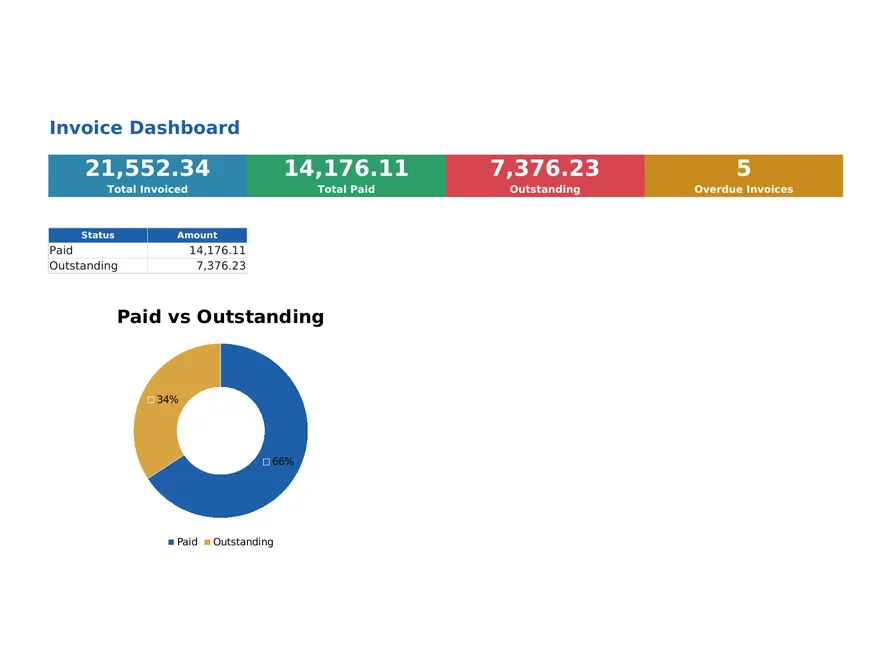
Pro costs $5, one payment on Lava.top, and gives you the full file with 6 tabs. After sending an invoice, log it on the Registry sheet: invoice number, client, issue date, due date, amount, and currency. Set Status to Paid or Unpaid from the dropdown. The Registry has 30 formula cells, and it flags any invoice past its due date as overdue. The Dashboard sheet shows Total Invoiced, Total Paid, Outstanding, and the number of overdue invoices, so you always know what is owed.
In short
Invoice Generator & Client Tracker is a ready-made invoicing tool for freelancers and small businesses, built in Google Sheets and Excel. The free Lite file contains 4 tabs: Start Here, Clients, Services, and Invoice. You add your clients and services once, and the invoice form fills in prices automatically, and totals everything including tax. The currency switches between $, € and ₽ right on the invoice. The Invoice sheet holds 27 formula cells that do the math for you. Pro costs $5 as a one-time payment on Lava.top and expands the file to 6 tabs, adding a Registry with 30 formula cells plus a Dashboard that shows total invoiced, total paid, outstanding amounts, and the count of overdue invoices. The Registry marks each invoice Paid or Unpaid from a dropdown and its Status column flags overdue items. Updated Oct 27, 2026 by Pintergrab.
Questions people ask
Do I need Excel to use this template?
No. The file is .xlsx, so it opens in Excel, and you can also import it into Google Sheets with File, then Import, then Upload. All dropdowns and formulas work the same in both.
How do I add a new client or service?
Open the Clients or Services sheet and type a new row. The invoice dropdowns pull from those sheets, so your new entries appear as options the next time you create an invoice.
How do I switch the invoice currency?
On the Invoice sheet, use the currency dropdown in B7 and pick $, € or ₽. Each invoice can use its own currency, but keep one currency per file copy if you track totals.
Where do I record which invoices got paid?
Only in Pro. The Registry sheet lists each invoice with a Paid or Unpaid status dropdown, and the Dashboard shows invoiced, paid, and outstanding totals. Lite is just the invoice form.