Freelance Invoice Template: Invoice Generator & Client Tracker
The Invoice Generator & Client Tracker is a freelance invoice template in .xlsx, free in the Lite version with 4 tabs and $5 in Pro with 6 tabs. Add clients and services once, pick them from dropdowns, and the invoice form fills in prices and totals tax automatically.
Updated · By Pintergrab
Lite is free to download, no sign-up. Pro is sold on Lava.top.
How freelancers use it
Most freelancers juggle several clients and repeat the same services every month. This template turns that into a two-list setup. On the Clients tab you enter each client once — name, email, address (Acme Studio and Nordic Design Co. are the sample rows). On the Services tab you list what you sell with a default price and unit — Web Design at 60 per hour, Logo Design at 250.
After that, invoicing is mostly picking from dropdowns:
- On the Invoice tab, the client field offers your client list, and each line item offers your service list.
- Prices pull in from the Services tab, and the sheet totals the invoice including tax (27 formula cells in Lite).
- A currency dropdown switches the invoice between $, €, and ₽.
- In Pro, take the next invoice number from the Registry's next empty row.
Which parts matter most
The Invoice tab is the core. It holds the form you fill and print, with your business name, date, line items, and totals already wired up.
The Services tab saves the most time. Enter each service and price once; every future invoice reuses it.
The Registry (Pro) is where tracking happens. Columns for Invoice No., Client, Issue Date, Due Date, Amount, Currency, Status (Paid/Unpaid dropdown), and Paid Date give you a running ledger of every invoice sent.
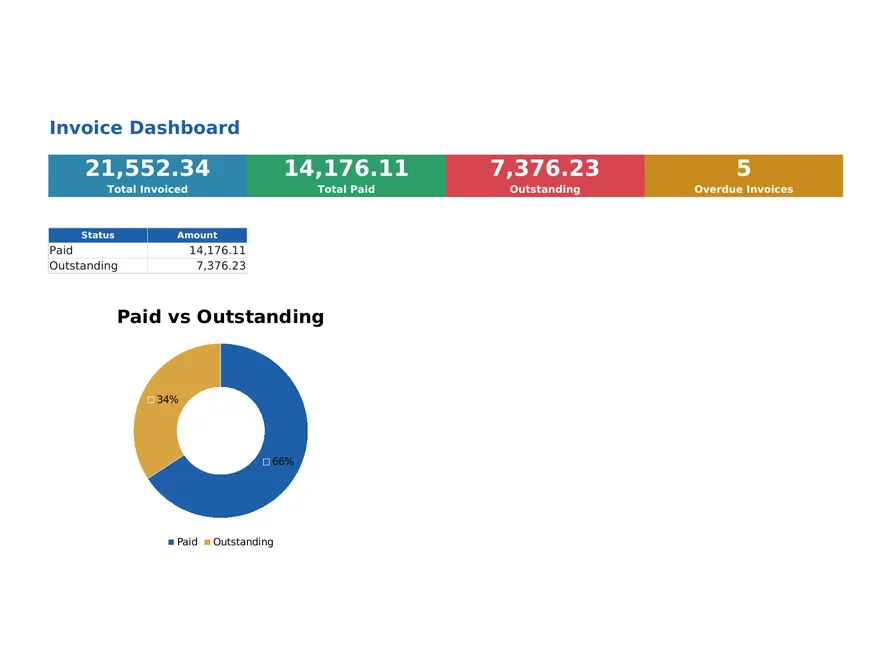
The Dashboard (Pro) sums that ledger into Total Invoiced, Total Paid, and Outstanding.
A filled-in example
Say you bill 10 hours of Web Design to Acme Studio at 60/hour, plus a Logo Design at 250. You pick Acme Studio from the client dropdown, add both services as line items, and the sheet totals 850 plus tax. In Pro, you log it on the Registry: Invoice No. 3, Acme Studio, issue date, due date, 850, $, Unpaid. When the money arrives, you switch the Status dropdown to Paid and add the paid date. The Dashboard updates its paid and outstanding totals from those rows.
Getting it
The Lite .xlsx is free on the page and opens in Excel or Google Sheets (File > Import > Upload). Pro is $5, one payment, and adds the Registry and Dashboard tabs.
In short
The Invoice Generator & Client Tracker is a freelance invoice template built in Google Sheets and Excel. It comes in two versions. The free Lite file (10 KB, .xlsx) has 4 tabs: Start Here, Clients, Services, and Invoice, where 27 formula cells handle totals and tax. Pro costs $5 and adds 2 more tabs — Registry, with 30 formula cells that track payment status as Paid or Unpaid and flag overdue invoices, and a Dashboard showing total invoiced, total paid, and outstanding amounts. On the invoice sheet, dropdowns pull client names from the Clients tab and services from the Services tab, so prices fill in automatically. A currency dropdown switches between $, €, and ₽ per invoice. In Pro, take the next number from the Registry's next empty row.
Questions people ask
How do I set up my services and prices in the template?
Go to the Services tab and list each service with a default price and unit, such as Web Design at 60 per hour or Logo Design at 250. Those names then appear in the invoice line-item dropdowns, and the prices fill in automatically.
How does the dashboard know what's paid and outstanding?
The Dashboard (Pro) reads the Registry. Each registry row has a Status dropdown set to Paid or Unpaid. The sheet sums those into Total Invoiced, Total Paid, and Outstanding, so the numbers update as you change statuses.
Do I have to enter client details on every invoice?
No. Add each client once on the Clients tab with email and address. The client dropdown on the Invoice tab pulls from that list, so you pick a name instead of retyping details.
Can I use the same file for invoices in different currencies?
Each invoice can pick its own currency from a $, €, ₽ dropdown. Dashboard totals assume one currency, so if you bill in several currencies, keep separate file copies for each.