Invoice Generator & Client Tracker: a small business invoice tracker in Excel
The Invoice Generator & Client Tracker is a small business invoice tracker built in Excel and Google Sheets. The free Lite file (10 KB, 4 tabs) fills invoices with service prices and tax totals. The $5 Pro version adds a registry and dashboard with 6 tabs.
Updated · By Pintergrab
Lite is free to download, no sign-up. Pro is sold on Lava.top.
What small businesses track with it
A small business invoice tracker answers three everyday questions: which invoices were sent, which got paid, and which are still open. This template covers them in one spreadsheet file that opens in Excel or in Google Sheets via File > Import.
The free Lite file has 4 tabs: Start Here, Clients, Services, and Invoice. You fill in your clients and services once, then pick them from dropdowns on the invoice. The form pulls the default price for each service, and totals the lines with tax. You type the invoice number.
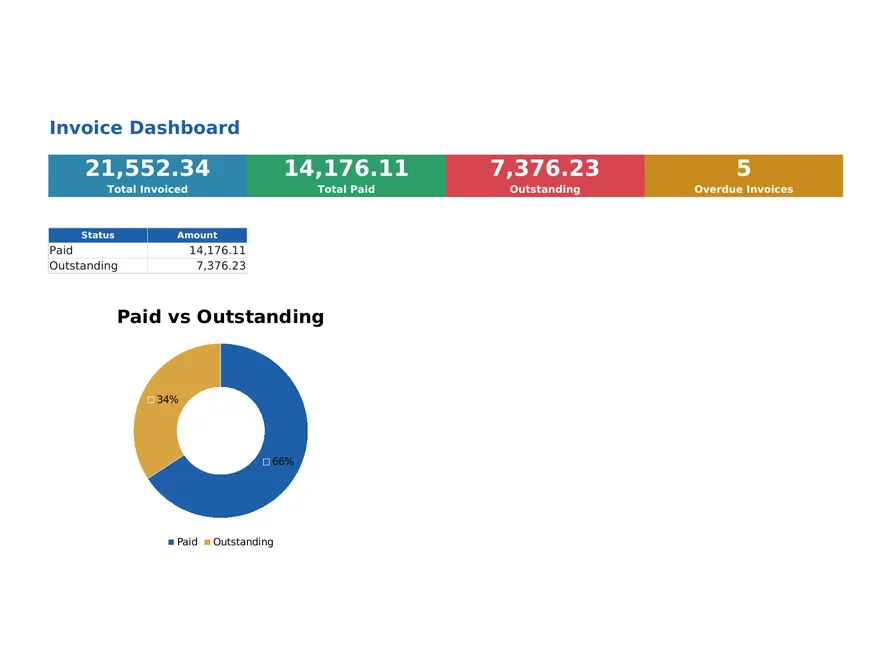
The $5 Pro version has 6 tabs. It adds a Registry, where every sent invoice gets a line with its number, client, issue date, due date, amount, currency, and a Paid or Unpaid status. It also adds a Dashboard that sums total invoiced, total paid, and outstanding, and counts overdue invoices.
The parts that matter most
- The Invoice tab. Dropdowns pick the client and the currency ($, €, or ₽). Line items draw prices from the Services tab, so a 60/hour web design line or a 250 logo design line fills in without retyping.
- The Registry (Pro). One row per invoice. The status dropdown is Paid or Unpaid. Anything past its due date gets flagged as overdue.
- The Dashboard (Pro). Three headline numbers: invoiced, paid, outstanding. A glance tells you what money is still outside.
- Invoice numbers. In Pro, take the next number from the Registry's next empty row.
A filled-in week
Say you run a two-person design studio. Monday, you add a new client row on the Clients tab and a consulting service at 90/hour on Services. Tuesday, you finish a logo job for that client, open the Invoice tab, pick them from the dropdown, add Logo Design at 250, and send invoice number 1 in dollars. Wednesday, you log it on the Registry with a due date two weeks out, status Unpaid. Friday, an older invoice passes its due date and the registry shows it as overdue. The dashboard updates: total invoiced up by 250, outstanding the same, overdue one line. When the payment lands, you flip the status to Paid and add the paid date.
That loop, send, log, mark paid, is the whole job of the tracker, and the file does the counting for you.
In short
The Invoice Generator & Client Tracker is a ready-made invoicing tool for freelancers and small businesses, built in Google Sheets and Excel. You add clients and services once, and the invoice form fills in prices automatically, and totals everything including tax. The free Lite download is a 10 KB file with 4 tabs: Start Here, Clients, Services, and Invoice. The Pro version costs $5 and includes 6 tabs, adding an invoice registry where each line records the invoice number, client, issue date, due date, amount, currency, and a Paid or Unpaid status, plus a dashboard that sums total invoiced, total paid, and outstanding amounts. Currency switches between $, €, and ₽ right on the invoice. The registry flags invoices past their due date as overdue. In Pro, take the next invoice number from the Registry's next empty row.
Questions people ask
What is a small business invoice tracker in Excel?
It is a spreadsheet that records every invoice you send, its amount and due date, and whether it was paid. This template adds service price auto-fill, tax totals, and a $ / € / ₽ currency switch on the invoice form.
What does the free Lite version include?
The Lite file is a 10 KB Excel workbook with 4 tabs: Start Here, Clients, Services, and Invoice. It generates invoices with price auto-fill from your services list and tax-inclusive totals; you type the invoice number. The registry and dashboard are in the $5 Pro version.
How does the Pro dashboard show invoiced, paid and outstanding?
The Dashboard tab sums every line in the registry into three numbers: total invoiced, total paid, and outstanding. It also counts overdue invoices, meaning unpaid invoices whose due date has passed, so you know which clients to follow up with.
How many invoices can the registry hold?
The registry has one row per invoice with columns for number, client, issue date, due date, amount, currency, status, and paid date. You keep adding rows as you send invoices, and the dashboard and overdue flags keep counting from whatever is in the sheet.