Wedding Planning Spreadsheet for Couples: Guests, Seats and Budget
The Wedding Spreadsheet Kit keeps the guest list, seating chart and budget in one workbook. Seats are dropdowns of your 120-row guest list, a name used twice turns red, and the budget splits your total across 16 categories. Pro costs $5.99 and adds vendors, a timeline and a dashboard; the free Lite file has the guest list.
Updated · By Pintergrab
Lite is free to download, no sign-up. Pro is sold on Lava.top.
What couples track with it
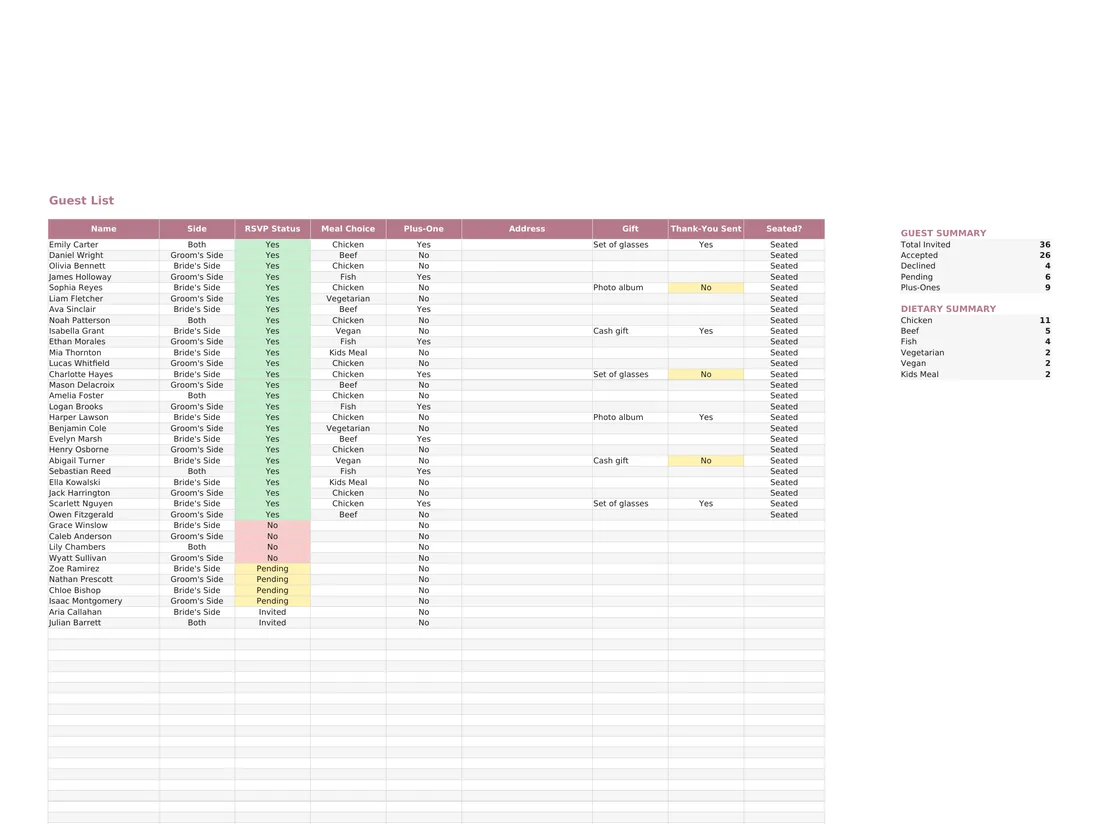
- Guests and RSVPs. One row per guest, with counters for accepted, declined and no reply yet, and a dietary count for the caterer.
- Seats. 20 tables of 8 on the Seating Chart, filled from dropdowns of the guest names.
- Money. A total budget at the top, 16 categories with planned, actual, paid and due, and a payment schedule with dates.
- Vendors. One row per vendor with contact details, total cost, deposit, balance due and the date it is owed.
- The day itself. A Day-of Timeline that starts with hair and makeup at 8:00 AM.
Which parts matter most
The link between the Guest List and the Seating Chart catches three mistakes. Seats only offer names that are on the Guest List, so a misspelled name can't get in. A name placed twice turns red. And the Seated? column on the Guest List shows Not seated for every guest with RSVP Yes who still has no seat. When that column is empty, everyone who said yes has a place.
On the Budget tab, the % share is the lever. The sample starts at Venue 28%, Catering & Bar 20% and Photography 9%. Change a share and Planned for that category follows your total.
A filled-in budget, as it comes in the file
The sample Budget tab shows how the columns read once bills arrive. With a total of 30,000:
- Venue: 28%, planned 8,400, actual 8,820, paid 4,410, due 4,410.
- Photography: 9%, planned 2,700, actual 2,700, paid in full.
- Wedding Attire: 7%, planned 2,100, actual 2,100, nothing paid yet.
The Payment Schedule below lists dates such as a venue deposit of 4,500 on October 1, 2026 and a catering payment of 50% on January 10, 2027. The Dashboard then shows budget used % as actual against planned, and paid % as paid against actual.
In short
The Wedding Spreadsheet Kit by Pintergrab is one Excel workbook for a couple planning a wedding. Its Guest List holds 120 guests with side, RSVP, meal, plus-one, address, gift and thank-you columns, and counts accepted, declined, no reply yet and 6 meal choices. The Pro Seating Chart has 20 tables of 8 seats, 160 seats in all. Every seat is a dropdown of names from the Guest List, a name used twice turns red, and a Seated? column on the Guest List marks confirmed guests without a seat. The Budget tab splits a total, 30,000 in the sample, across 16 categories by % share, with actual, paid, due and a payment schedule. A Vendor Tracker, a Day-of Timeline and a Dashboard with the countdown, guests confirmed, budget used % and paid % complete the 7 tabs. Pro costs $5.99, one payment on Lava.top, and includes 8 bridal shower games.
Questions people ask
How many guests and tables does the kit handle?
The Guest List has 120 rows and the Seating Chart has 20 tables of 8 seats, which is 160 seats. Start Here explains how to go further: copy the last row and drag the formulas down for more guests or tables.
Do I have to type guest names twice for the seating chart?
No. Each seat on the Seating Chart is a dropdown that reads the names from the Guest List. You type a name once on the Guest List and pick it from the list when you seat that guest.
Can we track deposits and due dates?
Yes, in two places. The Vendor Tracker has Total Cost, Deposit Paid, a calculated Balance Due and a Due Date for each vendor. The Payment Schedule on the Budget tab lists each payment's date, vendor, amount and whether it is paid.
Does the dashboard count down to the wedding?
Yes. Type the wedding date at the top of the Dashboard, and Days Until Wedding updates each time you open the file. The sample date is May 5, 2027. The same tab shows guests confirmed, budget used % and paid %.