Small Business Bookkeeping Spreadsheet for Excel & Google Sheets
$5Free LiteXLSX 8 tabs
Updated By Pintergrab
Small Business Bookkeeping is an Excel and Google Sheets workbook for freelancers and small shops. The free Lite has 5 tabs: Instructions, Settings, Income, Expenses and a Summary that works out profit and the tax to set aside. Pro, a one-time $5 on Lava.top, has 8 tabs: a Dashboard instead of the Summary, plus Invoices, Mileage and Quarterly Tax.
Excel (.xlsx), 29 KB
Pay once on Lava.top by card, Apple Pay or PayPal. Lava gives you the Pro files after payment. The Lite file saves right away, with no email.
What's inside
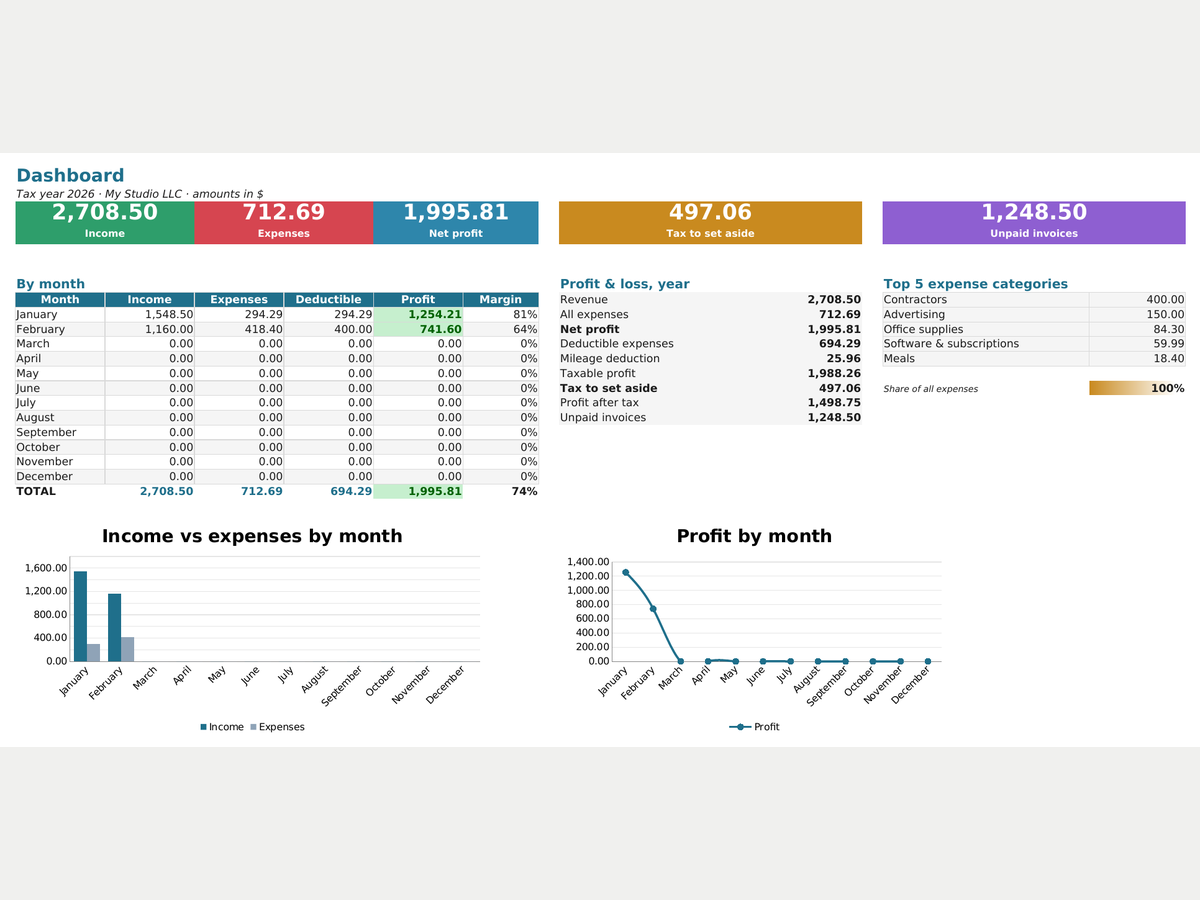
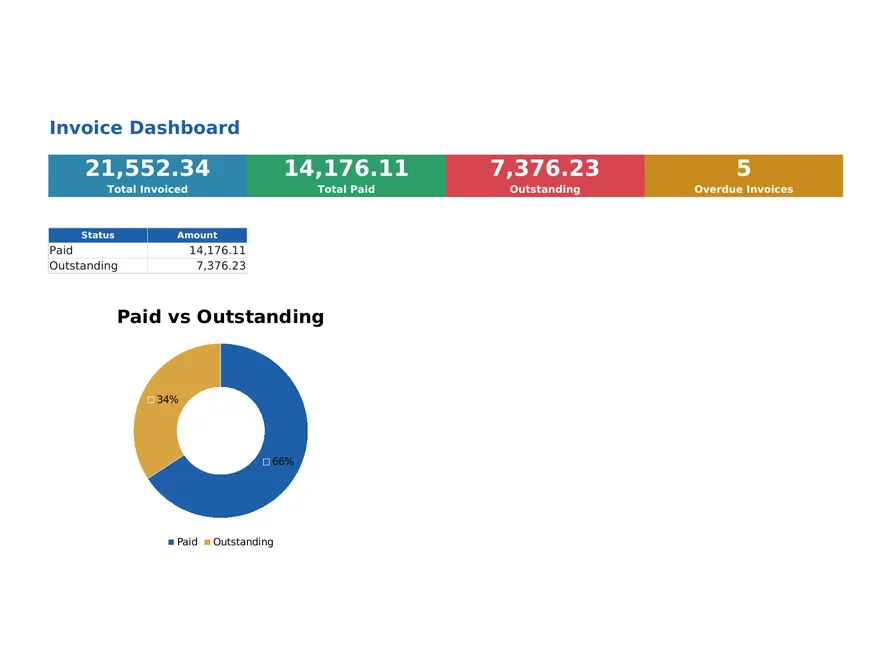
A bookkeeping workbook for freelancers, sole proprietors and small shops who want their numbers in one file. Settings hold your currency, tax year, the share of profit you set aside for tax, and the channel, category and client lists that feed every dropdown. Log each payment on Income and each purchase on Expenses, marking whether it is deductible and whether you kept the receipt. Income also shows a quick set-aside (rate times payment) for moving money aside as it comes in. Invoices get a status of Open, Due soon, Overdue or Paid from today's date, with days late counted. The Mileage log picks the IRS 2026 rate by trip date (72.5 cents through June 30, 76 cents from July 1; both editable in Settings for other years or countries). The Dashboard shows income, expenses and profit for each month, the year's profit and loss, your five biggest expense categories, unpaid invoices and the tax to set aside on profit, plus two charts. Quarterly Tax splits the same figures into four quarters with the IRS due dates and a "still to pay" column per quarter. Sheets are not locked: type in the white cells, leave the gray formula cells alone. Light and dark themes, print areas fit to the page width; works in Excel 2016+, LibreOffice Calc and Google Sheets.
Lite and Pro
| In the file | Lite, free | Pro, $5 |
|---|---|---|
| Tabs | 5 | 8 |
| Income rows and expense rows | 200 and 300 | 200 and 300 |
| Profit and tax to set aside | Summary tab | Dashboard |
| Invoices with status, 100 rows | No | Yes |
| Mileage log, 150 trips | No | Yes |
| Dashboard with 2 charts | No | Yes |
| Quarterly Tax with IRS due dates | No | Yes |
| Dark theme file | No | Yes |
| Excel, LibreOffice and Google Sheets | Yes | Yes |
How to use the Small Business Bookkeeping
Download the free Lite file.
It saves right away, with no email.
Open it in Excel or Google Sheets.
In Google Sheets use File, then Import, then Upload.
Type in your own numbers.
The formulas and print areas are already set up.
Get Pro for $5.
Pay on Lava.top. Lava gives you the Pro files after payment.
In short
Small Business Bookkeeping from Pintergrab is an .xlsx workbook for freelancers, sole proprietors and small shops that opens in Excel 2016 or newer, LibreOffice Calc and Google Sheets. On the Settings tab you enter your business name, currency symbol, tax year and the share of profit to set aside for tax, 25% until you change it, plus the income channels, expense categories and clients that feed the dropdowns. Income has 200 ready rows and Expenses 300, and every expense is marked deductible or not, with a receipt column. The free Lite file has 5 tabs and a Summary of income, expenses, taxable profit and the tax to set aside. Pro costs $5 as one payment on Lava.top and has 8 tabs. Invoices tracks 100 invoices as Open, Due soon, Overdue or Paid, the Mileage log holds 150 trips at the 2026 IRS rate for the trip date, the Dashboard shows every month with 2 charts, and Quarterly Tax splits the estimate by IRS due date.
FAQ
Is it Excel or Google Sheets?
It is an .xlsx file that opens in Excel 2016 or newer and LibreOffice Calc, and uploads to Google Sheets (File - Import - Replace spreadsheet). Every formula works in all three; the single progress bar on the Dashboard shows in Excel and LibreOffice only.
Why are there two tax figures?
The Income sheet has a quick set-aside column: your rate times each payment, for moving money aside as it comes in. The Dashboard and Quarterly Tax work out the tax on profit: income minus deductible expenses minus the mileage deduction, times the rate from Settings (25% by default). The profit figure is the one to go by; both are estimates for setting money aside, not a filing.
Can I use my own currency and tax year?
Yes. The currency symbol, the year and both mileage rates live on the Settings sheet and every formula reads them from there.
What is the difference between Lite and Pro?
Lite has Instructions, Settings, Income, Expenses and a Summary. Pro is a separate file with Invoices and their status, the Mileage log, the Dashboard with charts, Quarterly Tax and a dark theme.
Can I add rows or categories?
200 income lines, 300 expense lines, 100 invoices and 150 trips are ready with formulas. Need more? Insert rows above the last line and copy the gray cells down from the row above. Edit categories, channels and clients on Settings and the dropdowns update.
More templates
All templates
Built with AI assistance.