Sermon Notes Template for Adults and Kids
Part of church bulletin templates: 20 bulletins, programs, certificates and forms.
FreeDOCXPDF
Free, no sign‑up. Size: DOCX 219 KB, PDF 87 KB. The DOCX opens in Word or LibreOffice Writer; the PDF shows the sample filled in.
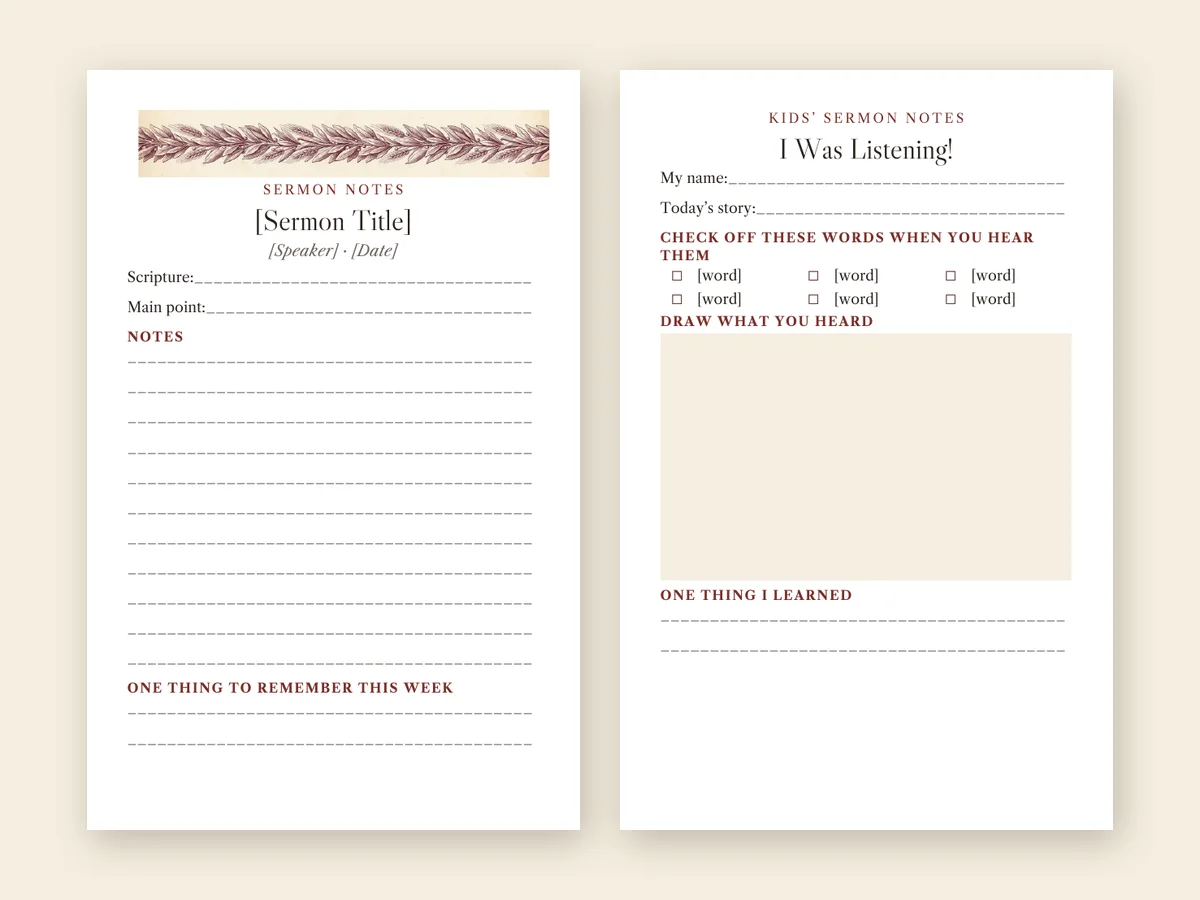
This sermon notes template has 2 half-letter pages, 5.5 × 8.5 in: one for adults and one for kids. The adult page has lines for the sermon title, speaker, date, Scripture, main point and 11 lines of notes. The kids page has a word check-off list, a drawing box and one thing learned. Free editable DOCX, with a PDF sample.
Updated · By Pintergrab
How to fill in and print it
Download the DOCX to edit; the PDF shows both pages finished.
In the DOCX, type six words from this week's sermon into the kids' check-off boxes.
Add the sermon title, speaker and date if you know them ahead.
Print on half-letter paper, or two pages per US Letter sheet from the print dialog, at 100% scale.
Cut Letter sheets in half along the middle.
Hand out the adult and kids pages with the bulletin.
Adult page
| Field | What to write |
|---|---|
| [Sermon Title] | Title as announced |
| [Speaker] · [Date] | Who preached and when |
| Scripture | The reference for the reading |
| Main point | The sermon in one sentence |
| Notes | 11 ruled lines |
| One thing to remember this week | 2 lines |
The page leaves the content to the listener: there are no printed verses, outlines or questions. If your pastor shares an outline, type the headings into the Notes area before printing, one heading every three or four lines.
Kids page
The kids page is built for children who can write a few words. It has a field for My name and one for Today's story, then Check off these words when you hear them with 6 boxes. Each box has a [word] field: type six words from the sermon or the reading before printing, such as a name or a place that comes up more than once. Under the list is a big drawing box with the label Draw what you heard, and at the bottom 2 lines for One thing I learned.
For younger children, type easier words or leave the lines for a parent to fill in. For a bigger group, the drawing box works as the main activity during a longer message.
Size and printing
Each page is 5.5 × 8.5 in. There are two ways to print:
- On half-letter paper, one page per sheet, at 100% scale.
- On US Letter, two pages per sheet from the print dialog. This puts the adult page and the kids page side by side; cut the sheet in half.
Print a test sheet first and check that the ruled lines reach the edges evenly. Heavier paper works better for the kids page if crayons or markers are used.
Notes book
To make a sermon notes book, print as many adult pages as there are Sundays you want to cover, stack them and staple along the short edge, or punch holes for a small binder. Half-letter binders and covers are sold in this size. Add a title page by typing a name and a year into the header of the first sheet.
Editing
Open the DOCX in Microsoft Word or LibreOffice Writer to change the header or the field names, for example Text instead of Scripture. Headings are set in Libre Caslon Display and the fields in Libre Caslon Text, both embedded. Keep the page count at 2 so the two-per-sheet printing still pairs the pages.
In short
The sermon notes template on this page holds 2 half-letter pages, each 5.5 × 8.5 in, the size of a US Letter sheet cut in half. The adult page starts with a header band, the words Sermon Notes and fields for the sermon title, the speaker and the date. Two fill-in lines follow, Scripture and Main point, then 11 ruled lines for notes and 2 lines for One thing to remember this week. The kids page has a title line, fields for the child's name and today's story, a check-off list of 6 words to listen for, a large box to draw what they heard and 2 lines for one thing they learned. The 6 words are blank fields, so the pastor or teacher picks them each week. Printed two per Letter sheet from the print dialog, one sheet gives an adult page and a kids page side by side.
Questions people ask
How to make sermon notes?
Write the title, the speaker, the date and the Scripture reference at the top. During the sermon, write the main point in one sentence, then short notes: a verse, a phrase you want to keep, a question. End with one thing to remember this week. Our template gives you a line for each of these on one half-letter page, with 11 lines for notes.
What goes on a sermon notes page?
A sermon notes page usually has the sermon title, the speaker, the date, the Scripture reference, space for notes and a line for something to remember or do during the week. Ours has all of these on a 5.5 × 8.5 in page: two fill-in lines for Scripture and Main point, 11 ruled lines for notes and 2 lines to finish.
What to put in sermon notes for kids?
Give kids a short task while they listen: a list of words to check off when they hear them, a box to draw what they heard and a line for one thing they learned. Our kids page has a name line, today's story, 6 blank word boxes you fill in before printing, a drawing box and 2 lines for one thing learned.
What size is a sermon notes page?
Ours is half-letter, 5.5 × 8.5 in, which is half of a US Letter sheet. It fits a half-letter binder. You can print it on half-letter paper or two pages on one Letter sheet from the print dialog, then cut the sheet in half. Keep the scale at 100% so the ruled lines stay full width.
What is a sermon notes book?
A sermon notes book is a notebook or journal with one page per sermon, where you keep notes week by week in one place. You can make one from this template: print a stack of adult pages, then staple them along the short edge or punch them for a half-letter binder. Each page has the same fields, so past notes are easy to find.
$5All 20 templates in one ZIP
Get all 20 church templates in one download
One ZIP with all 20 church bulletin and program templates in 4 styles. Each one is an editable DOCX and a PDF sample, and a README explains fonts, printing and folding.
Price on Lava.top: $5 or €5, one payment, no subscription. Payment and the download are on Lava.top.