Church Bulletin Covers to Print
Part of church bulletin templates: 20 bulletins, programs, certificates and forms.
FreeDOCXPDF
Free, no sign‑up. Size: DOCX 658 KB, PDF 484 KB. The DOCX opens in Word or LibreOffice Writer; the PDF shows the sample filled in.
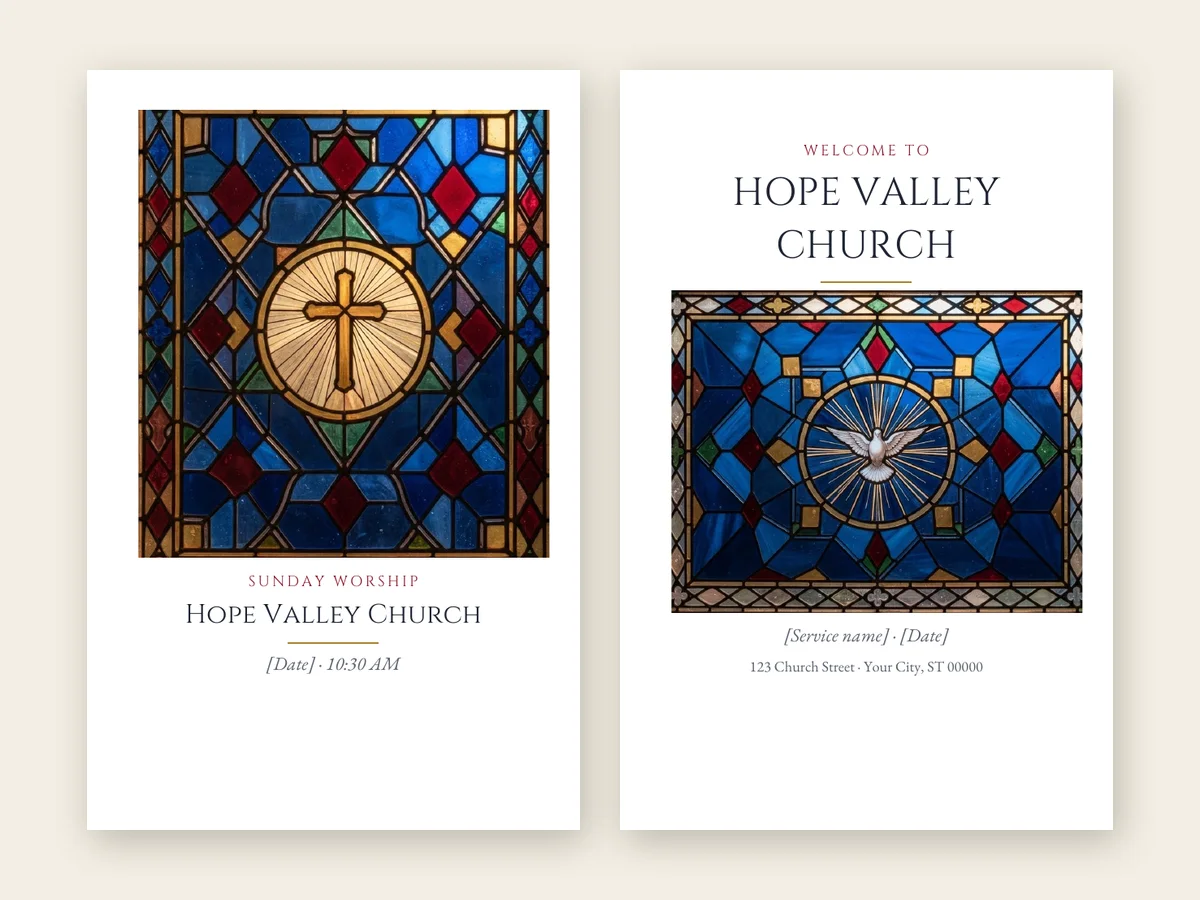
These church bulletin covers are 2 printable cover designs in a stained glass style. Each is a half-letter page, 5.5 × 8.5 in, the size of a folded US Letter bulletin, and two fit on one Letter sheet. Cover 1 reads Sunday Worship; cover 2 reads Welcome to. Download the editable DOCX or the PDF free.
Updated · By Pintergrab
How to fill in and print it
Download the DOCX to edit; the PDF shows both covers finished.
Choose cover 1 for Sunday worship or cover 2 for a named service.
Type the church name and the date, service name or time.
Replace the stained glass art with Change Picture or Replace if you want your own image.
Print at 100% on half-letter paper, or two per Letter sheet, and cut the sheet in half.
Attach the cover to the bulletin or copy the design onto its front panel.
The two covers
| Cover | Layout | Text lines |
|---|---|---|
| 1 | Tall stained glass panel on top, text below | Sunday Worship, church name, [Date] · 10:30 AM |
| 2 | Church name on top, wide stained glass panel below | Welcome to, church name, [Service name] · [Date], street address |
Cover 1 suits a regular Sunday. Cover 2 has a field for the service name, so the same design works for a special service, a homecoming or an evening worship, with the name typed in.
Size
Each cover is a half-letter page: 5.5 × 8.5 in. A bulletin made from one US Letter sheet folded in half has a front of the same size, so the cover lines up with the fold. Lettering is set in Cinzel and the date line in EB Garamond; both fonts are embedded in the DOCX.
Ways to use the covers
- Print a cover on its own half-letter page and staple it on top of a half-page bulletin.
- Copy the art and title into the cover panel of a folded bulletin, such as the free church bulletin template in this collection, which uses the same stained glass style.
- Print a stack of covers in advance with the date left blank, then write or stamp the date each week.
Sample text
The sample church is Hope Valley Church at 123 Church Street. The service time on cover 1 is 10:30 AM. [Date] and [Service name] are fields in square brackets: click into them and type. Change the church name in both covers before printing, and check that a long name still fits on two lines.
Printing
Print on half-letter paper (5.5 × 8.5 in) if your printer takes it. On US Letter, open the print dialog and set 2 pages per sheet, keep the scale at 100%, then cut the sheet in half. Card stock gives a firmer cover than copy paper if your printer feeds it. Print one sheet first and check the cut line before printing the stack.
Changing the art
The stained glass panels are pictures. Right-click one and choose Change Picture in Word or Replace in LibreOffice Writer to put in a photo of your sanctuary or a seasonal image. Keep the replacement close to the same shape: tall for cover 1, wide for cover 2. A church office that kept its covers as Microsoft Publisher files can rebuild them here in a word processor; Microsoft 365 dropped the app on October 1, 2026.
In short
The church bulletin covers file on this page holds 2 cover designs, each on a half-letter page of 5.5 × 8.5 in. That is the size of a US Letter sheet, 11 × 8.5 in, folded in half, so a cover matches the front of a standard folded bulletin. Cover 1 has a tall stained glass art panel at the top, the words Sunday Worship, the church name and a line for the date and a 10:30 AM service time. Cover 2 puts Welcome to and the church name at the top, a wide stained glass panel in the middle and lines for the service name, the date and the address. The church name in both is a sample, Hope Valley Church. Print the covers on half-letter paper, or two per Letter sheet from the print dialog, at 100% scale. The art is a picture you can replace in Word or LibreOffice.
Questions people ask
What is a church bulletin cover called?
It is usually just called the bulletin cover or front cover: the outside front page of a folded bulletin. Some suppliers sell covers printed ahead with art and a blank inside, so the church only prints its own text on them. In our file the two designs are full half-letter pages, so the cover can be printed on its own or copied onto the front panel of a folded bulletin.
What to put in a church bulletin cover page?
Put the church name, the service name or Sunday Worship, the date and the service time on the cover, plus one image. Some churches add the address or a welcome line. Our cover 1 holds Sunday Worship, the name and a date and time line; cover 2 holds Welcome to, the name, a service name and date line and the street address.
How to make a church bulletin cover page?
Open the DOCX in Word or LibreOffice Writer, pick cover 1 or cover 2 and type over the church name and the date line. Replace the stained glass art with your own picture through Change Picture or Replace if you like. Print at 100% on half-letter paper or two per Letter sheet, then cut and attach the cover to your bulletin.
What size is a church bulletin cover?
A cover for a bulletin folded from US Letter paper is 5.5 × 8.5 in, half of an 11 × 8.5 in sheet. Both of our cover designs are that size. Print them on half-letter paper, or two per Letter sheet and cut, at 100% scale so the art keeps its proportions.
$5All 20 templates in one ZIP
Get all 20 church templates in one download
One ZIP with all 20 church bulletin and program templates in 4 styles. Each one is an editable DOCX and a PDF sample, and a README explains fonts, printing and folding.
Price on Lava.top: $5 or €5, one payment, no subscription. Payment and the download are on Lava.top.