Budget Dashboard Pro 2027: Year Planner, Bills, Debt Payoff, Goals
$5Free LiteXLSX 20 tabs
Updated By Pintergrab
Budget Dashboard Pro 2027 is an Excel and Google Sheets budget workbook. The free Lite has 3 tabs: Instructions, Settings with a monthly plan for every category, and Jan, the January sheet with plan vs actual. Pro, a one-time $5 on Lava.top, has 20 tabs: all 12 months, a Dashboard, Bills, Debts, Goals, Sinking Funds and Paycheck.
Excel (.xlsx), 15 KB
Pay once on Lava.top by card, Apple Pay or PayPal. Lava gives you the Pro files after payment. The Lite file saves right away, with no email.
What's inside
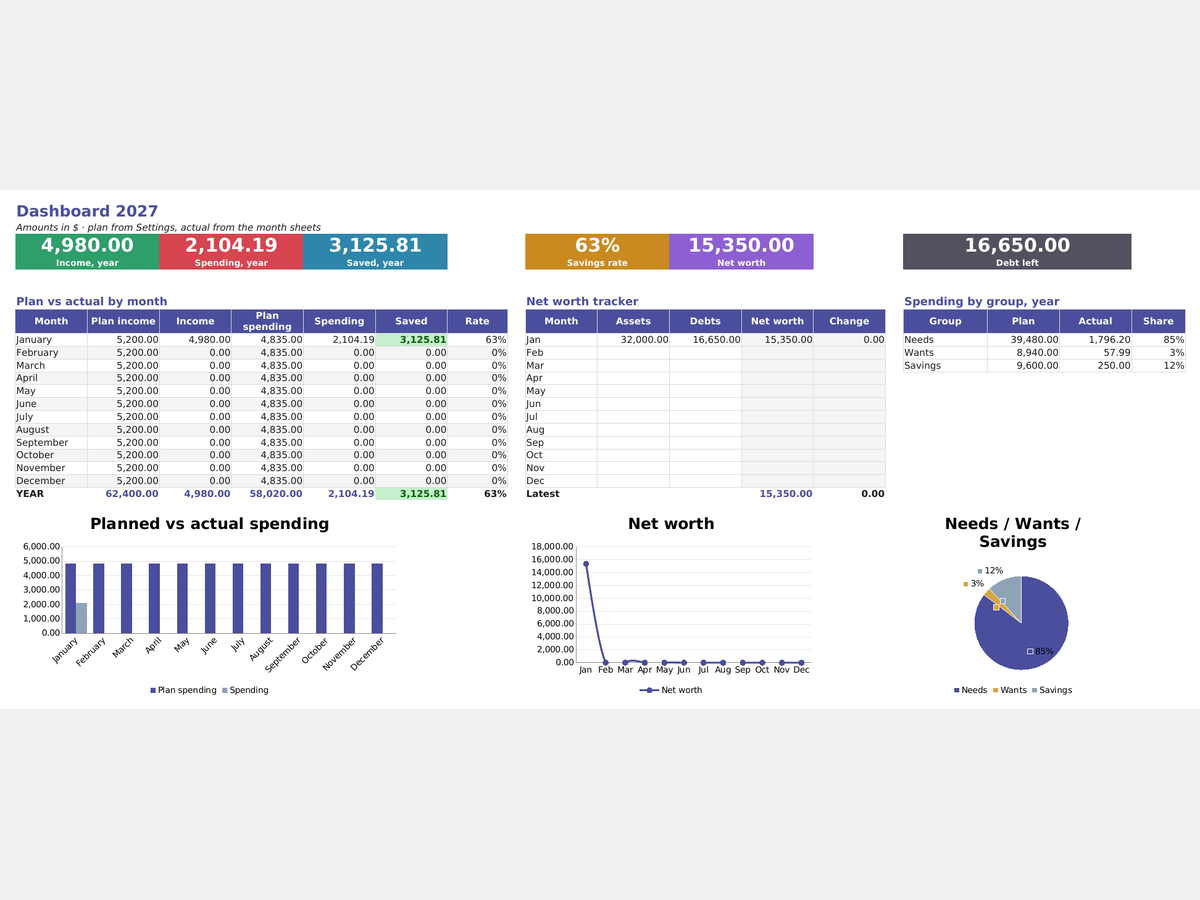
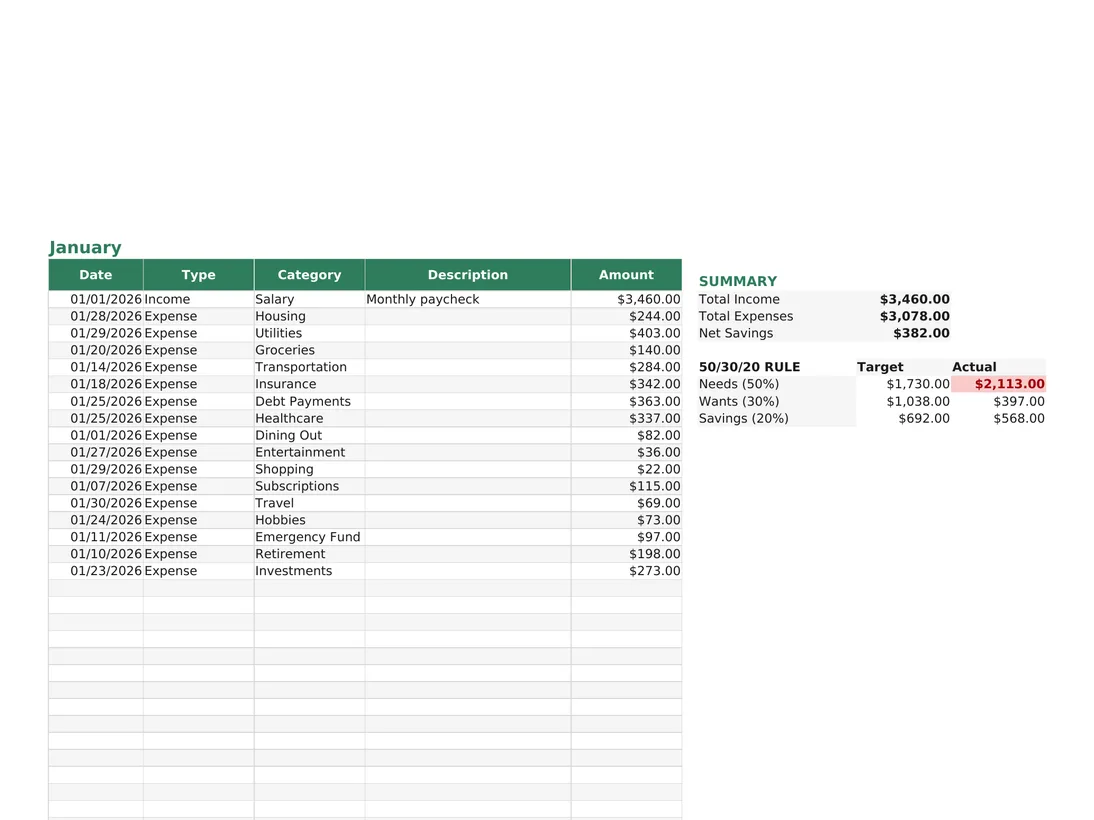
A 2027 budget workbook that goes further than our Family Budget Planner. Settings hold a monthly plan for every category; each of the twelve month sheets logs transactions and compares plan with actual per category, red where you overspend. The Dashboard reads all twelve sheets: planned and actual income and spending, what you saved (left over plus what went into savings categories), savings rate, the Needs / Wants / Savings split, three charts and a net worth tracker you fill once a month. Bills lists every recurring payment with first due date and frequency, works out the next date from today, counts the days, highlights anything due within a week and shows what is due in each month. Debts takes balance, rate and minimum, lets you pick Snowball or Avalanche plus an extra monthly amount, and returns payoff order, months to zero and interest paid for every debt. Goals, Sinking Funds and Paycheck round it off: months left and a target date with a progress bar per goal, yearly costs split into a monthly set-aside, and take-home pay assigned to envelopes by percentage or fixed amount with the remainder in view. Light and dark themes, dropdowns everywhere, one .xlsx for Excel 2016+, LibreOffice Calc and Google Sheets.
Lite and Pro
| In the file | Lite, free | Pro, $5 |
|---|---|---|
| Tabs | 3 | 20 |
| Month sheets with plan vs actual | 1, January | 12 |
| Dashboard with 3 charts and net worth | No | Yes |
| Bill calendar with a 7-day warning | No | Yes |
| Debt payoff, Snowball or Avalanche | No | Yes |
| Savings goals and sinking funds | No | Yes |
| Paycheck planner | No | Yes |
| Dark theme file | No | Yes |
| Excel, LibreOffice and Google Sheets | Yes | Yes |
How to use the Budget Dashboard Pro 2027
Download the free Lite file.
It saves right away, with no email.
Open it in Excel or Google Sheets.
In Google Sheets use File, then Import, then Upload.
Type in your own numbers.
The formulas and print areas are already set up.
Get Pro for $5.
Pay on Lava.top. Lava gives you the Pro files after payment.
In short
Budget Dashboard Pro 2027 from Pintergrab is an .xlsx budget workbook for Excel 2016 or newer, LibreOffice Calc and Google Sheets. On Settings you give every category a monthly plan; each month sheet has 60 rows for transactions and compares plan with actual for every category. The free Lite file has 3 tabs: Instructions, Settings and Jan, the January sheet. Pro costs $5 as one payment on Lava.top and has 20 tabs. Its Dashboard adds up all twelve months and draws 3 charts: planned vs actual spending, net worth and the Needs / Wants / Savings split. Bills works out each next due date from today and highlights anything due within 7 days. Debts takes up to 10 debts, orders them by Snowball or Avalanche and shows months to zero and interest paid. Goals, Sinking Funds and Paycheck plan savings and split take-home pay into envelopes.
FAQ
How is this different from the Family Budget Planner?
Family Budget Planner Pro, also $5, has 12 month sheets, a dashboard, a snowball list where you number the order yourself and savings goals. This one adds a monthly plan for every category checked against actuals, net worth, the bill calendar, Snowball or Avalanche order and interest worked out by formula, sinking funds and the paycheck planner.
Is it Excel or Google Sheets?
It is an .xlsx file: Excel 2016 or newer, LibreOffice Calc, and Google Sheets through File - Import - Replace spreadsheet. Every formula works in all three. Progress bars show in Excel and LibreOffice; Google Sheets shows the percentage only.
How are months to zero worked out?
With the NPER formula from each rate and payment: the debt in position 1 gets the extra payment, the rest pay minimums. When the first debt is gone, roll its payment into the next one and your real finish comes sooner.
What depends on today's date?
Next bill dates and days left, target dates for goals and months left for sinking funds. Open the file tomorrow and they move on their own.
What is in the free Lite file?
Instructions, Settings and one month sheet with plan vs actual. The other eleven months, the Dashboard, Bills, Debts, Goals, Sinking Funds, Paycheck and the dark theme are in Pro, a separate file.
More templates
All templates
Built with AI assistance.