How to Use the Printable Wedding Planner, from Budget to Big Day
Start with the budget summary: write your total and a planned amount for each of 16 categories. Then go through the 12-month checklist and put an owner and a due date on every task. In Pro, add guests, seating, vendors and the day-of timeline. The free Lite has 6 pages; Pro has 34 for $5.
Updated · By Pintergrab
Lite is free to download, no sign-up. Pro is sold on Lava.top.
Steps
Download the free 6-page Lite PDF in US Letter or A4 with the button above, or get the 34-page Pro for $5.
Print the pages you need, or open the PDF in an app you can write in.
On the budget summary, write the total and a planned amount for each of the 16 categories.
Go through the 4 checklist pages and give every task an owner's initials and a due date.
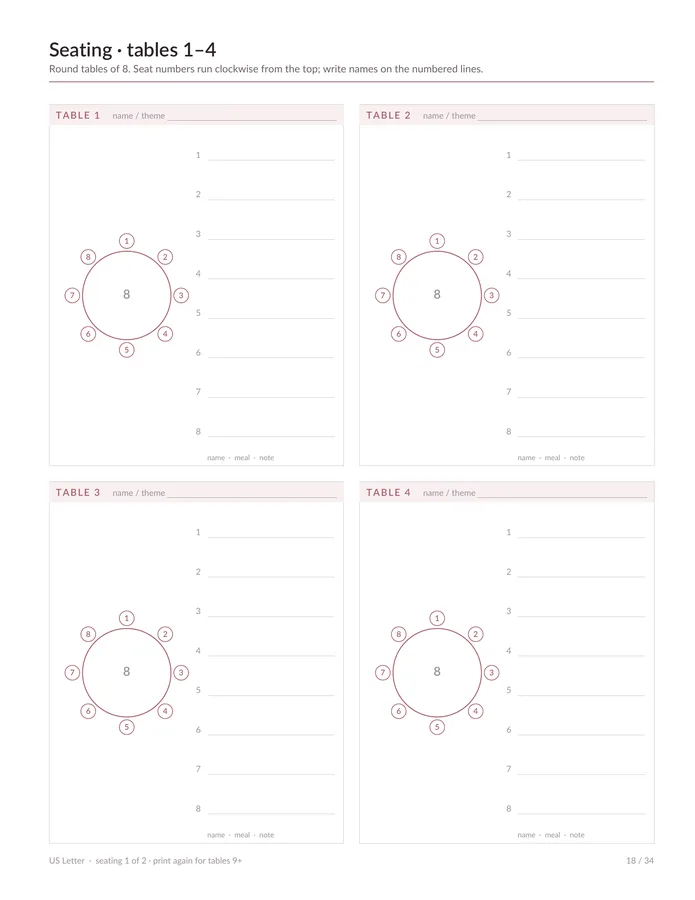
(Pro) Fill the guest list, one row per household, then seat guests at the round tables of 8.
(Pro) Fill a vendor card per vendor and log each deposit and balance on the payment schedule.
Two weeks out, work from the final countdown page and (Pro) the day-of timeline.
Step 1: Set the budget first
On the budget summary, write the total and who contributes what. Then fill Planned for each of the 16 categories. The Typ. % column gives a starting point: venue 28%, catering and bar 20%, photography 9%. The page notes that these come from industry cost surveys and are a starting point, not a rule. On a total of 30,000, 28% gives the venue a plan of 8,400.
Step 2: Assign the checklist
Work through the 4 checklist pages. For every task, initial the owner and write a due date. Cross out what doesn't apply and add your own lines. The 12-month block opens with the budget, the guest count, 2 to 3 possible dates and the venue, since the guest count drives venue and catering.
Step 3 (Pro): Guests and seating
The guest list has one row per household, 26 per page on 3 pages, with columns for invitation, RSVP, meal, plus-one, hotel and table. Invitations go by address; meals and tables go by person, so use the notes column. Then seat guests on the round tables of 8, seat numbers clockwise from the top, and list everyone on the Who sits where page for the coordinator and the escort-card table.
Step 4 (Pro): Vendors, money and the day
Give each vendor a card: quote, deposit, balance, due dates, contract number, insurance and the tip you plan. Log every deposit and balance on the payment schedule in date order. In the last weeks, switch to the final countdown and fill the day-of timeline. The morning page starts at 7:00 AM, the reception page runs from 3:00 PM to midnight, and the page asks you to pad every hand-off with a 15-minute buffer.
In short
The Wedding Planner by Pintergrab is a printable PDF you fill in by hand, page by page. The budget summary comes first: a total, contributions from the couple and from family, and 16 categories with a typical US share, from 28% for the venue down to 1% for favors. The 4-page checklist runs from 12 months to 1 month before; every task gets an owner's initials and a due date, and the page says to reorder freely. The final countdown covers two weeks, one week, the day before and the morning. In the 34-page Pro, the guest list holds 78 households on 3 pages, seating has 8 round tables of 8 plus a head table for 10, and the day-of timeline runs in 15-minute rows from 7:00 AM. Lite is free with 6 pages. Pro costs $5, one payment on Lava.top, in US Letter and A4.
Questions people ask
Do I have to print all 34 pages?
No. The contents page says every page is different and you can print the sections you need, as many copies as you need. You can print the checklist and budget first and add the guest and seating pages once the RSVPs come in.
How do the owner and due lines work?
Each checklist task has room for a check mark, the initials of whoever owns it and a due date. Writing both on every line turns the month blocks into a plan with names, and the page says you can reorder tasks freely.
How do the day-of timeline pages work?
There are two. The morning and ceremony page has 15-minute rows from 7:00 AM, and the reception page has rows from 3:00 PM to midnight. Write who does what and where, and give the final version to every vendor and the wedding party.
Where do we track gifts and thank-you notes?
On the Pro gift and thank-you tracker: number, from, gift, occasion, sent and date sent. Write each gift down the day it arrives. The page reminds you that thank-you notes go out within three months.