2027 Digital Planner for Goodnotes: Printable + Digital, 111 Pages
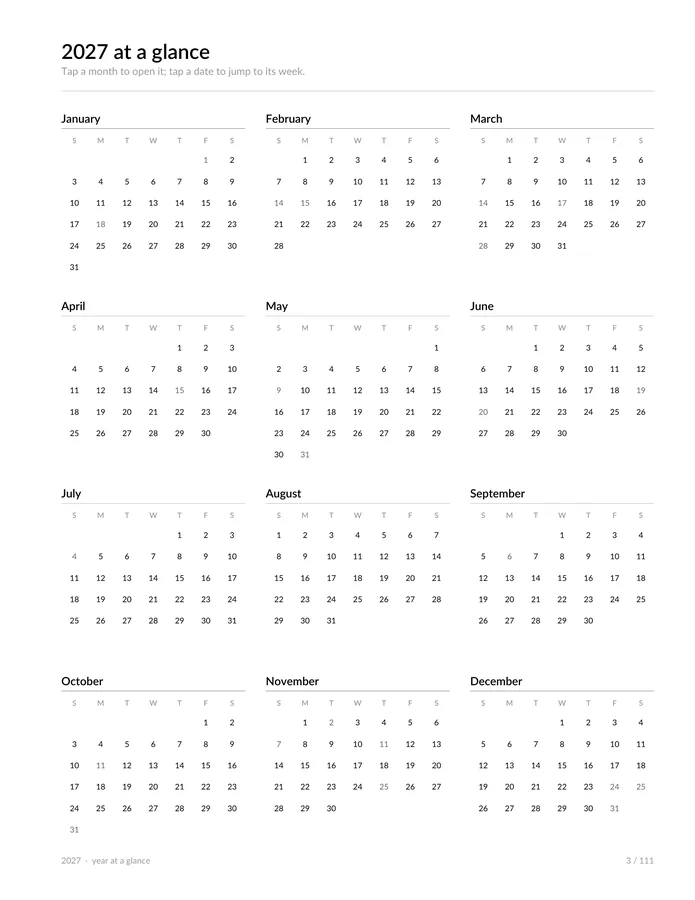
The 2027 Dated Planner ($5 Pro) includes a Goodnotes-ready digital file with working links: tap a month on the year-at-a-glance page to open it, tap a date to jump to its week, tap the week title to return to the month. It spans 111 pages, with 53 weekly spreads and side tabs for navigation.
Updated · By Pintergrab
Lite is free to download, no sign-up. Pro is sold on Lava.top.
Digital planning in Goodnotes
Open the digital file in Goodnotes on a tablet and it behaves like a paper planner with a jump-button on every page. Tap a month on the 2027-at-a-glance page and it opens; tap any date inside a month and you land on that date's weekly spread; tap the week title — "Jan 3–9, 2027" — and you go back to its month. The tabs sit inset from the edge with real tap areas, so a thumb won't miss them.
People use it for the usual mix: appointments, work tasks, homework, meal plans, bills, workouts, and habit tracking. Each date links to its week and the week title links to its month, so you flip between a date and its week in two taps instead of swiping through 111 pages.
Which parts matter most
- The weekly spread. Eight blocks in a 2×4 grid, seven lines per day, a time gutter on the left and a checkbox gutter on the right. A "This week" block holds a top 3, and a 4×7 habit strip runs alongside.
- The month page. Three light lines in every cell and US holidays labeled. Focus-3, monthly habits and notes sit on the right.
- Trackers. You write the same four habits in the weekly strip and the monthly tracker. Goals carry a metric, a deadline, a milestone box per quarter and a dot per month. Twelve budgets track bills due, plan vs. actual, and sinking funds.
An example week
Take "Jan 3–9, 2027", week 2 of 53. In the "This week" block you write your top 3 — say, file taxes paperwork, book dentist, finish chapter 4. Each day gets up to seven lines. Monday the 4th: "dentist 9 AM" in the time gutter; "send draft" on Tuesday with a checkbox you tick off. The habit strip has four habits — you might use water, walk, read, stretch — one column per day, so at most seven marks per habit per week. Tap the week title to go back to January and jot "dentist 9 AM" in the 4th's cell too.
Files and price
The Goodnotes file is US Letter. Pro is $5 once and includes the printable PDFs too: Letter and A4, Sunday or Monday start. The free Lite sample is 5 pages — a month, a week, a habit tracker, the goals page, and a note explaining the sample.
In short
The 2027 Dated Planner — Printable + Digital runs 111 pages and ships as both a printable PDF (US Letter and A4, Sunday or Monday start) and a Goodnotes file with working hyperlinks. In the digital version, the year-at-a-glance page links to all 12 months, every date on a monthly page links to its own week, and each week title links back to its month. There are 53 weekly spreads — each day has seven writing lines with a time gutter on the left and a checkbox gutter on the right — plus 12 monthly habit trackers, 12 monthly budgets with plan vs. actual categories and sinking funds, and quarterly goals with a milestone box per quarter. Months show US holidays and three light lines in every cell. The same four habits appear in the weekly strip and the monthly tracker. Pro costs a one-time $5; the Lite sample is 5 pages and free.
Questions people ask
How do the hyperlinks work in Goodnotes?
Tap a month on the year-at-a-glance page to open it, tap any date to jump to that date's week, and tap the week title to go back to the month. Tabs are inset from the edge with real tap areas. Page numbers in the contents match the printed folio.
Is the Goodnotes file included in the $5 Pro version?
Yes. Pro includes the digital file plus the printable PDFs: US Letter and A4, in Sunday- and Monday-start versions. The whole planner is 111 pages, and the free Lite sample is 5 pages.
Can I handwrite in it on a tablet?
Yes. In Goodnotes you write directly on the pages with a stylus. Each day on the weekly spread has seven lines plus a time gutter on the left and a checkbox gutter on the right, and every month cell has three light lines for short notes.
Do the weekly and monthly pages connect in the digital file?
They do. Every date on a month page links to its week, and the week title links back to the month. For habits, you write the same four habits in the weekly strip and the monthly tracker, as the file asks.