Free Habit & Routine Tracker Template (Excel, Google Sheets)
The free Lite version is an .xlsx file with 3 tabs: Start Here, Habits, and one month (Jan) with 630 formula cells. You set a weekly target of 1-7 times per habit for up to 15 habits, mark days with a checkmark, and see streaks and completion automatically. Pro adds 11 more months plus a year dashboard.
Updated · By Pintergrab
Pro: $5 on Lava.top, one payment.
What's in the free Lite download
The Lite file (habit-lite-en.xlsx, 19 KB) has 3 tabs:
- Start Here — a short intro and setup steps.
- Habits — type up to 15 habits, each with a "Times per week" dropdown (1–7) and a "Why it matters" note.
- Jan — the month grid, with 630 formula cells.
Each day you pick from a three-option dropdown: leave it blank, ✓ for done, or – for a rest or sick day. The dash keeps your streak alive instead of wiping it. The formulas give you Days Done, % of Target, Best Streak, Current Streak and Weeks Hit for every habit, with a colored heatmap grid. A separate dark-theme Lite file is included too.
How to download and use it
- Download the free Lite .xlsx from the page.
- Open it in Excel, or in Google Sheets via File → Import → Upload.
- Open the Habits tab and type your habits. Pick a times-per-week number — 3 is a real target, 7 is a resolution.
- On the month sheet, mark a day with ✓ when you do it, or – for a rest day.
Everything is plain formulas with hidden helper columns and no macros, so it works in Excel, LibreOffice Calc and Google Sheets.
What Pro adds
| Lite (free) | Pro ($5) | |
|---|---|---|
| Tabs | 3 | 15 |
| Months | 1 (Jan) | 12 (Jan–Dec) |
| Dashboard | — | Year dashboard |
| Themes | Light and dark | Light and dark |
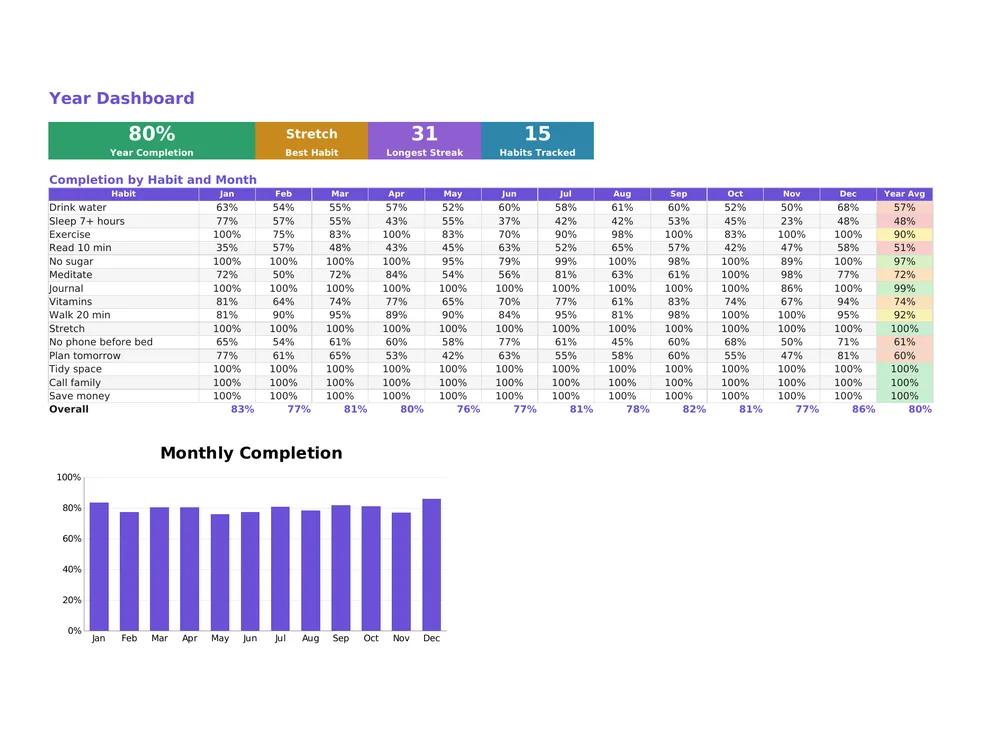
Pro is the same system, just for the whole year: all 12 monthly sheets, plus a dashboard tab with 227 formula cells covering year completion, completion by habit and month, top habit by completion, longest streak and habits tracked, with charts. One $5 payment on Lava.top.
If you only want to test one month, Lite does everything Pro does for a single month. If you want the full year in one file with the yearly overview, that's the upgrade.
In short
This habit tracker template is built around the reason people abandon trackers: one missed day kills the streak. Here it doesn't. Each of the 15 habit rows gets its own weekly target from a dropdown of 1 to 7, and the month sheet measures you against that target instead of against all 31 days — three gym sessions a week, done, counts as 100%. On the day grid you pick from a dropdown of three options: blank, a checkmark for done, or a dash for a rest or sick day, and the dash carries your streak instead of resetting it. The free Lite file covers one month with 630 formula cells computing Days Done, percent of target, best streak, current streak and weeks hit, plus a heatmap. The $5 Pro version expands to 15 tabs: all 12 months plus a year dashboard with completion by habit and month.
Questions people ask
How many habits can I track in the free habit tracker template?
Up to 15 habits. The Habits tab has 15 rows, each with a times-per-week dropdown from 1 to 7. You can copy a row and extend the formulas manually if you need more, but the template is designed to cap at 15 for readability.
Does the free version work in Google Sheets?
Yes. The file is a standard .xlsx with plain formulas and no macros, so it opens in Excel, LibreOffice Calc and Google Sheets. In Google Sheets, use File, then Import, then Upload to load it.
How do rest days keep my streak going?
Each day cell has a dropdown with three options: blank, ✓ for done, and – for a rest or sick day. The dash tells the formula the day was intentional, not skipped, so your streak calculation carries over instead of resetting to zero.
How is this different from a normal 31-day habit tracker?
It measures you against your own weekly target, not against the full month. If you set a habit to 3 times a week and do 3 sessions, that reads as 100% of target rather than a low percentage of 31 days. You also see Weeks Hit — how many weeks you reached your weekly target.