Funeral Program Template With Obituary Page
Part of church bulletin templates: 20 bulletins, programs, certificates and forms.
FreeDOCXPDF
Free, no sign‑up. Size: DOCX 398 KB, PDF 101 KB. The DOCX opens in Word or LibreOffice Writer; the PDF shows the sample filled in.
This funeral program template is a 4-panel bi-fold you print double-sided on an 11 × 8.5 in US Letter sheet and fold to 5.5 × 8.5 in. It has a photo cover, a full obituary page, an 11-line order of service and space for pallbearers, interment and repast. The DOCX for editing and the PDF are both free.
Updated · By Pintergrab
How to fill in and print it
Save the funeral program DOCX and open it in your word processor.
Replace the name, dates, service time and place on the cover, then swap the photo with Change Picture or Replace.
Write the obituary over the sample sentences and the three gray prompts.
Fill in the order of service, the officiant, pallbearers, interment and repast; delete lines you do not need.
Print both sides on one Letter sheet, flip on short edge, 100% scale.
Fold the sheet in half with the cover facing out.
What is on the four panels
| Panel | What it holds |
|---|---|
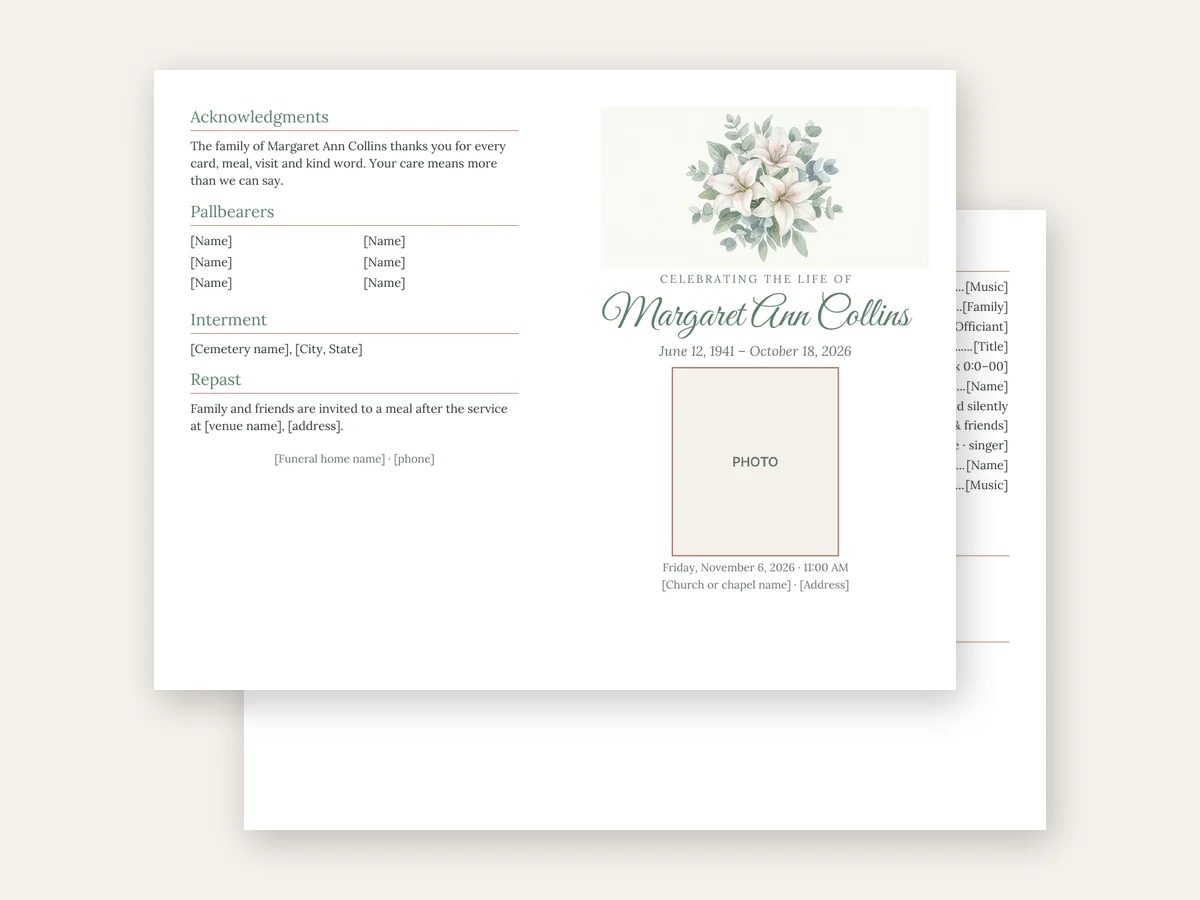
| Cover | Watercolor header, Celebrating the Life of, full name, dates of birth and death, photo frame, day, date, time, church or chapel and address |
| Inside left | Obituary: opening sentence, three prompts, survived by and preceded in death by, then a box for a poem or verse with 3 lines |
| Inside right | Order of Service (11 lines), Officiating, Honorary Pallbearers (4 names), Flower Bearers |
| Back | Acknowledgments, Pallbearers (6 names in two columns), Interment, Repast, funeral home name and phone |
The obituary page
The obituary starts with two sentences already written for the sample: name, age, city, date of passing, and where and to whom she was born. Below it are three gray prompts to replace with your own paragraphs: education and work, family, and interests. The panel closes with the survived by and preceded in death by lines.
The box underneath is labeled A Poem or Verse and holds a single field, [Poem or verse chosen by the family]. The file contains no poems, verses or prayers. Paste the text the family picks, or delete the box and give the obituary more room.
The order of service
The 11 lines are Prelude, Processional, Welcome, Hymn, Scripture Reading, Prayer, Obituary, Reflections, Solo, Eulogy and Recessional. On the Obituary line the right-hand field says Read silently, because the full text is printed on the facing page. The other lines end in fields such as [Officiant], [Title], [Book 0:0–00] for the reading reference and [Title · singer] for the solo. Ask the officiant for the final order and delete or add lines to match.
Sample filled in
Sample text shows how much fits on each panel: Margaret Ann Collins, 85, born June 12, 1941, died October 18, 2026. Her service is on Friday, November 6, 2026, at 11:00 AM. The acknowledgment reads as a thank-you from her family for cards, meals and visits. Church, cemetery, funeral home, venue and all names of bearers are fields in square brackets. The cover is sized so that a name as long as Elizabeth Josephine Montgomery still fits without pushing the program onto a third page.
Photo, fonts and printing
The photo frame on the cover is a placeholder picture: right-click it and choose Change Picture in Word or Replace in LibreOffice Writer, then pick a portrait photo. Headings are set in Lora and the name in Great Vibes; both fonts are embedded in the DOCX.
Print the two pages on one sheet, double-sided, flip on short edge, at 100% scale. Fold the sheet in half so the cover faces out. Card stock or heavier paper holds a fold better than copy paper if your printer feeds it.
In short
The funeral program template on this page is a 4-panel bi-fold. Both sides of an 11 × 8.5 in Letter sheet are used, and one fold turns it into a 5.5 × 8.5 in booklet. The cover has a watercolor header, the words Celebrating the Life of, the name in a script font, the dates of birth and death, a photo frame and the time and place of the service. The inside left panel is the obituary page with writing prompts and a box for a poem or verse the family chooses. The inside right panel holds an 11-line order of service from Prelude to Recessional, the officiant, 4 honorary pallbearers and the flower bearers. The back carries a thank-you from the family, 6 pallbearers, the interment, the repast and the funeral home. The sample is for a fictional woman, Margaret Ann Collins.
Questions people ask
How do you write a funeral program?
Gather the details first: full name, dates of birth and death, a photo, the date, time and place of the service, the officiant, the order of service and the names of pallbearers. Then write the obituary in short paragraphs: life and work, family, interests. Type everything into the template fields, ask a family member to proofread names and dates, and print one test copy.
Can I make my own funeral program?
Yes. A funeral program is a document you can type in Word or LibreOffice Writer and print at home or at a print shop. This template gives you the layout: a photo cover, an obituary page, an 11-line order of service and a back panel for thanks, pallbearers and the repast. You replace the sample text and print it double-sided on US Letter.
What is the standard program for a memorial service?
There is no single standard: the order depends on the church, the family and the person leading the service, so ask the officiant first. Our file starts from this pattern in 11 lines: music and a welcome, a hymn, a reading and prayer, the obituary, reflections, a solo and a eulogy, then closing music. Reorder or delete lines to match what the officiant and the family plan.
What to put in a funeral program?
Put the full name, dates of birth and death, a photo and the service date, time and place on the cover. Inside, add the obituary and the order of service with the officiant's name. On the back, list pallbearers, the interment, the repast and a short thank-you from the family. Our template has a field for each of these, plus honorary pallbearers and flower bearers.
Where can I find a free template for a funeral program?
On this page. The funeral program template is free to download as an editable DOCX for Word or LibreOffice Writer and as a PDF that shows the finished layout. It is a bi-fold on US Letter that folds to 5.5 × 8.5 in, and it comes filled in with sample text you replace with your own.
$5All 20 templates in one ZIP
Get all 20 church templates in one download
One ZIP with all 20 church bulletin and program templates in 4 styles. Each one is an editable DOCX and a PDF sample, and a README explains fonts, printing and folding.
Price on Lava.top: $5 or €5, one payment, no subscription. Payment and the download are on Lava.top.