How to Use the Planner Bundle: Pick the Files, Print, Start Week 1
Open the guide, then pick the files you need. Choose the 2027 planner by paper size and week start, Sunday or Monday, or use the digital edition on a tablet. Print only the undated daily pages you will use. If a wedding is coming, start its checklist and budget first. The bundle of 11 PDFs is $7.99.
Updated · By Pintergrab
Lite is free to download, no sign-up. Pro is sold on Lava.top.
Steps
Get the bundle for $7.99 with the button above, or download the free 2-page guide first.
Open the guide and check the file list: 11 PDFs, each planner in US Letter and A4.
Pick the 2027 print file by paper size and week start, or open the digital edition on a tablet.
Print the 2027 year pages, goals and the first month's weeks; add months as you go.
Print only the undated daily page types you will use, such as the half-hour daily.
If a wedding is coming, print the wedding checklist and budget summary first.
Fill in your first week: the Top 3 and the four habits on the habit strip.
Step 1: Choose your 2027 file
The 2027 planner comes in 4 print files. Pick by paper and by the day your week starts:
- US Letter or A4, to match your printer's paper.
- Sunday start: Week 1 of 53 runs Dec 27, 2026 to Jan 2, 2027.
- Monday start: Week 1 of 53 runs Dec 28, 2026 to Jan 3, 2027.
If you plan on a tablet, use the digital edition instead. On the year page, tap a month to open it; on a month, tap a date to jump to its week; tap the week title to go back.
Step 2: Print in sections
The 2027 planner's contents page shows where everything sits: months on pages 6 to 17, weekly spreads from page 18, habit trackers from page 71, monthly budgets from page 83, then sinking funds, a money overview, 6 undated daily pages, reading, a sticker sheet, notes and a 2027 in review page. Print the year, goals and the first month's weeks, then add months as you go.
From the Undated Daily Planner, print only the page types you use: the half-hour daily, the ADHD time-block daily, weekly, monthly, habits, goals, self-care or notes.
Step 3: Start the wedding planner early, if there is one
The Wedding Planner's checklist begins 12 months before the wedding. Print the 4 checklist pages and the budget summary first, and add the guest list, seating and vendor pages later.
Step 4: Fill in your first week
On the week's page, write your Top 3 and the four habits for the habit strip. Write the same four habits on that month's habit page, which has room for up to eight more. Copy birthdays and renewals from the Important dates page onto the month pages.
In short
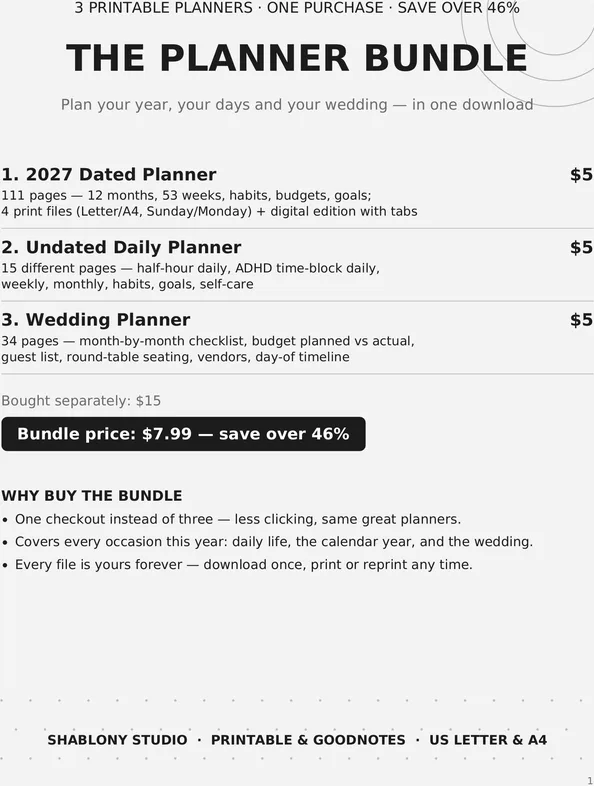
The Planner Bundle by Pintergrab is 11 PDF files, and using it starts with choosing which ones to print. The 2027 Dated Planner comes as 4 print files, US Letter or A4, each with Sunday- or Monday-start weeks, and all have 111 pages. Week 1 of 53 starts on December 27, 2026 in the Sunday file and December 28, 2026 in the Monday file. A fifth file is the digital edition with clickable tabs. The Undated Daily Planner has 15 different page types in a 17-page file; its pages are undated, so you print only the days you need. The Wedding Planner is 34 pages; its contents page says to print the sections you need, as many copies as you need. The free download is the 2-page guide. The full bundle costs $7.99, one payment on Lava.top.
Questions people ask
Sunday or Monday start: which 2027 file should I print?
Both are in the bundle, in US Letter and A4. Pick the week start you are used to. In the Sunday file, Week 1 of 53 begins December 27, 2026; in the Monday file, it begins December 28, 2026. The page count is 111 either way.
Can I print just part of a planner?
Yes. The undated daily pages are meant to be printed only for the days that need an hour-by-hour plan. The wedding planner says to print the sections you need, as many copies as you need. The 2027 planner can go month by month.
Where should I print the planners?
The guide says to print at home or at a print shop. Use the US Letter files for a printer loaded with standard American paper and the A4 files elsewhere. Every planner in the bundle comes in both sizes.
How do the 2027 habit pages connect to the weekly pages?
Every week has a habit strip with four rows. The monthly habit page uses the same four habits plus up to eight more, so you write the same four in both places and count the month on the habit page.