How to Use the Vehicles & Machines Coloring Pages: 40-Page Pack
Download the free Lite PDF with the first 5 pages using the button above, print a test page on A4 or US Letter paper, then get the $5 Pro version for all 40 pages. Print any page as many times as you like for your own kids.
Updated · By Pintergrab
Lite is free to download, no sign-up. Pro is sold on Lava.top.
Steps
Download the free Lite PDF with the button above: A4 or US Letter.
Open the file and print one page as a test on plain paper.
Check that the lines come out dark and sharp; adjust print quality if needed.
Get Pro for $5 on Lava.top to receive all 40 pages (41 with cover) plus PNG files.
Print seven pages for a first week — one per day per child.
Alternate parked and in-motion versions of the same vehicle on nearby days.
Color with crayons or wide markers; count wheels on pages like the train and road roller.
Step 1: Download the free Lite PDF
Download the free Lite PDF with the button above. It has 6 pages: a cover plus the first 5 coloring pages of the pack. Two files are offered — coloring-vehicles-40-free-1-5-letter.pdf for US Letter paper and coloring-vehicles-40-free-1-5-a4.pdf for A4 paper. Pick the one that matches your printer paper. Both are around 11 MB, so the download may take a minute on slow connections.
Step 2: Print a test page
Open the PDF in any PDF viewer and print one page first. Use plain office paper — the line art prints fine on it. Check that the lines come out dark and sharp. If they look faint, set your printer to a higher quality mode. Every page is 300 DPI and print-ready, so no adjusting is needed beyond that.
Step 3: Get the full 40 pages
If the first 5 pages work, get Pro for $5 on Lava.top — one payment. Pro includes:
coloring-vehicles-40-40-letter.pdf(41 pages, US Letter)coloring-vehicles-40-40-a4.pdf(41 pages, A4)coloring-vehicles-40-png.zip(PNG files)
The 41st page is the cover; the rest are the 40 coloring pages. Print as many copies as you like for your own use.
Step 4: Fill in your first week
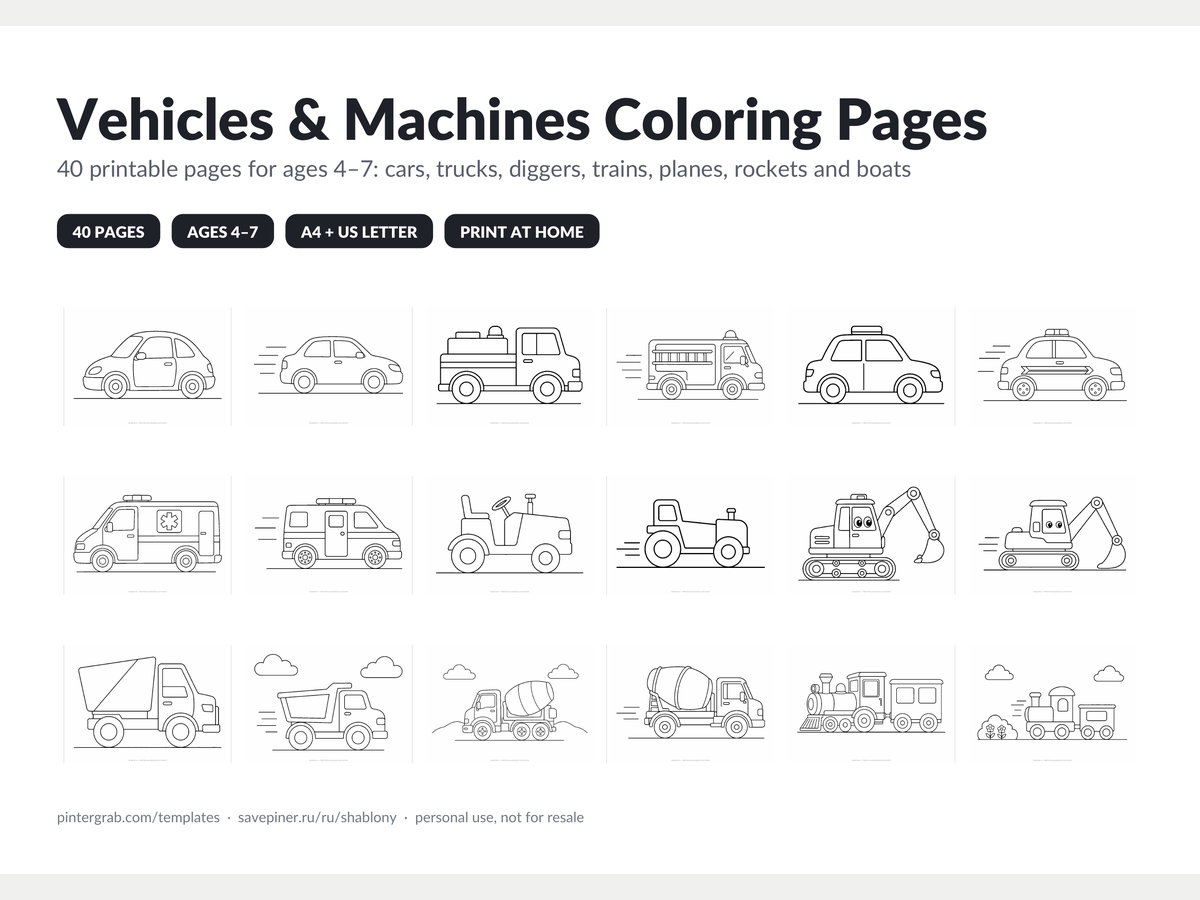
The pack has 20 vehicle types in 2 versions each: parked and in motion. A simple first-week plan for one child: print 7 pages, one per day. For example, start with the parked passenger car, then the same car in motion the next day so your child spots the difference. Alternate familiar machines (bus, bicycle, fire truck) with bigger ones (excavator, dump truck, cement mixer). Each page has large regions, so crayons and wide markers both work. Pages with many wheels, like the train or road roller, are good for counting practice while coloring.
In short
The Vehicles & Machines Coloring Pages pack contains 40 printable pages for kids ages 4-7: 20 vehicle types such as passenger car, fire truck, tractor, excavator, train, airplane and rocket, each drawn in 2 versions — parked and in motion. Every page is hand-checked so the wheel count is correct and all wheels sit on the ground. The line art uses one cartoon style with clean even lines and regions large enough for a crayon. There are no real brands or logos, only generic recognizable vehicles. Files come as A4 and US Letter PDFs at 300 DPI, plus a PNG zip in Pro. The free Lite version includes the first 5 pages (6 pages in the file counting the cover). Pro costs $5 as one payment on Lava.top and includes all 40 pages (41 pages per file with cover).
Questions people ask
How many pages are in the free Lite version?
The free Lite PDF includes the first 5 coloring pages, plus a cover, so the file has 6 pages in total. Both A4 and US Letter versions of the Lite file are free to download.
What do the two versions of each vehicle look like?
Each of the 20 vehicle types appears twice: once parked and once in motion. So the fire truck comes standing still and driving, the airplane parked and flying, and so on across all 40 pages.
How often can I reprint a favorite page?
As often as you like,: for your kids, a classroom you teach, or repeat prints of a favorite page like the excavator or rocket.
What paper size do the files use?
The pack comes in A4 and US Letter PDFs at 300 DPI, print-ready. Pro also includes a zip of PNG files. Pick the file that matches the paper your printer holds.