Color-by-Number Pages — 40-Page Pack: How to Use
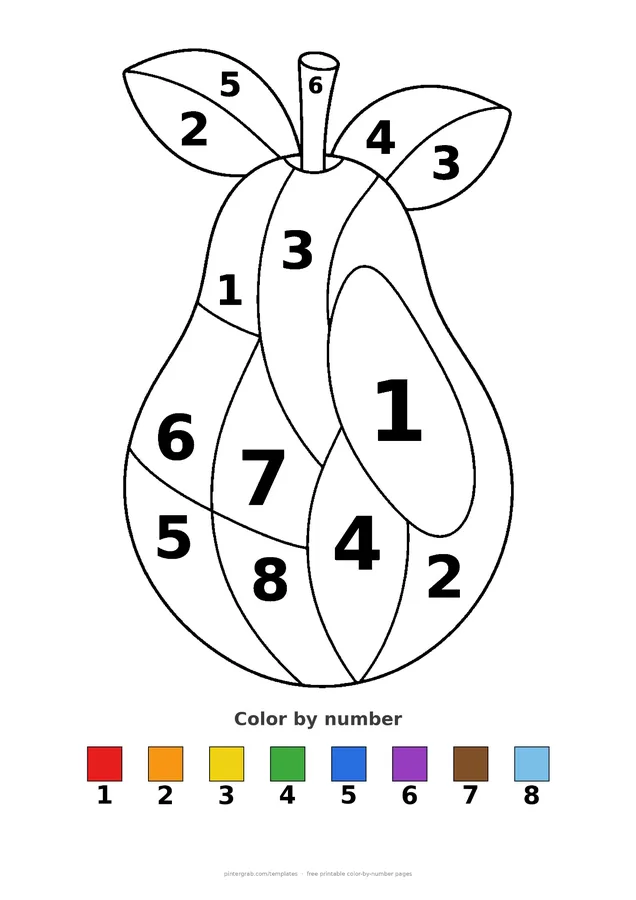
Download the free Lite PDF with the first 5 pages, print one page to test ink, then get Pro for $5 for all 40 pages. Each page has large zones and a 6-8 color legend. Pick a page, read the legend with your child, and color zone by zone.
Updated · By Pintergrab
Lite is free to download, no sign-up. Pro is sold on Lava.top.
Steps
Download the Lite PDF with the button above: A4 or US Letter, 6 pages.
Print one page and check that lines and digits come out dark.
Read the 6-8 color legend with your child before coloring.
Color all zones for one number at a time, then move to the next.
Get Pro for $5 on Lava.top when you want all 40 pages.
Print any Pro pages you need, as many copies as you like.
Print a fresh copy of a favorite page for the next round; the pack is for personal use.
Step 1: Download the free Lite PDF
Download the free Lite PDF with the button above. It contains the first 5 pages of the pack plus a cover page. Two versions exist: color-by-number-40-free-1-5-a4.pdf (A4, about 3.6 MB) and color-by-number-40-free-1-5-letter.pdf (US Letter). Pick the one that matches your paper. The free version is the first 5 pages — the other 35 pages are Pro only.
Step 2: Print a test page
Print one page from the Lite PDF first. Check that the lines come out dark and the digits are easy to read. Each page has a legend of 6-8 colors at the side, and several zones can share one color. If the print looks pale, reprint with a higher quality setting before you use more pages.
Step 3: Get Pro (optional)
If the first 5 pages work for you, get Pro for $5 on Lava.top. One payment. Pro files: color-by-number-40-40-a4.pdf (41 pages), color-by-number-40-40-letter.pdf (41 pages), and color-by-number-40-png.zip (about 2.9 MB). All PDFs are 300 DPI, print-ready. Print as many copies as you like for your own use — for a class, siblings, or repeat pages.
Step 4: Fill in your first page
- Pick an easy page, like the fish or the star.
- Read the legend out loud with your child. Say each number and its color: "1 is red, 2 is blue."
- Find all zones with number 1 and color them.
- Move to the next number. Big zones mean fewer mistakes.
A simple first week
- Day 1-2: two Lite pages, with you reading the legend.
- Day 3-4: two more Lite pages, child reads the numbers alone.
- Day 5: fifth Lite page, child picks the crayons.
- Then: move to the Pro pages, one page per day, 6-8 colors each.
In short
The pack has 40 color-by-number pages for kids ages 4-7. Each page uses large, simple closed zones and a legend of 6-8 colors, so several zones can share one color. The numbers and legend are placed by code, not drawn by an AI model, so the digits stay crisp and readable. The free Lite version includes the first 5 pages of the pack as a 6-page PDF (about 3.6 MB) in both A4 and US Letter. Pro costs $5 as one payment and includes 41-page PDFs in A4 and US Letter, plus a PNG zip (about 2.9 MB). All files print at 300 DPI. Themes include butterfly, fish, flower, rocket, snowman, and hot air balloon, in one consistent style with a clean even line.
Questions people ask
What is in the free Lite version?
The first 5 pages of the pack plus a cover, in one PDF of about 3.6 MB. Both A4 and US Letter versions are free. The other 35 coloring pages are in the Pro version only.
How many colors does my child need per page?
Each page has a legend of 6-8 colors. Several zones can share one color, so you do not need many crayons. Count the legend before you start and pull those colors out.
Can I print the pages more than once?
Yes. Print as many copies as you like — for siblings or a class group. The files print at 300 DPI on A4 and US Letter paper.
Is the pack good for a 4-year-old?
Yes. The pages target ages 4-7 and use large, simple closed zones instead of tiny details.